  1. Home
  2. Apple
  3. Computing
  4. Deals

The ultra-slim 2019 MacBook Air is $200 off on Amazon right now

Add as a preferred source on Google
Image used with permission by copyright holder

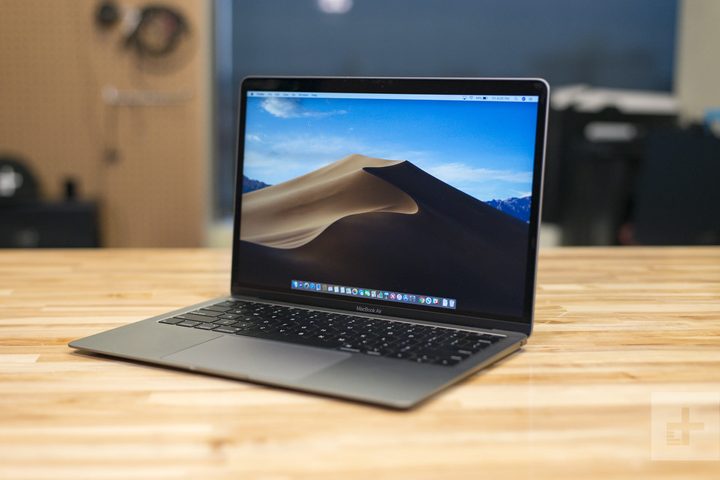
Ultra-slim Windows laptops are quickly becoming the norm, but no Apple fan can forget that the MacBook Air was the first real “ultrabook” of its kind. Apple is nothing if not innovative, and although the MacBook Air is no longer the only game in town, it’s still the go-to if you’re looking for a super-lightweight machine and can’t live without MacOS. And while the newer MacBooks have also slimmed down a bit in recent years, Apple has kept the MacBook Air line updated nicely, and Amazon has the latest model on sale right now for $200 off.

Buy Now

This MacBook Air is the mid-2019 refresh of the third-gen model, which Apple released in 2018 (meaning this MacBook is the newest in the Air family). It sits at 13.3 inches, putting it in a nice size category between smaller 12-inch laptops and full-sized 15.6-inch machines. That 13.3-inch screen is one of Apple’s brilliant Retina displays as well, featuring a 2,560 x 1,600 resolution with more than 4 million pixels. True Tone technology also auto-adjusts the brightness levels to match the color temperature of your current environment which greatly reduces harsh white light to prevent eye fatigue.

Under the hood, this configuration packs a dual-core Intel i5 CPU paired with 8GB of RAM, and for storage, you’ve got a 128GB SSD. If you’re buying a MacBook Air instead of a standard MacBook or MacBook Pro, though, it’s probably not for the hardware — it’s because you want that unrivaled sleekness and feather-light weight. The 2019 Air lives up to its name in this department: It weighs in at just 2.75 pounds and measures 15.6mm thin (or just over 0.6 inches) when closed, so it’s good to go for all-day carry. Its internal battery also delivers up to 12 hours of juice, allowing you to work and play on the move without having to hunt around for an outlet every few hours.

This 2019 MacBook Air normally goes for $1,099, and if you’re an Apple lover, you know that retail prices are typically what you can expect to pay for this stuff outside of seasonal sales. One-off deals do come around sometimes, however, and Amazon has a nice one going right now: A $150 savings is combines with a $50 checkout discount, knocking a total of $200 off the usual price and letting you snag this 13-inch MacBook Air for $900.

Buy Now

Looking for more great stuff? Find tech discounts and much more on our curated deals page.

Lucas Coll
Former Deals and News Writer
Lucas Coll has been a freelance writer for almost a decade and has penned articles on tech, video games, travel, cars, and…
How to change the default apps on a Mac
Apple's default apps are great, until they're not. Here's how to swap them out in seconds.
change default apps on Mac featured image

One of my favorite things about macOS is that it comes with default apps to handle your everyday tasks. You get Safari to browse the web, the Mail app to handle your emails, and the Preview app to open and view photos and PDFs.

But what if you want to use a third-party app you prefer over the default app? Thankfully, Apple makes it easy to change the default apps on your Mac. So, whether you want to use Google Chrome or Outlook, here’s how you can set them as the default on your Mac. 

Read more
What is WhatsApp? How to use the app, tips, tricks, and more
From setting it up to mastering hidden features, here is your complete guide to WhatsApp.
WhatsApp app store listing open on iPhone

There's no shortage of messaging apps out there. The past decade has given us more options than we know what to do with, largely because smartphones demanded something better than plain old SMS.

Both the App Store and the Play Store are packed with apps that promise to revolutionize the way we communicate. Most of them didn't make it. The truth is, a messaging app is only as good as the number of people using it, and most apps never cross that threshold.

Read more
How to restore deleted or missing contacts on your iPhone
Lost your iPhone contacts? Here's how to get them back in minutes!
iPhone in hand showing restore contacts page

At some point, we all stopped memorizing phone numbers. It happened gradually, and now most of us can barely recall two or three phone numbers off the top of our heads. So when your iPhone contacts vanish, whether after a software update or an accidental delete, it can feel like a minor crisis.

Thankfully, if you act fast, you can easily restore deleted contacts on your iPhone. So, before you start texting people asking for their numbers again, try these methods to get your contacts back. These methods will work on all latest iPhone models.

Read more