
“The feature-packed Tripmate Titan is well worth the asking price.”
- Compact design
- Easy to use
- Portable router
- NAS function
- Big battery
- Streaming lag
- Ugly software
- Inconsistent charging
“Why you can trust Digital Trends – We have a 20-year history of testing, reviewing, and rating products, services and apps to help you make a sound buying decision. Find out more about how we test and score products.“
This peculiar, pocket-sized pal is packed with handy features that should appeal to travelers. The HooToo TripMate Titan is primarily a travel router that you can use to create your own private Wi-Fi network to connect up to five devices. It’s an ideal solution for hotel stays, offering easy multiple connections and an extra layer of security.
The TripMate Titan can also act as network-attached storage (NAS) if you plug a flash drive, card reader, or external hard drive into it via USB. And that’s not all, because it also boasts a 10,400mAh battery that you can use to charge up your phone or tablet on the go.
Compact and sturdy
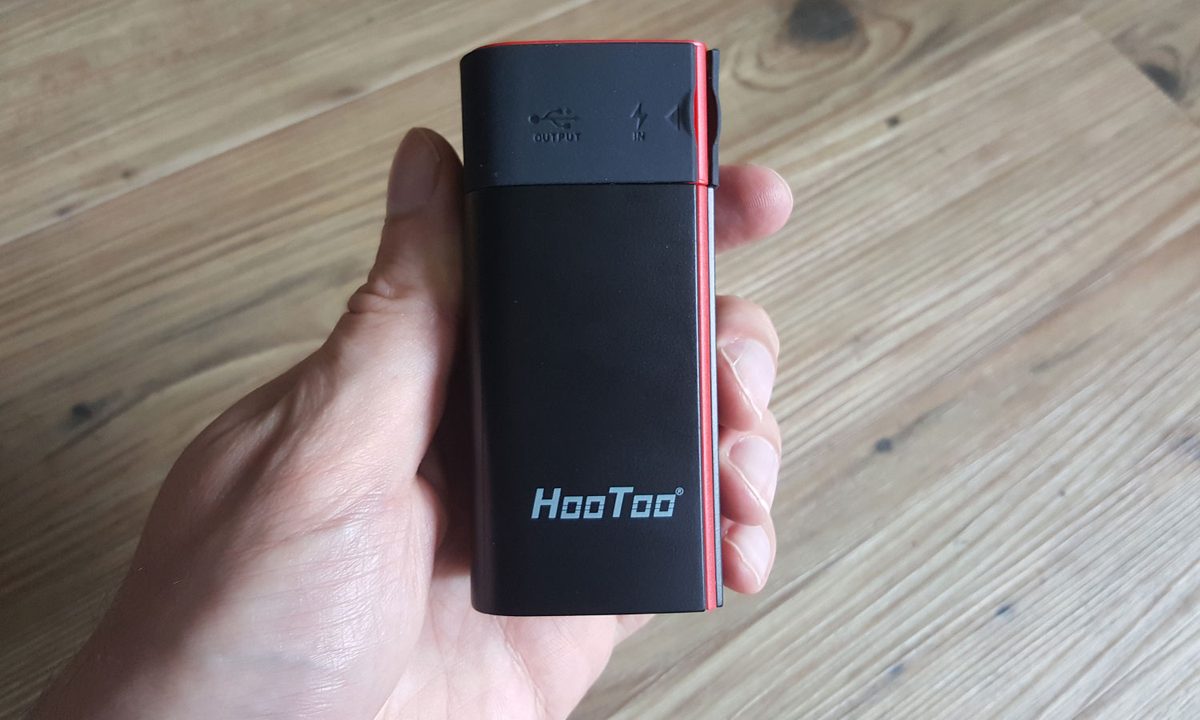
Open the box and you’ll be surprised by the diminutive stature of the TripMate Titan. It’s an impressively compact device, measuring just 3.74 inches tall and 1.73 × 1.73 inches across. It feels solid in hand, and weighs in at around 9 ounces (255g). You get a short Micro USB to USB cable and a user manual in the box with it.
The red and black design is striking, if slightly villainous (it was originally called the TripMate Sith), and it has a soft-touch rubbery feel.

There are two panels you can prize open to gain access to the ports. Behind the first, you’ll find a USB port capable of charging at up to 2.1A, which is nice and fast for a portable battery charger. Next to that there’s the Micro USB port for charging up the battery in the TripMate Titan itself. The maximum charging rate is 2A, so it’s going to take several hours to replenish the 10,400mAh battery inside. If it’s drained, you’ll want to charge it up overnight.
Open the second panel and there’s a standard RJ45 Ethernet interface labelled WAN. You can plug a cable directly from a modem and use the TripMate as a router, or you can plug a cable in from a larger router and use the TripMate as a bridge. There’s also a reset pinhole that offers a quick way to wipe settings and reboot.
Setting it up
You may be slightly bewildered by the set of instructions that comes with the TripMate Titan because they aren’t the clearest. But as it turns out, the device isn’t difficult to set up.
It’s an ideal solution for hotel stays, offering easier multiple connections and an extra layer of security.
Holding down the power button for three seconds brings it to life. There’s a series of four white LEDs circling the power button to indicate remaining battery power, and then a colored LED on the other side to indicate Wi-Fi status: It flashes blue when you turn it on and then turns green to indicate that it’s working.
If you have an Ethernet cable, all you have to do is plug it into the port labelled WAN. If you just want to use it as an access point, then you’re done. For router functionality, you’ll need to configure a few extra details. As soon as you turn the TripMate Titan on you’ll see it pop up as a Wi-Fi option on your smartphone, laptop, or whatever. Log in with the default password provided and you’re connected. You can have the TripMate scan for an existing Wi-Fi network and connect to it wirelessly to act as a bridge. You’ll configure it through the browser on your connected device.
Once it’s online, you can connect up to five devices to the TripMate Titan wirelessly. It’s much slower in bridge mode, so always opt for the Ethernet cable connection when you can.
Your own Wi-Fi network
If you’re wondering why you would want a device like this, consider a few scenarios. Let’s say you’re staying in a hotel and it has one of those annoying login or terms and conditions screens. You can’t get the Chromecast you brought from home connected because of it. Or maybe there’s a limit to how many devices you’re allowed to connect to the hotel Wi-Fi — get your laptop online and you’ll have to pay a second time for your phone.

Set up the TripMate Titan instead and you can connect your laptop, smartphone, and Chromecast to it. Not only does it allow you to configure the connection and share a single point of entry, it also creates your own private, password-protected network. We were able to connect two smartphones, two tablets, and a laptop to the TripMate Titan during testing and it worked just fine.
The range is pretty decent. It continued to work when I took my phone upstairs and a couple of rooms away. It started to drop out when I went to the back garden, but that’s only marginally worse than my normal router coverage. The TripMate Titan won’t have any trouble covering a hotel room or a small apartment.
File sharing and streaming
You can also use the TripMate Titan to share files, back up devices, or even stream movies wirelessly. All you have to do is plug a storage device into the USB port. You can plug a flash drive in there, a card reader with an SD card up to 64GB, or an external hard drive up to 4TB in size, as long as it’s in the NTFS, FAT16, or FAT32 format (check the manual on your external drive if you’re not sure).
We’re not really convinced by the Titan as a media streamer.
Download the free HooToo TripMate Plus app for Android, iOS, Windows, or Mac and you can connect to the Titan and share files to and from the connected storage.
We plugged in a 16GB Lexar flash drive and then installed the Android app on a Galaxy Note 5. The app is ugly, but if you go into the File/Folder section you’ll see the attached storage listed. We were able to access files on the flash drive and transfer photos from the phone to it.
It’s also possible to stream movies from the flash drive. We tried it with a short MP4 and it worked, but it was a little jerky thanks to buffering, and it also plays using the barebones movie player in the TripMate app. We’re not really convinced by the Titan as a media streamer.


Performance in this area is partly going to depend on your attached storage. Sadly, you can have only one attached storage device at a time, so if you use a USB hub and connect multiple drives it will only pick up on the first one.
The nice thing about this file sharing option is that it works wirelessly without the need for an internet connection. If you wanted to quickly share a few photos or other files with a few other devices, you could use the TripMate Titan and a flash drive to do it wirelessly. It could also serve as useful backup facility when you’re out and about.
Charging on the go
We’ve tested a lot of different portable battery chargers, so we were interested to see how the Titan would measure up. The 10,400mAh capacity of this battery should be enough for around three charges of most smartphones.
It’s supposed to support up to 2.1A output, which should be enough for reasonably fast charging, but when we plugged the Galaxy Note 5 into the Titan, the charging speed was in line with plugging into a PC. It was going to take two hours to charge up fully from 64 percent. The Note 5 has a 3,000mAh battery in it.
Interestingly, it was a different story with the Galaxy S7 Edge, which the Titan was able to charge fully from 49 percent in just an hour, and the S7 Edge actually has a bigger, 3,600mAh battery inside. We used exactly the same cable, so we can’t really account for this difference – and when we asked for help, the company couldn’t offer a good explanation either.
You can get portable battery chargers that are slightly smaller than this with a similar capacity, but the Titan actually measures up pretty well in terms of portability, especially when you consider all the other tricks it has up its sleeve.
Warranty information
The HooToo TripMate Titan comes with a standard 30-day money back guarantee, so you can return it within a month if you don’t like it for any reason. There’s also a 12-month product warranty, which covers you for any manufacturing faults or flaws but not for any accidental or deliberate damage.
Conclusion
The HooToo TripMate Titan is certainly not perfect. The software is really ugly, the media streaming capabilities are limited, and the slow charging rate for the Note 5 was a bit of a puzzle. But you can pick it up on Amazon right now for just $40. That’s impressively good value for a feature-packed item like this.
If you’re frequently trapped in hotel rooms, you’ll get the most value out of the TripMate Titan. As a travel router, we recommend it. Having a 10,400mAh battery is always useful if you’re out and about, and the Titan is also good for wirelessly backing up and sharing files. It certainly does more than enough to justify the price tag.