  1. Home
  2. Phones
  3. Audio / Video
  4. Mobile
  5. News

Netflix launches FAST Speed Test app for super simple connection checks

Add as a preferred source on Google

In May, Netflix launched Fast.com, a website that showed users their internet speed. At first glance, it may have seemed out of character, but for a company delivering streaming video, internet speed is something to take very seriously.

The site took off in terms of popularity, despite plenty of other sites offering similar functionality. Now, Netflix is making it even easier for mobile users to see just how fast their connection is with the launch of its new FAST Speed Test app, available for iOS and Android devices.

Recommended Videos

While other speed testing apps opt for comparatively flashy designs, Netflix’s app keeps things simple, with a large number showing your measured speed taking up the bulk of the screen. This aspect doesn’t just apply to the look of the app, but how it functions as well.
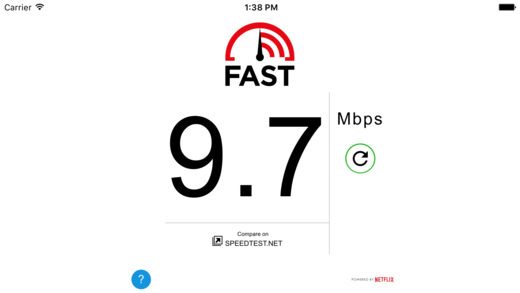
Netflix FAST Speed Test
Image used with permission by copyright holder

Most speed test apps show both download and upload speed, but Netflix’s app opts to only show download speed. The reason is simple, according to a post by Sergey Fedorov and Ellen Livengood on the Netflix Tech Blog: Netflix users only care about download speed, so that’s the number the company focuses on.

Since Netflix is in the business of delivering video, this is also how its app works. The app downloads 25 MB video files, split across a varying number of parallel connections, which can vary based on the user’s device and connectivity. How long the test takes to run depends on the user’s connection, with lower latency connections reaching peak speed much faster than high latency connections. Users can also compare Netflix’s results against results from SpeedTest.net, allowing for a second opinion.

The app is free to download, free of advertisements, and is available now via the App Store and the Google Play Store. You don’t even need a Netflix account — simply download and run the app. For a much deeper dive into how Netflix goes about measuring connection speed, see the blog post.

Also, If your internet connection is slowing you down, check out our tips on how to increase internet speed.

Kris Wouk
Former Contributor
Kris Wouk is a tech writer, gadget reviewer, blogger, and whatever it's called when someone makes videos for the web. In his…
iOS 27’s public beta is finally here, and you don’t need a developer account to get in
Siri's biggest comeback is finally leaving the lab.
iOS 27 new star rating feature in Photos

Greg Joswiak just made it official. A few minutes ago, Apple's marketing chief confirmed the availability of public betas for iOS 27, macOS 27, iPadOS 27, and other Apple devices.

If you've spent the last month watching developers gush over Siri AI, patiently waiting for the public beta, that wait is over.

Read more
The Pixel 11 may finally ditch Samsung’s modem for better battery life and connectivity
A modem change could transform the Pixel 11 experience.
Google Pixel 10 Pro Fold in Moonstone

If you've ever watched your Pixel's signal bars drop for no reason in a room where every other phone was fine, you already know Google has a modem problem. 

A new FCC filing suggests the company might finally be doing something about it (via Android Central).

Read more
New Pixel 11 leak reveals colors, specs, and a surprise accessory ahead of launch
Leaked images points to Midnight, Fuchsia, and Moss as the Pixel 11's color options
Rear shell of Google Pixel 10 Pro.

With the Pixel 11 just a month away from its official debut, a fresh leak has given us a lot to talk about. A set of placeholder listings that briefly surfaced on Amazon appears to show the Pixel 11, Pixel 11 Pro, and Pixel 11 Pro Fold in multiple color options, along with key specs and a new accessory that could debut alongside the phones. First spotted by 9to5Google, the listings are believed to be drafts that went live ahead of schedule.

A first look at the Pixel 11's color lineup

Read more