

This might be a little heady, but try to imagine all the things you don’t know at any given time. There’s all kinds of information that you have no concept of, and maybe didn’t even know you wanted to know. When you’re traveling through a neighborhood, there are people of unique backgrounds and varying ages living in houses that range in value. As you walk into a store, you’re just another of many who have had an experience at your given location. All of this information serves a purpose – though it may be more trivial than useful most of the time – and Sitegeist delivers that and more to your mobile device.
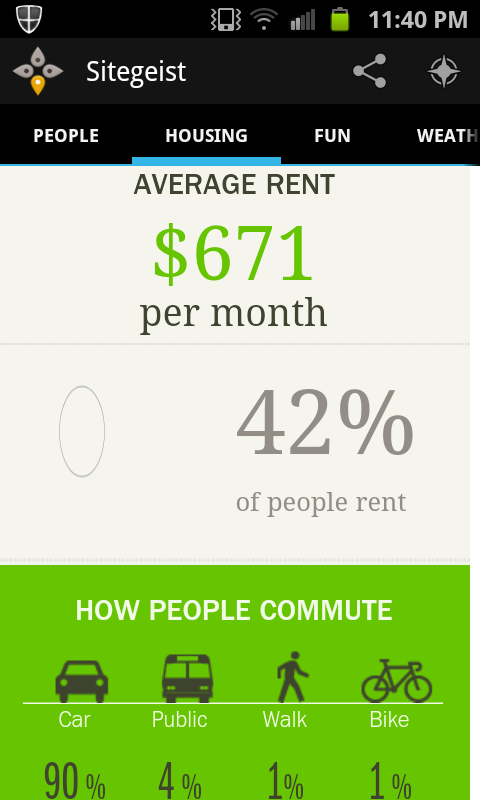 Sitegeist is an app that uses geo-location to peg you on a map, then delivers a wealth of details about your surroundings. It essentially exists just to provide you with some data-driven facts about places, which doesn’t seem all that important but it is very interesting. Drawing from public records and social networks, Sitegeist pieces together information to create a more complete picture of your location, using numbers and statistics to color in the usually obscured areas.
The data that Sitegeist provides is broken up into four categories: People, Housing, Fun, and Weather. Each tab is presented with an attractive visual style, color coded and complete with clever and classy graphic designs, and provides a breakdown of available information about a given topic. Reading through the “People” tab for example, one may glean factoids like the median age of people in the area, the political contributions from residents, age distribution by gender, and much more. The Housing category can tell you the average cost of a house of a neighborhood and what renters can expect to pay on a monthly basis, among other things. Fun pulls from Foursquare and Yelp to inform you of local hotspots and nearby attractions. Weather, predictably, tells you the weather, but also provides historical context by offering record high and low temperatures.
All of the information that Sitegeist can put in the palm of your hand is impressive. What’s most interesting though, is that it’s simply a collection of public information. Sitegeist simply aggregates it from sources like the U.S. Census Bureau and Weather Underground, then beautifies the information to fit into it’s stylized presentation. It even lists the data sources at the bottom of each tab so you can make a deep dive into the information on your one if you’re so inclined. Providing proper citation isn’t listed as a feature on the app description, but it probably should be as it gives people the chance to further explore past the material provided.
Using Sitegeist is extremely simple; it’s a straightforward app with a slick design and great esthetic that provides tons of information in easy to digest chunks. We’re just not sure how you use that information once you have it. Do you use it to impress your friends and wow them with your extreme knowledge of any given location, or do you somehow apply all this information in a way that can be beneficial? The house price and rental costs could come in handy for people looking to move to a certain area and some of the stats provided in the People category might give you a better idea of who exactly lives arounds you. We’re sure there’s plenty of other ways this information can be applied, but mostly it seems like fun pieces of location-centric trivia. What exactly you do with this information is up to you. We recommend following up reading it with a satisfied head nod and a thoughtful “huh.”


