
Since when is Facebook concerned about user privacy? Facebook has a very bad reputation when it comes to user privacy, but now it seems that the social network is starting to take the criticism to heart. On Thursday, Facebook introduced several new privacy features, including a change to default posting settings and the addition of a “Privacy Checkup.”
Facebook added the ability to post publicly back in 2009. Unbeknownst to most users, the default posting setting was “Public.” Now, Facebook has changed the default to “Friends Only,” ensuring that no one accidentally shares posts with the general public anymore. Finally, Facebook is putting that choice back into the hands of each individual user. In fact, Facebook will encourage users to keep their posts just between friends with little pop up windows that will prompt users to make the choice.


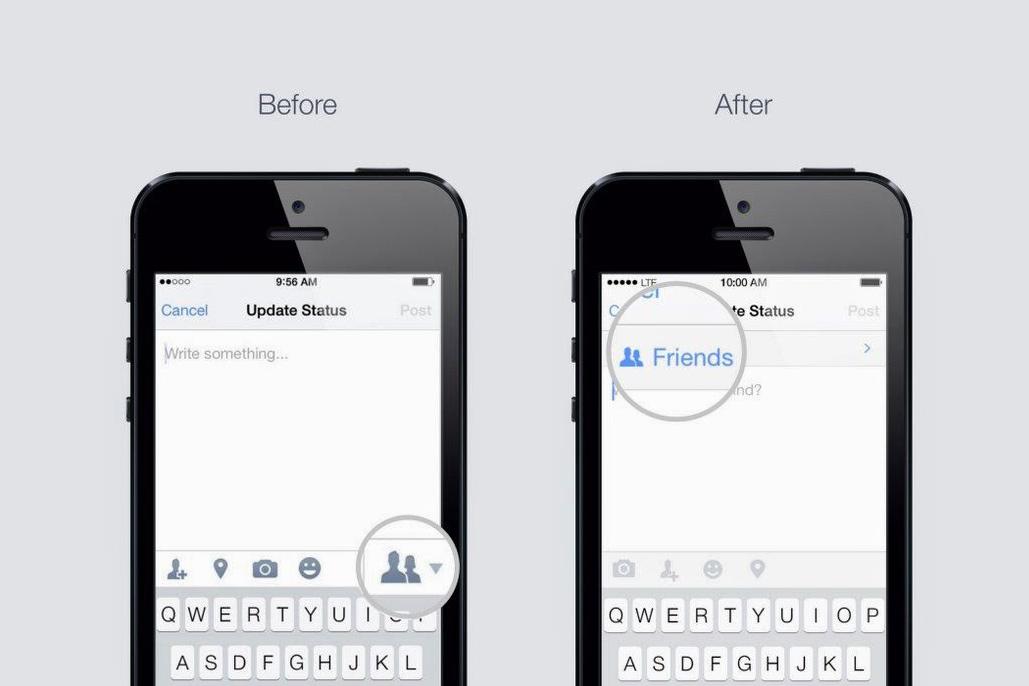
The icon that lets you choose between making a post viewable by the public or your just friends used to be hidden at the bottom of the screen as a small image. Now, in the mobile app, that selector has been moved to the top of the post and clearly says “Friends” or “Public,” letting you know the choice is in your hands – not Facebook’s. The selector is also more clearly marked on the Web version of Facebook. These new selectors will start rolling out in the coming weeks for testing.
In addition to the new selector tools and changed default setting, Facebook has also added a “Privacy Checkup” feature, which allows users to see what information apps are using and sharing from your account. It also shows you with whom you are sharing posts. Facebook will also soon add the new “Anonymous Login” feature that was announced at the F8 developer conference. The new feature will allow users to log into apps anonymously, so that they can test them out before they commit to sharing their personal Facebook data.
Facebook will also add an updated control panel, where you can view all the permissions you have given to third-party apps. The new control panel will give you more control over what information from your profile you choose to share with each individual app using Facebook login. All of these updates will continue rolling out to users in the next few weeks.
Facebook will still undoubtedly collect and share your data with advertisers and other slightly unsavory characters, but now the social network will at least grant its users the semblance of control and privacy.


