  1. Home
  2. Phones
  3. Mobile
  4. News

Gemini in Google Maps now lets you plan a vacation from screenshots

Add as a preferred source on Google
Google Maps on the Asus Zenfone 11 Ultra.
Andy Boxall / Digital Trends

How often do you take screenshots of exciting destinations from travel blogs and TikTok videos but forget about them entirely when you’re planning your next vacation? Don’t fuss if the answer is “plenty.” The increasing information overload leaves little room for memories of a fascinating spot in another random part of the world. Thankfully, the new Gemini AI features in Google Maps can do just that, so your interesting saves don’t go buried under the myriad screenshots on your phone.

After recently receiving Gemini’s superpowers to assist you in discovering places, Google Maps is gaining the ability to look through your screenshots to help you plan travels. The Maps app is getting a new “screenshot list” feature that will identify text from your screenshots and open up details on Google Maps. Google’s blog post also says you can save useful places in a list, which can be shared with others who might be traveling with you.
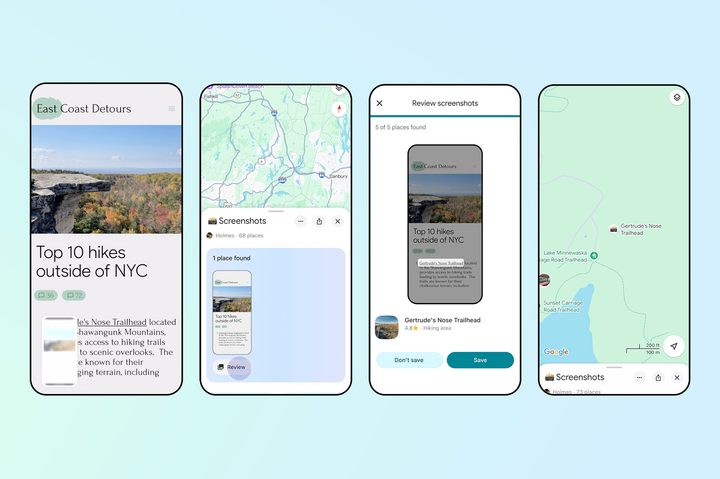
Google Maps vacation planning using screenshots with Gemini.
Google

Currently, Google Maps’ screenshot list can only read text from your screenshots. While image recognition would be ideal to help us locate some unidentifiable spots from images, that ability is not available just yet. One reason for that may be to allow all the processing to happen on-device instead of uploading your media to Google’s cloud centers.

Recommended Videos

Moreover, the screenshot list functionality is not turned on by default and must be toggled manually — which, I feel, is a good way for people to safeguard their privacy.

At the moment, the feature is starting to roll out only to iOS and will arrive on Android soon.

Taking stress out of travel planning

In addition to helping you jot down a list of places to add to your itinerary, AI overviews in Google Search will also help you create travel plans for specific destinations and based on the duration of your stay.

In addition, Google is expanding the popular price drop alerts it already offers for flights to hotels. If you search for hotel prices using Google, you will be able to set a price drop alert for specific dates and location. In case of a reduction in hotel room prices, Google will send you a notification via email.

Tushar Mehta
Tushar is a freelance writer at Digital Trends and has been contributing to the Mobile Section for the past three years…
Vivo X300 FE review: The compact flagship I didn’t expect to like this much
The Vivo X300 FE is the Hawkeye of flagships. It doesn't have superpowers, but somehow gets the job done better than everyone else.
Vivo X300 FE

Why Hawkeye?

Hawkeye was never the strongest Avenger, nor did he have the flashiest suit or superpowers. Yet he consistently proved his worth through precision, reliability, and doing the fundamentals exceptionally well. The Vivo X300 FE follows the same philosophy. It doesn't chase outrageous specifications or marketing gimmicks. Instead, it quietly nails the essentials with a superb display, dependable performance, excellent cameras, and outstanding battery life. It may not grab all the headlines, but when it matters, it's the flagship that gets the job done.

Read more
7 Apple Notes tips to elevate your note-taking experience
A few small tweaks buried in the menus that make Apple Notes feel like a completely different app.
Apple notes on iPhone

Over the years, Apple has turned Apple Notes into one of the best note-taking apps for the iPhone. The problem is that most people use the app just as a place to dump info and do not use it to its full potential. Today, I will share seven of my favorite Apple Notes tips that will elevate your note-taking experience. 

Switch between recently opened notes

Read more
This Android lock screen bug lets anyone text using Gemini without knowing your PIN
Google confirms a fix is coming for this risky Gemini lock screen bug
google-gemini

Your Android lock screen is supposed to keep your messages safe, even if someone gets hold of your phone. But a newly discovered Gemini bug could do the opposite. Since May, The Register has received multiple reports of people bypassing device authentication on Android 16 devices that allow Gemini access straight from the lock screen.

The flaw lets anyone use Gemini to send SMS and even WhatsApp messages without ever entering your PIN. It only works under specific conditions, but it is serious enough that Google has confirmed a fix is already rolling out.

Read more