Google Translate is one of those online tools that’s really come into its own in recent years, with constant improvements helping to make the app truly useful in situations where the language barrier makes communication impossible.
When you need to use Google Translate but don’t have an internet connection, you can still use the app offline so long as you’ve already downloaded the relevant language pack.
Offline translation mode isn’t as feature-rich compared to the online mode, and the translations might not be quite as accurate, depending on what you’re trying to say. But Google is working on it, with the company recently announcing another update for the app that makes offline translations even more natural.
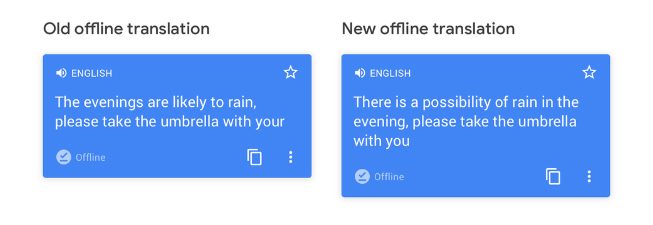
“Offline translation is getting better,” Google Translate product manager Sami Iqram said in a recent blog post. “Now, in 59 languages, offline translation is 12% more accurate, with improved word choice, grammar, and sentence structure.”
Iqram added that in some languages, including Japanese, Korean, Thai, Polish, and Hindi, the quality gain is more than 20%.
An example offered by Iqram shows how the app has improved the output quality when translating into English using the offline mode:
In addition, Google Translate now includes offline transliteration support for 10 more languages, among them Arabic, Bengali, and Tamil. The feature spells out the translation of a word using your own language script in case you want to speak the word or phrase, making it handy for language scripts that you don’t understand.
How to download a language pack
Google Translate is free and available for Android and iOS. If you’re interested in downloading a Google Translate language pack for offline use, simply tap on Settings and Offline Translation. Next, tap on the “+” symbol and select the desired language. Finally, tap the download button when prompted.
If you find yourself without any kind of connection when using Google Translate, it’ll switch to the offline file for the language you want to use instead of pulling all the data from Google’s servers. While the latest update has improved the quality of the translations, the functionality of the offline mode is limited, so you can only type what you want to say. In other words, you won’t be able to use the microphone for speaking, and the audio button won’t play your translations out loud, either. Camera support, where you can point your smartphone camera at a sign to find out what it means, will work for some languages, so give it a try and hope for the best.
If you’re already up to speed with Google Translate’s offline mode, be sure to head into Settings and Offline Translation to make sure you have the latest version following the recent update. You should see a download button beside the language pack. Tap on it, load up the new, improved versions of your saved language packs, and you’re good to go.
New to Google Translate? Here’s everything you need to know.