Apple has released the iOS 18.3 Release Candidate (RC) to developers and its public beta community members. This indicates that the final update will likely be available to users with the best iPhones on Monday, January 27.
While this update doesn’t introduce as many new features as iOS 18.1 and iOS 18.2 did, some elements will still interest everyone. Here’s what’s coming.
The biggest new feature
Once you install iOS 18.3 on your iPhone, you will quickly notice one of its most significant updates: improved Notification Summaries. Initially launched with iOS 18, this feature aims to simplify reviewing incoming messages, news headlines, and other notifications using Apple’s technology. However, the summaries have faced considerable criticism for their shortcomings.
In iOS 18.3, notification management has been enhanced to make messages more relevant and less intrusive. Additionally, you can disable notification summaries for specific apps directly from the lock screen.
As someone using the iOS 18.3 release candidate, I can confirm that Notification Summaries function better than before, which should please millions of iPhone users.
Other new features
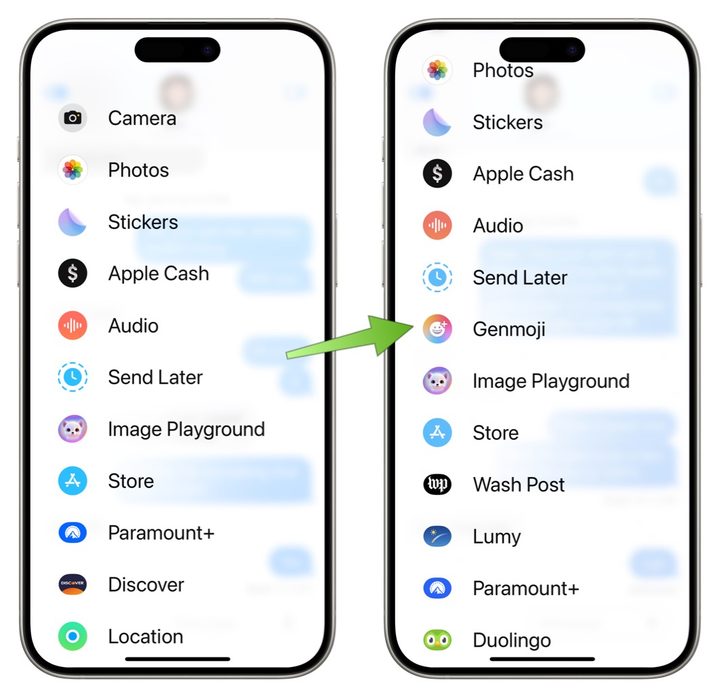
In addition to the Notification Summarizes improvements, at least three notable new features in iOS 18.3 also deserve attention. One of the most exciting is the ability to create personalized Genmojis directly from the emoji menu using a new “+” button. This update simplifies the process by removing unnecessary steps, making it easier for users to access this feature. With the Genmoji option now readily available in the emoji menu, we can expect a quicker adoption of one of Apple Intelligence’s most creative features.
Apple has also introduced a privacy enhancement in mobile Safari with the release of iOS 18.3. This improvement occurs when you crop screenshots to save as PDFs. Before finalizing the PDF, your phone will alert you that some cropped-out content may still be visible in certain apps. This warning lets you decide whether sharing the cropped PDF is the right choice.
The Calculator app is not introducing a new feature but is bringing back a feature removed in earlier iOS versions. This feature allows users to reapply the last calculation by tapping the equals button multiple times. Currently, this function is not available.
The camera interface has received a subtle update in iOS 18.3 for the iPhone 16 Pro. Instead of options like “AE/AF Lock” and “Clean Preview,” the labels have been changed to “Lock Focus and Exposure.”
iOS 18.3 includes bug fixes carried over from previous iOS versions and improvements for battery performance. It may take time to understand the implications fully.
You can download iOS 18.3 next week if you have a supported iPhone. Keep in mind, Apple Intelligence features are limited to the iPhone 16 series and iPhone 15 Pro and iPhone 15 Pro Max.