Selling over 1.7 million phones in a number of days is no small feat. But while the numbers trailing the official iPhone 4 launch in June have been spectacular, reports of the user experience have been marred by a number of unexpected shortcomings. From the infamous Death Grip to yellow screens and broken rear cameras, early adopters have encountered more than their share of issues this time around. Here’s what new iPhone 4 buyers can expect, and how to deal with them if they crop up.
 The Death Grip
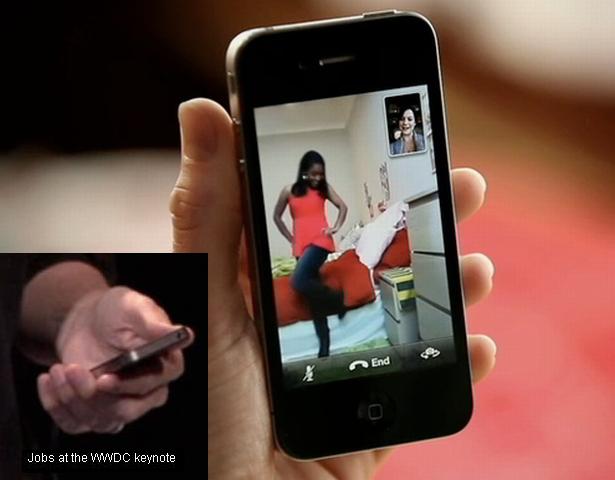
Reports of poor signal on the iPhone 4 began before it even hit shelves. Walt Mossberg was one of the few journalists privileged enough to get one early without paying thousands of dollars for a stolen model, and reported a “mixed bag” with reception in his review. Consumers echoed his complaints when they got their hands on them days later, quite literally.
Connecting the bottom and left-hand pieces of the antenna with your hand can cause signal to plummet from full to nothing – the so-called Death Grip. While Apple has flatly denied that the iPhone 4 has a hardware issue, and claims it’s an issue with how the signal is displayed, Consumer Reports confirmed in its own testing that holding the phone a certain way can result in dropped calls, and withheld its “recommended” title as a result.
Remedy: Spend $30 for a bumper case. Or at least, that’s Apple’s almost unbelievably brazen official line. Changing the way you hold your phone is also an option, but if you can’t work around it and find the reception problems too severe, a case is the only sure-fire trick. Cross your fingers, though: The issue seems to have gathered so much negative press, some analysts speculate Apple will issue a recall.
Rear camera stops working
Ever go to take a picture only to find the virtual shutter on your camera is stuck shut? Plenty of iPhone 4 users have. Even if it worked initially, many have found it stops functioning permanently at some point.
Remedy: Don’t bother rebooting or restoring, that hasn’t fixed it for any of the folks in the same boat. Open that calendar and make an appointment at the Genius Bar.
Rear camera white balance doesn’t work
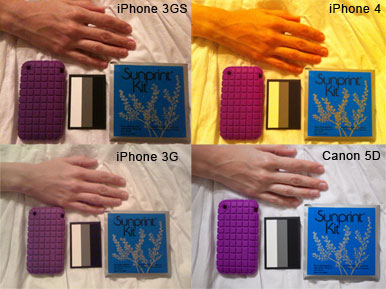
The iPhone 4 rear camera has taken some spectacular outdoor shots and even produced HD video good enough for music videos, but indoors, it’s another story. Many users have reported that faulty automatic white balance causes many low-light shots to take on an extremely yellow cast. Macworld documented it with a side-by-side test of four different cameras, including previous iPhone versions, and only the iPhone 4 seemed to interpret white sheets as yellow.
Remedy: Calls to Apple support have gone without answers, so you’re out of luck for the time being. Most likely, a future firmware update should be able to fix or at least improve the issue.
Yellow discoloration
While the iPhone’s high-resolution Retina display dazzles, some users have turned on their phones to discover that not all is rosy in Retina land. In fact, some of it looks downright yellow. Dozens of early adopters have reported yellow discoloration at the edges of their screen, usually in bands or blotches.
Remedy: Some reports suggest the bonding agent used under the screen, Organofunctional Silane Z-6011, was left uncured in the rush to get iPhones out the door and caused the yellow hue. Waiting a few days has apparently cleared it up for some folks.
Glass easily scratches or breaks
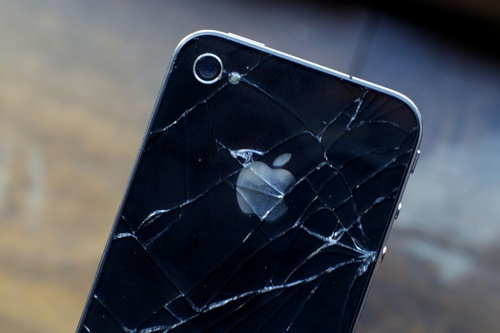
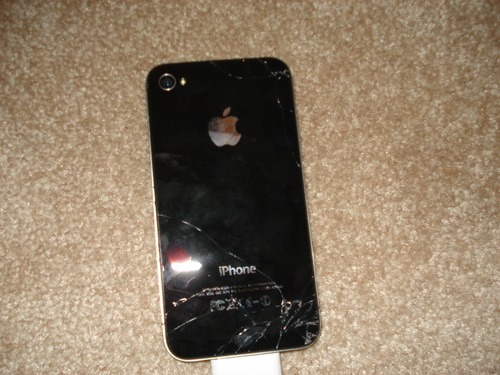
Apple has allayed concerns over all the glass on the iPhone 4 with claims that it’s “Chemically strengthened to be 20 times stiffer and 30 times harder than plastic,” but apparently glass is still glass. And with twice as much of it comes twice the vulnerability. You can find heart-wrenching anecdotal accounts of dropped phones all over the Web, but misfortune also struck several prominent tech sites. Gizmodo’s Ryan Salerno managed to shatter the glass back of his phone the day he bought it from a drop at ear height, and some folks over at Engadget managed to put a nice accidental gouge on their review model within a day, too.
Remedy: Wrap it up. A full wrap-around case will give that fragile steel-and-glass frame something cushier to fall on when it inevitably makes its way to concrete, and a screen protector like Zagg’s InvisibleShield can help protect the vulnerable face (and back, if you get the full body version) from scratching.
Reversed volume buttons
Although it seems to be extremely rare, at least one iPhone 4 user has reported volume buttons that make things louder when you press the “-” key and quieter when you press the “+” key. The phone in question also had the places on the buttons swapped, so technically it’s the symbol on them, not the wiring, which has been botched.
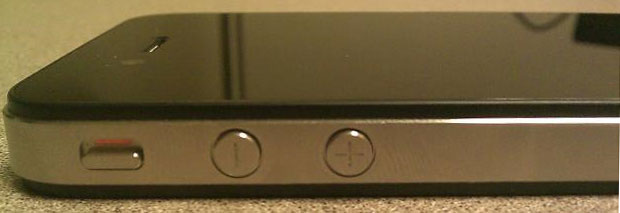
Remedy: Since the vast majority of iPhone users have no issue with their volume keys, this is pretty clearly a hiccup at one of Apple’s suicide-riddled Foxconn factories. Take it back for a replacement, or break out a Sharpie and make it right DIY style.
Check out our Apple iPhone 4 Review.