
Microsoft has tried positioning its tablet lineup as devices that are capable of enough computing power to replace laptops, but no one seemed to really buy into the premise. Most tablet owners possess and use a laptop. In response, Microsoft has upped the ante with its latest tablet, the Surface Pro 3, to really throw down the gauntlet against laptops once and for all. The Surface Pro 3 is an upgrade in every sense over its predecessors, but is it enough to take over the laps of users?
|
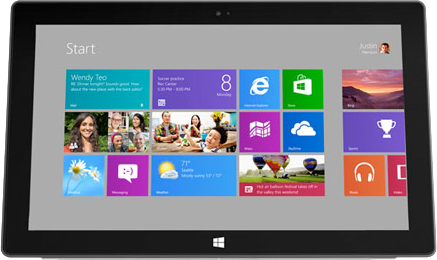
Surface Pro
|
Surface Pro 2 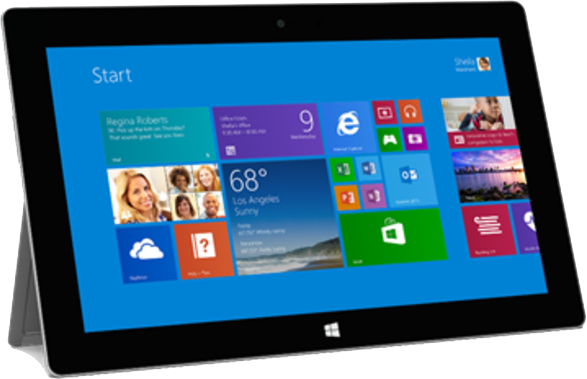 |
Surface Pro 3 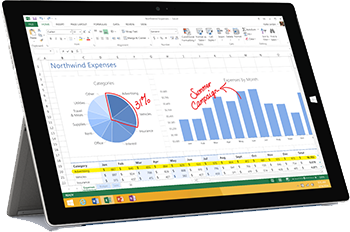 |
|
| Size | 275 x 173 x 13 (mm) | 275 x 173 x 13 (mm) | 292 x 201 x 9.1 (mm) |
| Weight | 910g | 907g | 800g |
| Screen | 10.6-inch ClearType HD | 10.6-inch ClearType Full HD | 12-inch ClearType Full HD |
| Resolution | 1920×1080 pixels | 1920×1080 pixels | 2160×1440 pixels |
| OS | Windows 8 Pro | Windows 8.1 Pro | Windows 8.1 |
| Storage | 64/128/256GB | 64/128/256/512GB | 64/128/256/512GB |
| SD Card Slot | Yes | Yes | Yes |
| Other Ports | USB 3.0, HD video out | USB 3.0, HD video out | USB 3.0, HD video out |
| Processor | Dual core 1.7GHz Intel Core i5 | Dual-core 1.9 GHz Intel Core i5 | Core i3/Core i5/Core i7 |
| RAM | 4GB | 4/8GB | 4/8GB |
| Connectivity | Wi-Fi (802.11a/b/g/n) | Wi-Fi (802.11a/b/g/n) | Wi-Fi (802.11a/b/g/n) |
| Camera | Front 1MP, Rear 1MP | Front 1.2MP, Rear 1.2MP | Front 3.5MP, Rear 5MP |
| Bluetooth | Yes, version 4.0 | Yes, version 4.0 | Yes, version 4.0 |
| Battery | 42 Wh (5 hours of use) | 42 Wh (10 hours of use) | 10 hours of use |
| Charger | Micro USB | Micro USB | Micro USB (USB 3.0) |
| Marketplace | Windows Store | Windows Store | Windows Store |
| Price | $300+ | $900+ | $800+ |
Computing Power
Microsoft made every effort to make sure the Surface Pro 3 was compared to laptops, not other tablets, when being discussed on stage at its announcement event. The phrase “full power of the PC” was used on multiple occasions and the more you’re willing to invest into the device, the more computing power you’ll get. Users will get either 4GB if they stay under the $1,000 threshold or 8GB when above. The entry level model comes with an Intel Core i3, the two mid-range devices running on an i5 processor, and the high-end devices run on the i7.
Microsoft has also managed to slim down the Surface Pro 3 while maintaining or improving upon the processors in the devices that came before it. There’s plenty of power in all of these options, though its not a huge upgrade over the older models of Surface Pros and continue to count on dual core processors. These processors also still requires the accompaniment of a fan.
Accessories
One of the biggest points of emphasis made with the Surface Pro 3 are the accessories. The Type Cover that has accompanied Surface devices since their start has been improved, making it easier to negotiate the positions the Surface Pro 3 can be used from. Microsoft spoke about “lap-ability” and believes a new adjustable kickstand in combination with the Type Cover’s magnetic seal will make it easier to sit with the Surface Pro 3. The Type Cover’s touchpad has also been improved and increased in size, a major complaint that plagued previous versions of the Surface Pro.
Additionally, the Surface Pro 3 now has compatibility with a pen, which Microsoft insists is not a stylus. The pen was used on the Surface Pro 3’s screen to write, which turned written letters into printed type or left it as handwriting depending on the application it was used with.
Price
If you’re looking at the high end of the Surface Pro 3 family, it can be easy to be scared away. The top end device reaches close to the $2,000, which is competitive with super powerful laptops. Microsoft is hoping even the midrange prices will compare well to laptops in the same bracket, and specifically made a point to compare to the MacBook lineup. Whether people will be willing to overlook the “tablet” label and start considering the Surface Pro 3 a real laptop and thus pay the price for it is yet to be seen. The entry level version of the Surface Pro 3 starts at $800, which is an easier pill to swallow as long as on doesn’t compare to to tablets, which rarely reach into that range.
Considering the original Surface Pro took a sizable price drop upon the release of the Surface Pro 2, we can expect the Surface Pro 2 will likewise slide down the pricing scale with the Surface Pro 3 announced.
The Surface Pro 3 will officially be available for pre-order May 21, 2014 and will be released June 20, 2014.


