

By now you’re well aware the iPad 2 has been officially unveiled at an invite-only media event in San Francisco – a presentation delivered by none other than Apple CEO Steve Jobs, currently on medical leave.
After the standing ovation, the 200-odd attendees watched the various demos of the new touchscreen tablet – it’s redesigned hardware, supported accessories, software and services – before spending some hands-on time with the product following the event.
And so after we tapped, swiped, pinched and flicked, the following is a look at what’s new and newsworthy, how it stacks up against the increasing competition in this space, and what Apple failed to add to the new device.
Speed
Arguably the biggest difference between the iPad 2 – out March 11 – and its popular predecessor is in the performance department.
Powered by Apple’s new A5 chip, the iPad 2 benefits from a dual-core processor (think two engines under the hood of your car), which delivers up to twice the performance over the original iPad, says Apple.
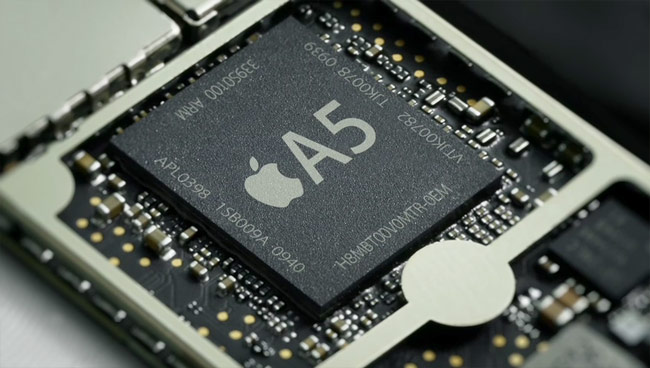
After spending some time opening web pages, launching video and playing around with the new Garage Band for iPad app (more on this in a moment), you can really feel the difference in speed.
While we didn’t get a chance to test out any games, Apple says graphics performance is increased up to 9 times over the original iPad, in the company’s testing.
Dual cameras
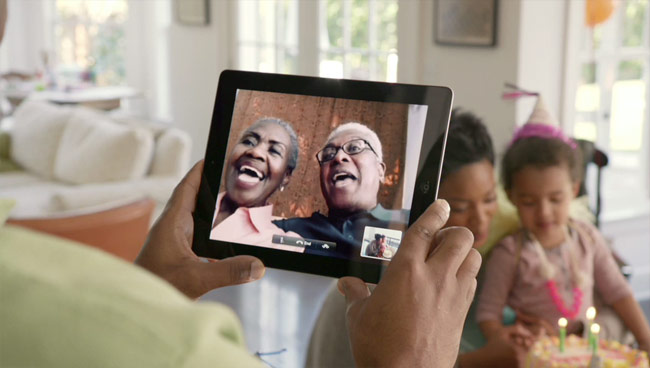
Not surprisingly, Apple has added two cameras to the iPad 2: one outward-facing for snapping pictures and shooting HD (720p) video and one front-facing camera for FaceTime video chats and for having fun altering your face with Photo Booth (both apps will be preinstalled on the iPad 2).
FaceTime, in particular, tested well on the iPad 2. As opposed to using an iPhone or fourth-gen iPod touch, it was good to use the nearly 10-inch real estate to see who you’re talking to. Your face appears in a small picture-in-picture window when someone answers, which you can place wherever you want on the screen with your finger, if desired.
iMovie for iPad ($4.99) was announced at the event, and you can use the built-in video camera to shoot footage before editing it, adding effects and captions, and then sharing it online. Or share it on a television, as an optional $39 HDMI accessory will be available for those who want to connect the tablet to a HDTV, projector, monitor or other device – and supporting up to 1080p video playback.
Redesigned body
While it’s less striking in person than on paper, the iPad 2 is one-third thinner (33 percent) over its predecessor, now just 8.8 millimeters thick compared to the 13.4mm-thick iPad. Still, this sucker is slim.
Even less noticeable is the iPad 2’s reduced weight of 1.3 pounds, down from 1.5 pounds (about 15 percent). Truthfully, the iPad 2 feels only marginally lighter than last year’s model, so I’d have to respectfully disagree with Steve Jobs’ comment that the iPad 2 feels like it “almost floats in your hand.”
 That said, I don’t have an issue with the first-gen iPad’s weight, though for those buying it strictly as an e-book reader could do much better with the Amazon Kindle.
The iPad 2 ships in both white and black (at launch), plus the optional magnetic “Smart Cover” that protects the iPad’s screen ships in one of 10 colors: five for the leather version ($69) and five for the polyurethane skins at $39 apiece (the same material “used to make spacesuits,” jokes Jobs). This clever accessory snaps into place and pulls off quickly when you need it; it can also be folded into a stand that angles the iPad 2 for typing (with a raised back) or props up the tablet for video playback and FaceTime video conference calls.
New sensor
The crowd didn’t seem overly excited about the addition of a three-axis gyroscope – also found in iPhone 4 and fourth-generation iPod touch — which helps determine the iPad’s orientation in a 3D space.
Used in games such as Gameloft’s sci-fi shooter N.O.V.A. 2, the iPad 2 aims to offer refined precision as you turn and rotate the device while aiming your weapons. We’ll see how this one plays out.
Battery, price
While less sexy, it’s what Apple didn’t change that might be most impressive about the iPad 2.
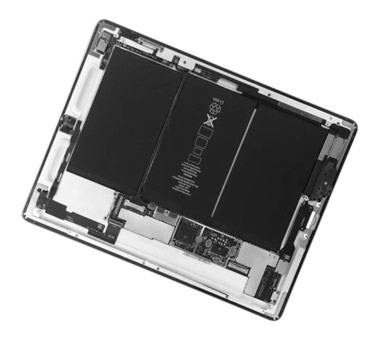
Despite the faster processor, thinner and lighter design and dual cameras, the battery remains at about 10 hours between charges, says Apple. This is a lot longer than any other tablet this reviewer has laid his hands on over the past year (and also better than the upcoming BlackBerry PlayBook, too).
 Starting at $499, the price also remains the same for iPad 2, which is great, and will be available through both AT&T and Verizon as well as select retailers. (Currently, stores such as Best Buy, Wal-mart at Target carry the first-gen iPad.)
Apple will drop the price on each version of the original iPad by $100, making the 16GB Wi-Fi version now just $399.
Software
Along with the short demo on iOS 4.3, which adds a few enhancements and features to Apple’s mobile devices, it would be remiss not to mention the huge advantage Apple has over the competition in the software department: Jobs says there are more than 350,000 apps available at the App Store, 65,000 of which are designed or optimized for the iPad. That, and the fact the iPad (1 and 2) smoothly synchronizes with iTunes on a PC or Mac gives them a huge boon.
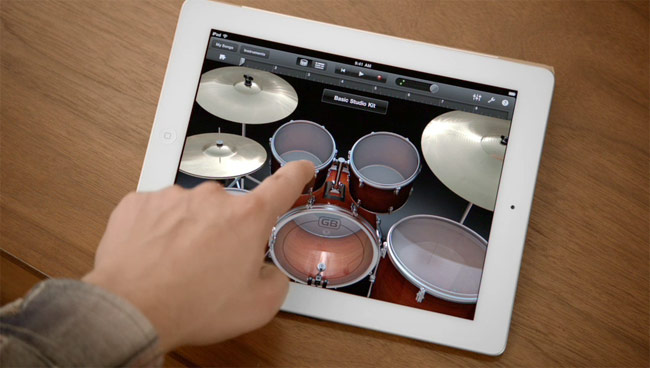
Speaking of software, arguably the most impressive demo was Garage Band for iPad ($4.99), which garnered the biggest applause at the event. Along with allowing you to connect your real instrument to record and mix music, a number of virtual instruments are ready for play including numerous piano sounds (including organs and synthesizers), drums, guitar and bass. Eight-tracking recording (including vocals) and easy sharing options make this a steal at under $5.
OK, so what’s not in iPad 2?
Despite the many rumors leading up to the official unveiling, the iPad 2 does not have an integrated USB port or memory card slot, nor does it have a higher-resolution “Retina” display. And the Safari browser doesn’t support Flash (therefore not all websites are supported).
Personally, I was hoping for near-field communications (NFC) support, a wireless technology with numerous applications ranging from mobile payments (swipe to purchase products) to touching another NFC-enabled smartphone or tablet to easily exchange contact information to tapping a sensor to automatically open a website or download media to the device. No such luck. Maybe iPhone 5, to start?
Summary
If our initial hands-on time with the product is any indication, Apple’s iPad 2 – while more evolutionary than revolutionary – is still the one to beat.
And hey, competition is great for the consumer, as we’ll see cooler features, new form factors and more aggressive pricing over time.
But it’s hard to deny Apple currently owns this space and isn’t likely conceding the crown anytime soon.
Check out our hands on video with the iPad 2 at the Apple media event.


