

Want to get into the tablet PC business?
Stop.
Remember the warning Dorothy, Toto, the Scarecrow, the Tin Woodsman and the Cowardly Lion encountered on their way into the enchanted forest on their way to their appointment with the Wicked Witch of the West? “I’d turn back if I were you.” Since you’re not Dorothy and a bucket of water will not melt Steve Jobs, that’s good tablet PC market advice. (There’s a joke about Apple sales-associates as flying monkeys in there someplace, but damned if I can find it.)
At last count, Apple has sold 4.19 million iPads in around six months and is selling roughly 1.3 million a month. Earlier this month, an analyst observed that the iPad has been adopted faster than any other technology or gadget. And you do know that iPod still holds a 76 percent market share in the MP3 player business after fending off nearly a decade-worth of Dorothy/iPod wannabes?
This is the giant, scowling, floating, flaming head you want to chase around?
Okay, you don’t believe in Apple spooks, Steve Jobs is just a man behind the curtain and you plan on pushing ahead with your tablet. Since you must be a pain junkie, here’s my mixed-metaphor 12-step yellow brick road program to the tablet Emerald City.
Just don’t say I didn’t warn you.
Step 1. No Spec Zone
Don’t compare specs. Ever. No one cares about obscure alphanumeric acronyms or what jacks or slots or cameras you have that the iPad doesn’t (have you ever tried shooting a picture with something the size of a Dr. Seuss book? AWK-ward!). The iPad isn’t about specs – it’s what you can do with it. Once you start your spiel with “our tablet has four more quads per channel than the iPad…” you’ve lost the argument. (Extra credit if you can identify the “four more quads per channel” reference.)
Step 2. It’s Alive!
Okay, there’s one spec you’re allowed to brag about: battery life. You can watch 10 hours of video on the iPad on a single charge. (Notice I didn’t say “the iPad has a 10-hour battery life – that’s a spec comparison.) How much video can we watch on your tablet without a recharge? If I can’t watch three films and maybe do a little work on a flight to Asia, follow the Cowardly Lion’s first instinct to leave the forest.
Step 3. Mine’s Smaller, But Better
Here’s a spec you definitely shouldn’t brag about – a 7-inch screen. Yes, a tablet with a 7-inch screen is more mobile, it’ll fit in a suit or cargo pants pocket, blah blah blah. But a 7-inch screen is not just three inches smaller than the iPad’s 9.7-inch screen. Put ‘em side-by-side (and I have) and you’ll see the iPad’s screen is around twice the area of a 7-inch display. And sorry, Dell – the 5-inch Streak is not a tablet). People will put them side-by-side. Then they’ll compare prices. Uh oh.
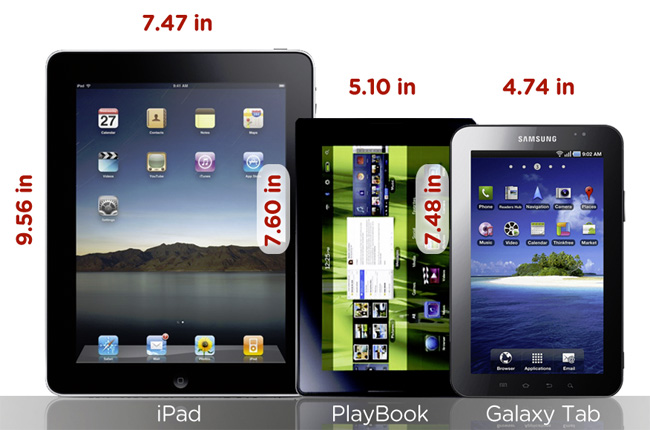 Image courtesy of Gizmodo
Step 4. Maker it Cheaper
HP, how do you price your Slate 500, a tablet with a smaller screen (8.9 inches) and less battery life than the iPad, at $100 more than an iPad? And Samsung, you priced your Galaxy Tab, with a 7-inch screen and less battery life, only $30 less than an iPad. (Sound of buzzer) I’m sorry, you didn’t win, but thanks for playing our game.
Step 5. …But Not Cheap
Have you handled an iPad? Forget what’s inside – the thing feels like it’s worth 500 bucks. By contrast, Samsung’s plastic Galaxy Tab, well, doesn’t.
Step 6. Naming Rights
Yes, critics pounced on the “iPad” moniker, comparing it (unfavorably) to a digital sanitary napkin. No one’s snickering now – except at would-be competitor attempts at tablet names such as RIM’s PlayBook. Like the mis-named “mosque at Ground Zero,” RIM’s tablet is neither for play nor is it a book. RIM has referred to PlayBook as a “professional tablet” – as opposed to an amateur tablet? – yet the name is completely oxymoronic in the “drive on a parkway, park on a driveway” way.

Step 7. Working Girl Appeal
Don’t say your tablet is designed for “professional” users to begin with. First, we all know you’re just trying to lower competitive expectations, and consumers can smell desperation. Second, the iPad already has been adopted by any number of businesses, even though Apple didn’t stress this “professional” use in its marketing. Instead, describe your tablet like Melanie Griffith’s character in Working Girl, Tess McGill, describes herself: “I have a head for business and a bod for sin.” I’d buy that tablet.
Step 8. Go Into Business
If you’re going to say your tablet is designed for someone rather than everyone, be specific. At last month’s CEDIA, every home and system control company – Crestron, AMX, Control4, Z-Wave, ZigBee – showed iPads as controllers, potentially replacing their own multi-thousand-dollar touchscreen devices. In addition, several cars – Mercedes Benz, the Hyundai Equus, the Toyota Tacoma, the BMW X3 – feature iPads as bundled accessories. These associations are no accident. Apple actively pursued these vertical businesses.
Step 9. Fictional Character Endorsement
Suddenly, the iPad is the biggest star on TV. Apple’s tablet has made appearances in episodes of The Good Wife, NCIS, CSI: New York, Parenthood, Law & Order: Special Victim’s Unit – at that’s just one month into the new TV season. Since there won’t be a James Bond movie for a while, you’ll have to find a role for your tablet in a different cultural geek zeitgeist franchise. Do hobbits use tablets?
 The iPad on ABC’s Modern Family
Step 10. No Stylus
Really, HP? A stylus? Oh, I’m sorry – a “digital pen.” Really? And no place on the Slate to store it? Really? Hey, HP. 1987 called. It wants its technology back.
Step 11: The Kitchen Sync
Unlike a cellphone, which has instant utility out-of-the-box, a tablet is, literally, a tabula rasa – you have to put stuff in it in order to get anything out of it. It has to be easy for consumers to acquire and load up their tablet with their photos, music, movies, and games, otherwise your tablet will be no more than a limited-function, silicon-filled plastic slab with a screen, and we already have those – they’re called Kindles. But Android mystifyingly still lacks an official iTunes-like desktop content sync client. DoubleTwist works, but it’s not nearly as seamless or fast as iTunes. If RIM wants PlayBook to appeal beyond its core base – or even to its core base – it’ll have to expand its BlackBerry Desktop Manager beyond contacts, e-mail and music to all the multimedia content that RIM is boasting the PlayBook can play. Microsoft does have the Zune marketplace, but the HP Slate runs full Windows 7, not Windows Phone 7.
Step 12: Got Apps?
Last, but definitely not least, see Step 1. What can I do with your tablet? E-book apps, the tablet equivalent of the Munchkins multitude, don’t count. Not all Android apps will work on all Android devices, especially tablets with their larger screens. RIM hasn’t said whether the PlayBook will run any of the current third-party App World apps because it won’t run the current BlackBerry OS 6, but a new OS called QNX, which means a dearth of third-party PlayBook play and work apps at launch. HP’s Slate runs Windows, but how do you get additional Windows apps on it? I hereby declare no tablet can be sold without access to a minimum of 1,000 apps, with the promise of at least 10,000 within a year. The great and powerful Oz has spoken. Now, go!
Still want to get into the tablet business? Short of following my yellow brick road, you might as well simply tap your heels together three times.


