
  1. Home
  2. Tablets
  3. Mobile
  4. Legacy Archives

Logitech announces iPad 2 folding keyboard, joystick accessories

Add as a preferred source on Google
Custom_format_Fold-up_Keyboard_4
Image used with permission by copyright holder

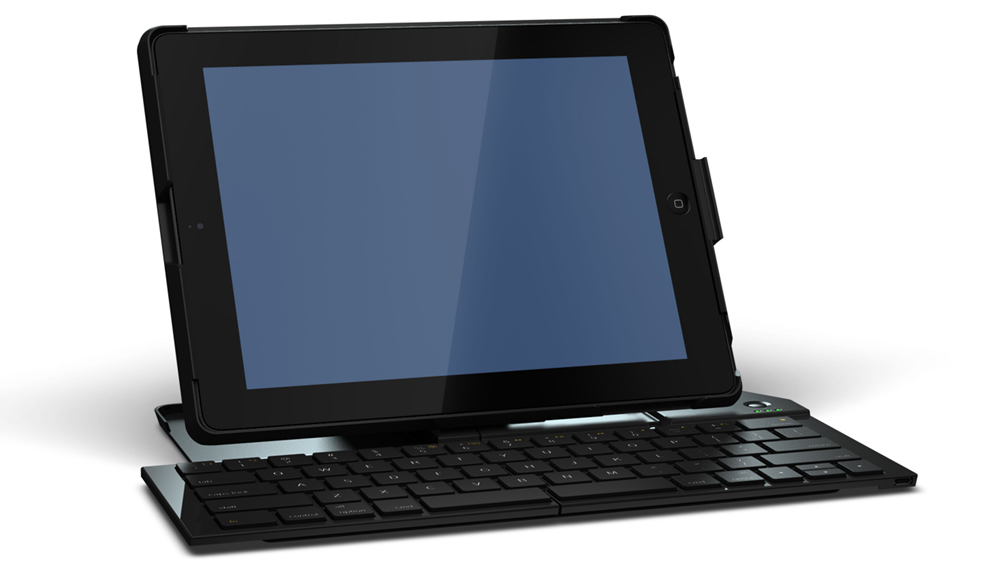
Designed to work with the iPad 2, Logitech announced the Fold-Up Keyboard for iPad. Powered by Bluetooth, the keyboard attaches to the bottom of the iPad and is designed to travel with the Apple tablet.  When in use, two sides of the keyboard rotate out and lock into place to form a full-sized keyboard. When the keyboard is unfolded and locked into place, it automatically powers up for use with the iPad 2. It also turns off automatically when unfolded and can be recharged through a USB connection. It’s also compatible with the iPad 2 Smart Cover, thus both can be used to protect each side of the iPad 2. The keyboard also acts as a stand when in use and includes a variety of keyboard shortcuts to highlight areas of text within an app like Pages.

logitech-ipad-JOYSTICK-BTYLogitech also announced the release of a thumb-stick style joystick for the iPad or iPad 2 specifically for use in games that require an on-screen joystick. The clear plastic joystick attaches to the corner of the iPad with two small suction cups and uses a coiled spring to return the joystick to the center position. When not in use, the joystick comes with a small carrying case to travel with the tablet. A sampling of notable, compatible games include Madden NFL 11, Splinter Cell Conviction, Call of Duty: World at War: Zombies, Assassin’s Creed: Altair’s Chronicles, N.O.V.A. 2 Near Orbit Vanguard Alliance,Resident Evil 4, Ultimate Spider-man: Total Mayhem, Geometry Wars: Touch and Real Racing 2 HD.

Recommended Videos

The Logitech Fold-Up Keyboard for iPad is heading to both the United States and Europe in September. Priced higher than the Logitech Keyboard case by ZAGG, the folding keyboard will  run an approximate retail price of $129.99. The Logitech Joystick for iPad will be released in the same locales in September for an approximate retail price of $19.99.

Mike Flacy
By day, I'm the content and social media manager for High-Def Digest, Steve's Digicams and The CheckOut on Ben's Bargains…
The iPhone Duo taught the iPad a much-needed lesson in multitasking. iPadOS 27.2 makes Split View less of a chore.
A small iPad tweak that fixes a big daily annoyance.
Electronics, Mobile Phone, Phone

It’s funny when a brand-new phone teaches an old tablet a lesson. That’s exactly what the iPhone Duo seems to have done for the iPad. I’m genuinely glad somebody at Apple was paying attention, as it was overdue.

iPadOS 27.2 makes setting up side-by-side apps on an iPad much easier, and it is an iPad multitasker’s dream come true if you ask me.

Read more
Affinity’s all-in-one creative app is finally here for iPad, and it costs nothing
You can now sketch, edit photos, and create vector artwork without switching between different apps.
Affinity UI on iPad

Canva has finally released the new Affinity app for iPad, nearly a year after it brought the redesigned creative suite to Mac and Windows. To go with it, the company has also introduced a bunch of new tools that take advantage of Apple Pencil and the iPad's touchscreen. And the good news is that the app is free, at least for the core creative tools.

As we reported last week, Affinity already offered separate Photo, Designer, and Publisher apps for iPad. The new version brings all those capabilities into a single app, allowing users to work on illustrations, photos, vectors, and page layouts without switching between different apps.

Read more
The iPad is finally getting the Affinity app creatives have been asking for
Affinity brings photo editing, vector design, page layout, and sketching together in one free iPad app.
Affinity UI on iPad

Affinity’s new all-in-one creative app is finally coming to the iPad, nearly a year after Canva launched the redesigned desktop version for Mac and Windows. Creatives have been asking for the iPad release ever since, especially because files created in the new Affinity app cannot be opened in the older V2 iPad apps.

Affinity already has Photo, Designer, and Publisher apps on iPad, but the new release combines those tools into the same unified app that Canva launched on desktop last year.

Read more