
 The iOS 5 update has been anything but easy, yet despite the hiccups it’s still been overwhelmingly well-received. IMessages, iCloud, the new camera functions–all features we heard about months ago but are more than ready to get our hands on. But wait–there’s more! While there are an abundance of new, well-known capability coming to an iPhone, iPad, or iPod touch near you, there are also a handful of easter eggs Apple has packaged inside iOS 5. Customize your iExperience to the Nth degree with these hidden gems.
[A quick warning for pre-iPhone 4 users: Some of the following aren't compatible with older models.]
AssistiveTouch
Keep your fingers off your iDevice as much as possible with AssistiveTouch, which lets you tilt and move your phone, tablet, or touch for certain commands. There are a variety of motions available and you can determine which correspond to certain functions—for instance, you can shake your iPhone to lock it.
Here’s how: Go to your settings, and under general, choose accessibility, where you should see AssistiveTouch at the bottom of the screen. Enable this and you will see an icon in the lower right hand corner which gives you options for up to four-finger gestures and determine what they do. You can also select “device” to create commands for controlling your phone that way.
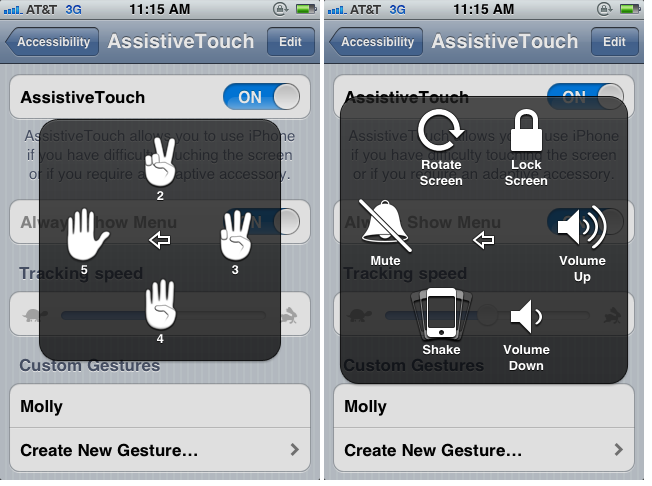
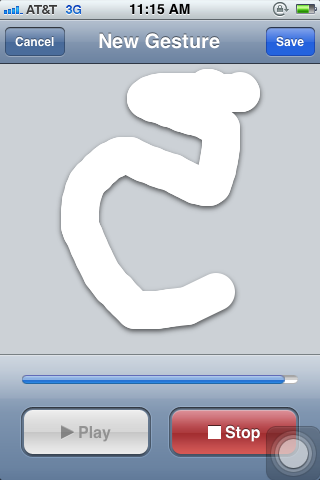 You can also select “create custom gesture.” You “draw” your gesture out on the screen, hit stop and save. It will save under the Favorites section of your gestures menu, and hitting it will act out the gesture you made. What the exact use of this is, we’re uncertain, but it’s entertaining.
Hide your Safari activity
In addition to reportedly receiving a major overhaul and being much faster, Safari now has the option the hide your browsing activity. First, hit up settings and find Safari. There, you’ll see a new Private Browsing tab. Enable this and the browser will no longer auto-record everything you do and pull up the last page you visited every time you open the app. There’s also the ability to clear your history in there.
Take pictures with your headphones
One major iOS update that iPhone 4 and 4S users will enjoy are the new camera features. Now, users are able to take pictures via the volume up button and there will also be camera accessibility via the locked screen. And if that wasn’t good enough for you, forgo touching your iPhone altogether and take photos via the volume up button on your headphones.
Most users might shrug and as what the big deal is, but given the iPhone 4 and more importantly, the 4S’, digital imaging abilities, this thing is turning more and more into a point and shoot camera. Not only can you click a shutter like you would with a standard pocket cam, the headphones mean the device can be used with a remote shutter of sorts. Break out a mini tripod and you’re set for high quality images on the go.
 Alternate routes in map
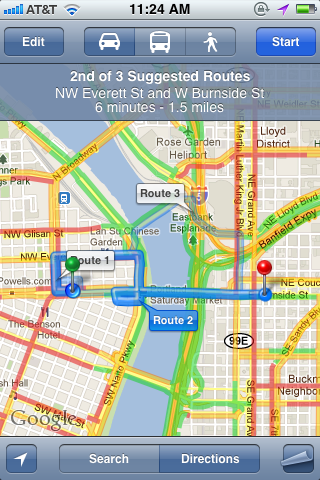
This update is so vital that we’re a little surprised Apple didn’t draw more attention to it. You don’t even have to toggle this on or anything—it’s just there waiting for you to take advantage of it. One of the most frustrating parts of using the pre-installed Maps feature is the lack of route choices. Now when you’re trying to find directions, options labeled “Route 2” and “Route 3” (should there be a third) will hover over the map.
Create custom vibrations and LED flashes
People have been making or buying ring tones for awhile, and the novelty has just about worn out. But what about creating a more discreet alert system? iOS 5 allows you to set up your own custom, under-the-radar notifications for certain contacts and functions.
For a personalized vibration, go to Contacts and choose someone. Then select edit, where you should see vibration. Choose “create new vibration” and you can tap to create a rhythm.
If you want LED flash alerts, look under General Settings and then Accessibility. Here you should be able to turn “LED Flash for Alerts” on. When your phone is in silent mode, you’ll get blinking notifications.
Get rid of Newstand icon
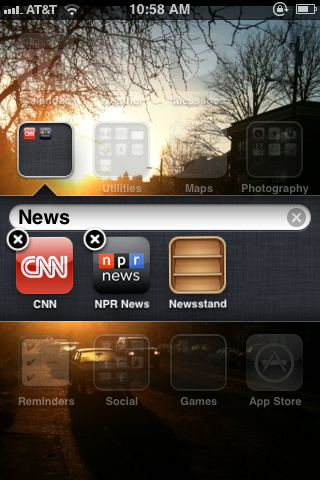 Oh, iOS 5. Making the Newsstand icon impossible to hide? Really? Well you might think that’s the case but it turns out there is one sort of glitchy option. Make a new folder by dragging two apps together—we suggest something news oriented just so Newsstand doesn’t stand out like a sore thumb. While that folder is still in limbo, grab Newsstand and drag it into the same folder as quickly as you can. Consider yourselves warned however: Once you do this, Newsstand is unusable and will crash your device every time you try to open it. But if you’re trying to hide the icon, we’re guessing it’s because you don’t want to look at an empty bookshelf every time you use your phone or iPad.
We’re not sure if the difficulty in hiding Newsstand is an iOS 5 bug or a purposeful move on Apple’s part, trying to get you to fill up empty space by forcing its barren bookshelf on you.


