

“With notable improvements over its predecessor, the Insignia NS-WBRDVD connected Blu-ray player is a great addition to any home theater.”
- Great price/performance ratio
- Addition of DTS-HD Master Audio Essential
- WiFi Capable
- Nice USB functionality
- Remote could be smaller
“Why you can trust Digital Trends – We have a 20-year history of testing, reviewing, and rating products, services and apps to help you make a sound buying decision. Find out more about how we test and score products.“
Introduction
We reviewed Insignia’s NS-BRDVD3 last November and were impressed by its price-to-performance ratio. The latest iteration, model NS-WBRDVD, features some great improvements, including WiFi.
Out of the Box
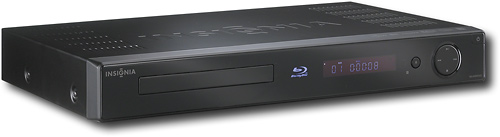
At first glance, the most notable change between the NS-WBRDVD and its predecessor are its looks. The new model features a pretty black mirror finish, with fewer buttons, and no silver feet peeking out from below the player. Aesthetically, it’s a notable improvement. The remote is a bit large, but I didn’t find any of the bugs that the previous reviewer found here; it worked like a champ every time. The WiFi feature also means that you don’t have to tether your player to the spots in your home where you have Ethernet hookups—a great bonus for those who want to use this player in, say, the bedroom instead of the office or main living area.
Features and Performance
Once I plugged my HDMI cable from the player to my Panasonic plasma TV, I found that getting up and running was exceedingly simple thanks to Insignia’s intuitive user interface. You just click on Settings, Network, then select your preferred WiFi network, and you’re connected. While other reviewers have had some problems getting set up with their WiFi, my preferred network showed up immediately. The next step is getting hooked up with your free trial Netflix subscription. This requires going onto the Internet via your computer and keying in a code included in your welcome materials. In no time, you’ll be able to browse Netflix—and now Pandora’s—offerings. Simply select the “Connected” menu and click on the appropriate logo to get started with either service. (Note: If you are not interested in the Netflix option, you’ll need to cancel after the free trial period is over to avoid being charged a monthly fee.) Because this player is always connected, Firmware upgrades (like the addition of Pandora) are a cinch.

The online Netflix service is very convenient, though I find the online movie selection to be somewhat lacking. Hopefully the online Netflix catalog will get more robust as time goes on with more movies constantly being added. In the meantime, I watched several Blu-ray movies on the player, including Tim Burton’s version of Alice in Wonderland. The 1080p image was dazzling, especially in the vivid scenes in Wonderland after Alice descends down the rabbit hole.
On the audio side of things, the Alice in Wonderland disc does not include a Dolby Digital True HD audio track, but does feature an excellent DTS-HD Master Audio track, which is where the addition of DTS-HD Master Audio Essential (a pared down version of DTS-HD Master Audio that does not support DTS Neo:6), revealed itself. The previous version of this player had no support for DTS-HD Master Audio, so this is definitely a big plus. Through my Definitive Technology surround system, the uncompressed soundtrack was flawless.
I loved the USB feature on the player, as well. Connect a USB-enabled device, like a digital camera, and a Picture menu will come up automatically. Then, you select the folder of images you want to watch, and you can Play All or Play Selected. It’s very cool for home videos as well—especially if you are like me and have a Mac laptop where all your home videos are stored, but that does not have video outputs.
Conclusion
This is a great little player at only $179 offering lots of bang for your buck, a laudable user interface, and wonderful performance for a budget Blu-ray player. Sure, there are better Blu-ray players out there, but certainly not with this many features and in this price point.
Highs:
- Great price/performance ratio
- Addition of DTS-HD Master Audio Essential
- WiFi Capable
- Nice USB functionality
Lows:
- Remote could be smaller


