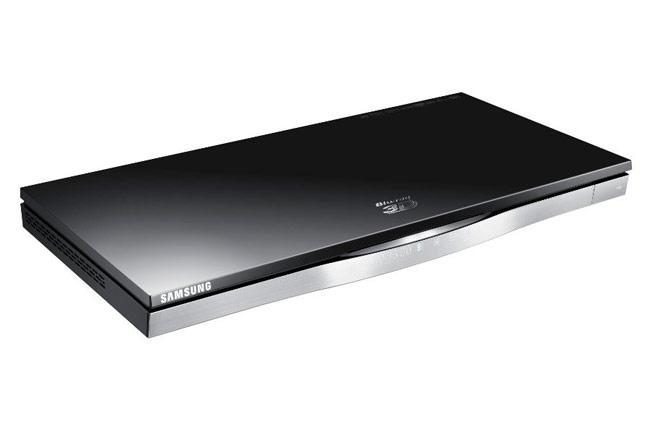
“Samsung’s BD-D6500’s quick loading time, quiet operation and sleek design make it a value for its asking price...for now.”
- Super-slim design with slot-loading mechanism
- Touch-sensitive controls
- Streams most video file types
- Built-in Wi-Fi streams HD content well
- Sluggish navigation and controls
- SmartHub deletes apps during updates but doesn’t replace
“Why you can trust Digital Trends – We have a 20-year history of testing, reviewing, and rating products, services and apps to help you make a sound buying decision. Find out more about how we test and score products.“
Samsung’s BD-D6500 is classified as a mid-level Blu-ray player, but it is so feature rich, you’d think it was one of the company’s high-end players. That’s the funny thing about raising the bar year after year on a technology that some say has yet to really catch on; Blu-ray players are now coming standard with features that were considered premium this time last year. Meanwhile, the prices continue to plummet. Maybe 2012 will be the year the Blu-ray finally hits critical mass?
With a street price of anywhere between $112 and $140, the Samsung BD-D6500 offers built-in Wi-Fi and Samsung’s SmartHub interface with access to a growing selection of apps including Netflix, Hulu, Amazon, Blockbuster, VUDU, ESPN, Pandora and many, many more. This player is also DLNA compliant and will stream a pretty impressive list of video file types including AVI, MKV, WMV, MP4, and MPEG video, with a wide variety of codecs including DivX HD. It will also stream MP3 and WMA music files and pictures in JPEG format. Oh yeah, and it also plays Blu-ray discs and up-converts DVD.
That’s a whole lot of features.In fact, the only thing the BD-D6500 doesn’t offer, which its higher-end Samsung cousins do, is dual-HDMI outputs, a built-in hard drive, 2D to 3D conversion (which most 3D TVs offer anyway) and the ability to be wall mounted. Taking that into consideration, the BD-D6500 stands to offer the best bang-for-your-buck in terms of features. The question is, how is its performance? In our Samsung BD-D6500 review we describe what the user experience with this machine is like and discuss whether it’s good enough to compel folks to finally pull the trigger on a Blu-ray player.
Out of the box
Packaged in the box with the BD-D6500, we found a remote control, batteries for said remote and a set of courtesy A/V cables (which we recommend you throw away immediately or toss into a box for later use should you need to tie something down later on).
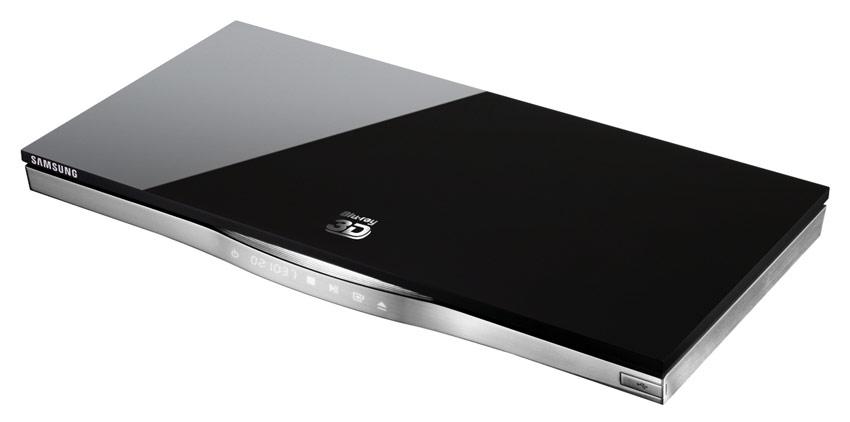
The BD-D6500 is slim and light but not too light. At 16.9 x 1.3 x 8.2 inches and 3.8 lbs, it has just enough heft to let you know it isn’t a disposable player, but is still light and compact enough to sit just about anywhere you might need to put it (within reason, folks).
We like the appearance of the gloss-black finish on the top of the player and the way it plays off its silver accents. Just be prepared to wipe it down often, as it’s a serious fingerprint and dust magnet.
Features and design
The back panel of the BD-D6500 isn’t particularly exciting. It bears most of the typical connections including one HDMI, one component video, one A/V, an Ethernet jack, and an optical digital output. For whatever reason, Samsung opted not to include a coaxial digital audio output with this model.
The front panel is a little sexier. Its plastic, gloss-black top extends around the front and sides giving the player a two-piece look. The lower half of the unit is finished with plastic made to look like brushed metal. Closer inspection, however, reveals that the brushed-metal appearance is deceiving: Once the player is plugged in, its LCD display is visible from behind it. To the right of the display is the player’s only flip-down piece, which hides the included USB input.

At first glance, you might wonder where the buttons on BD-D6500 are. It turns out that there aren’t any traditional buttons, per se. Instead, touch-sensitive controls are integrated along with the LCD display. These controls are limited to the basics, like power, eject, play, stop, play, pause and return. Just above the controls, we found the unobtrusive disc slot.
Performance
The BD-D6500 fired right up for us without any pomp and circumstance or delay. We marked it at five seconds from the time we pressed the power button until the time it put up its home screen.
The home screen is extremely simple. Four categories are represented by a river (more like a creek in this case) of icons along the bottom of the screen. From there, one or more options appear just above . This gives the user quick and easy access to Internet apps via SmartHub, content on the local network, content on the player and player settings. We don’t want to overstate things here, but it may be the most simple and effective menu layout we’ve seen on a Blu-ray player thus far.
Blu-ray discs load relatively quickly. Most of our discs were playing inside of 25 seconds after they were inserted into the disc drive. We remember the days when it took well over an entire minute. We do love our instant gratification, don’t we?

The BD-D6500 is a relatively quiet player. While laser movement is audible, it certainly isn’t loud and we didn’t find it at all annoying. The disc-spinning motor was also pleasantly quiet.
The picture quality we experienced while viewing Blu-ray material and calibration discs was on par with what we experienced with the Sony BDP-S1700ES, which is to say it was very good. We weren’t as impressed with the BD-D6500’s DVD up-conversion, though. While the DVD resolution was certainly improved, we felt like the picture lacked clarity and focus as compared to players like the Oppo BDP-93. Of course, the Oppo costs a fair amount more than this player.
Streamed video content looked great through the BD-D6500. We watched some 1080p movies through VUDU and the picture was outstanding. The same was the case for high-definition TV shows watched through Hulu. Even low-bitrate video from Netflix looked pretty good. More importantly, we didn’t have any buffering problems. At no point did any of our media stop to let the player buffer more info. We take this to mean that the Wi-Fi adapter built into the BD-D6500 is of excellent quality, and that the firmware used to stream media is stable and well designed. As a media streamer, this player gets a big thumbs up from us.

We do have a few bones to pick with the BD-D6500, though. First, we noticed that the player liked to update itself often. It updated three times over the course of a month and each time, we noted it deleting apps. These weren’t apps that we had installed either, mind you. These apps were loaded on the player when we got it. This is something we could understand if the app was old, expired or needed updating, but the update process simply deleted the app and never replaced it. In order to get BBC, Blockbuster and Accuweather back on our SmartHub dashboard, we had to download and install the apps ourselves. Granted, this is a pretty brisk process, but a curious hassle nonetheless. (Editor’s Update: We brought this issue up with our contacts at Samsung and they assured us this was not typical behavior. According to Samsung, the apps may be deleted as part of an update, but are supposed to be replaced later as part of the update process. It is possible that the issue we experienced is restricted to the review sample we received)
We also found that the BD-D6500 was slow to respond to our remote control commands. This made navigation; movie playback control (i.e. fast forward, reverse, etc.) particularly confounding, since commands seem to execute a good second after the button is pressed. It also made playing some of the (poor) games available through Samsung’s app store unplayable.
Conclusion
Those who demand electronics with a snappy response to commands may find the torpid execution of the BD-D6500 too much to bear, but those with plenty of patience will be rewarded by this Blu-ray player’s otherwise easy-to-use interface, great picture quality and extensive selection of streaming-media options. With entry-level Blu-ray players now offering Internet apps and coming in as low as $80 this holiday season, it is fair to wonder if the BD-D6500 earns the additional $30 or $40. We think it does. Its quick loading time, quiet operation and sleek design make it a value for its asking price…for now. This time next year, we think Samsung and others will need to raise the bar for players at this price point yet again.
Highs:
- Super-slim design with slot-loading mechanism
- Touch-sensitive controls
- Streams most video file types
- Built-in Wi-Fi streams HD content well
Lows:
- Sluggish navigation and controls
- SmartHub deletes apps during updates but doesn’t replace