“Why you can trust Digital Trends – We have a 20-year history of testing, reviewing, and rating products, services and apps to help you make a sound buying decision. Find out more about how we test and score products.“
The success of Microsoft’s Surface Pro has spawned plenty of imitators. Acer, Dell, and HP, among others, have their own similar takes on the product. One major brand has been conspicuously absent from the list, at least until now – Asus.
That’s not to say Asus hasn’t built 2-in-1 devices. It has plenty. But Asus has generally preferred full dockable keyboards or swing-hinge designs over kickstands and keyboard covers. The last major 2-in-1 from Asus, the Tai Chi series, looked nothing at all like the Surface Pro.
But it Asus has changed its strategy. The new Asus Transformer 3 Pro embraces the kickstand. Does Microsoft have reason to worry?
Twins
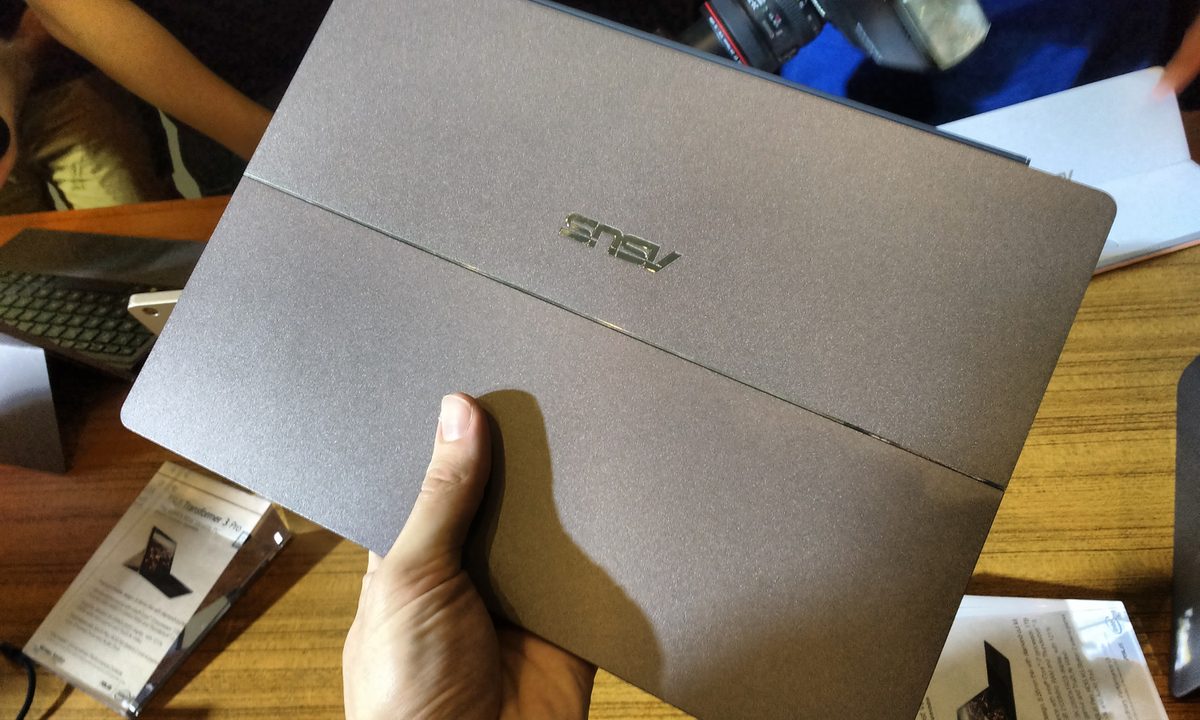
Like Microsoft’s 2-in-1, the Transformer 3 Pro is a buttoned-down machine. The model we looked was built from dark charcoal colored metal, and included a dark grey keyboard cover. This reserved approach is in contrast to Asus’ typical design which, though often modest at a glance, usually includes subtle flash. Not here. It’s all business.
It’s also the closet we’ve seen any system come to simply borrowing Microsoft’s design. The tablet portion’s tough metal case, with hard edges and cooling vent hidden along one side, looks extremely to the Surface Pro. The Asus is almost identical in thickness at 8.35 millimeters, a tenth of a millimeter slimmer than the Surface Pro 4.
And then there’s the “stepless hinge” kickstand. It can flip out to any angle up to its maximum rotation of 170 degrees. In short, in operates identically to the Surface Pro. But this isn’t a knock-off. Asus’ hinge feels every bit as robust.
Bigger, better?
Of course, there are differences, starting with display size. The Surface Pro 4 has a 12.3-inch display, but the Transformer 3 Pro has a 12.6-inch screen. That may not seem important, but it does make Asus’ 2-in-1 feel a bulkier than not just Microsoft’s alternative, but also systems from Dell and HP. We think the display bezels, which look large, are contributing to the sensation of size.
The Asus’ feels bulkier than the Surface Pro 4.
The touchscreen has a 3:2 aspect ratio, with a resolution of 2,880 x 1,920. That works out to 274 pixels per inch, slightly more than the Surface Pro 4, and definitely more than competitors with 1080p displays. We’re ecstatic to see Asus finally move to the 3:2 aspect ratio. Past Transformers have made do with a 16:9 display, and they always felt awkward as a result.
Pixel density isn’t the only area where Asus is pumping up the numbers. The company also claims the display can show 121 percent of the sRGB gamut, making it a wide-gamut display. To be honest, it was hard to see the difference on the show floor. The display looked crisp, and beautiful, but it didn’t look better – at first glance – than any other leading 2-in-1.
The internals are what we’d expect from a high-end device. Processor selection ranges up to Intel’s Core i7, with up to 1TB of solid state storage, and up to 16GB of RAM. Asus says the 2-in-1 will be compatible with the company’s external graphics dock, which is a nice thought. But make no mistake – this is a portable device. It will, even in its most powerful configuration, have its limits.
A world-class keyboard
The keyboard cover, as with the Surface Pro, flips over the screen to protect it from scratches and make the device easier to transport. It attaches magnetically to the Transformer 3 Pro, and can be used either flat, or propped up at a slightly more ergonomic angle.
Typing feels great, with good key travel and an edge-to-edge layout.
Typing feels great. There’s a good amount of key travel, and a decent tactile bottoming action makes it clear when a key is activated. The layout is edge-to-edge, and thus spacious (this isn’t a small 2-in-1, after all), and the overall feel of the materials is superb. We enjoyed the Transformer Book 3’s keyboard better than the Zenbook 3, which feels more shallow. Keyboard backlighting is included, too.
Our praise continues with the touchpad. It’s rather large and has a smooth, pleasing surface. While not on par with the best notebooks, we wouldn’t complain about using it all day. And the experience is definitely above par for the 2-in-1 category.
A serious contender
We’ve reviewed a lot of 2-in-1 devices at Digital Trends. Most are clearly inspired by the Surface Pro, and most fall short. Many make the mistake of equipping an under-powered Core M processor. Others mess up the keyboard, or select a display that’s too small.
Asus hasn’t made those mistakes. Its Transformer 3 Pro won’t win awards for originality, and we suspect some Surface owners will levy a few choice words at it for its imitation. That aside, it’s promising. It seems to nail the fundamentals; proper display size, thin design, great keyboard.
And then there’s pricing. Asus says it’ll come to market at $1,000. That’s slightly more than the basic Surface Pro 4, but the Transformer 3 Pro includes the keyboard, and will (probably) have slightly better base specifications than its competition.
The details matter with 2-in-1s, so we can’t say for sure that Asus’ new device is a winner. But, if it lives up to its strong first impression, this could be the category’s new king.
Highs
- Large, vibrant display
- Solid, professional construction
- Excellent keyboard cover
- Attractive entry price
Lows
- Derivative design
- A bit bulky