
 Back in June, all we knew about Photovine was that it was a Google project and–everyone assumed–had something to do with a social photo-posting platform. And while we now know both those things were correct, we’re finally getting some hands-on time with the Photovine concept.
A promo video last month revealed that the photo app is based on user-created “vines,” which are open to your image interpretation. And yes – it’s a lot like Piictu. Piictu also has themed, user-spawned and filled galleries that you can browse and add your own photos to.
Google used its subsidiary publisher, Slide, to create Photovine. Slide is also the name behind Disco (a Google group texting application), and Pool Party, which now seems like a first run at what Photovine became. Pool Party is a group photo platform where you create and fill titled photo albums, and is still invite-only. Something tells us it isn’t very long for this world, given Photovine’s polish and the fact that it’s already open for general use.
While Photovine isn’t revolutionary, it’s clean, easy to use, and relatively fun. And of course, banking on user interest in a photo sharing platform is a given. Here are our initial impressions of the app.
Setup. Installing and getting Photovine up and running was stupid simple. You’re first taken to your profile, where there is a provided checklist guiding you through the process. Sure, that might seem unnecessary, but we’re reminded of Color and the confusing users suffered there. Although be sure you like your username: We couldn’t find a way to edit this after the fact.
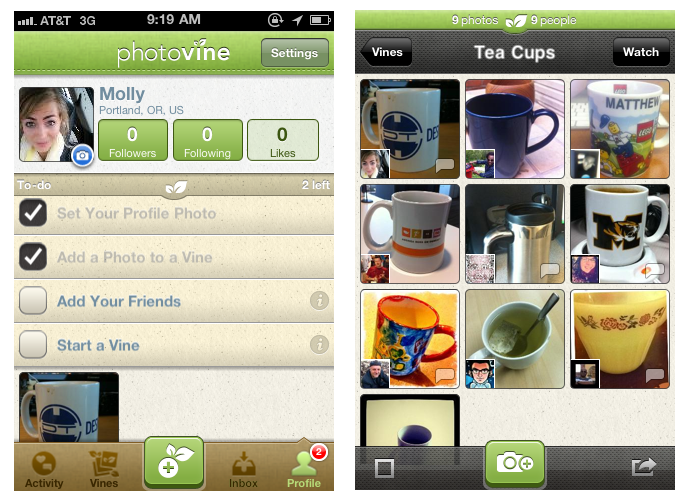
Vines. To browse vines, look to the lower panel. Once here, you can look through the latest, most popular vines. There’s also a tab titled “watching” which keeps track of vines you’ve either started or participated in. And on the lower panel, there’s a +vine symbol for creating your own themed gallery at any point. Adding to a vine simply requires you to click on the desired topic and then contribute your photo, which you can also push to Twitter and Facebook.
Making friends. You can follow another user or like specific photos. As it always is with a new application like this, it’s initially pretty lonely. But picking out photos you like and posting more often inevitably means you’ll find some connections. What’s also interesting is that you can see who has viewed your photos. When visiting your profile, you can look at specific photos, and the number next to the eye icon shows how many people have seen that image and also reveals their usernames.



