1. Home
  2. Phones
  3. Apple
  4. Mobile
  5. News

Google’s Gboard keyboard on iOS adds new languages, voice typing, and more

Add as a preferred source on Google

As far as third-party keyboards are concerned, few come close to the versatility of Google’s Gboard. The popular digital touchpad for iOS and Android boasts predictive typing, a growing gallery of GIF and emojis, a one-handed mode, and built-in Google Search. And on Thursday, Google announced an update that’s going to make it even better.

Gboard now speaks in 15 more languages. Google has added support for Croatian, Czech, Danish, Dutch, Finnish, Greek, Polish, Romanian, Swedish, Catalan, Hungarian, Malay, Russian, Latin American Spanish, and Turkish. And voice typing — the ability to dictate messages by pressing the mic button on the keyboard’s space bar — is in tow, bringing the iOS release up to par with its Android counterpart. And finally, it now includes the new emojis added as part of Apple’s iOS 10 update.

Recommended Videos

Those emojis are kind of a big deal. The new crop of wordless iconography, approved as part of the Unicode 9.9 standard earlier this year, were “beautifully redesigned” to “reveal even more detail,” Apple said at the time. More than 100, including new clowns, bacon, and other foods, animals, sports, and professions, joined the existing iOS collection.

Those aren’t not the only new features in store for Gboard users on iOS. Google’s added a way to more easily access Google Doodles, the commissioned animations that honor holidays, anniversaries, and notable people. They’re now accessible from the keyboard’s “G” search button, which will animate on the days there’s a new Doodle.

The updated Gboard’s available for free from the App Store on iTunes.

Google, which introduced Gboard in May 2016, hasn’t let it stagnate. In August, the search giant added support for five new languages (Spanish, Portuguese, German, Italian, and French) and Smart GIF, a feature that automatically suggests emoticons for certain things you type — texting “let’s party,” for example, serves up images of balloons, dancing skeletons, and other thematically relevant doodles. And in January, Google rolled out the keyboard to Google app users on Android — if you have the Google app installed, you can enable Gboard without needing to download it separately.

Privacy concerns marred Gboard’s release, but Google later clarified that words and phrases typed using Gboard weren’t passed onto the search giant’s servers.

“Gboard will remember words you type to help you with spelling or to predict searches you might be interested in, but this data is stored only on your device,” according to its support page. “This data can’t be accessed by Google or by any apps other than Gboard.”

There’s no real reason then not to take Google’s smartphone keyboard for a test drive.

Kyle Wiggers
Kyle Wiggers is a writer, Web designer, and podcaster with an acute interest in all things tech. When not reviewing gadgets…
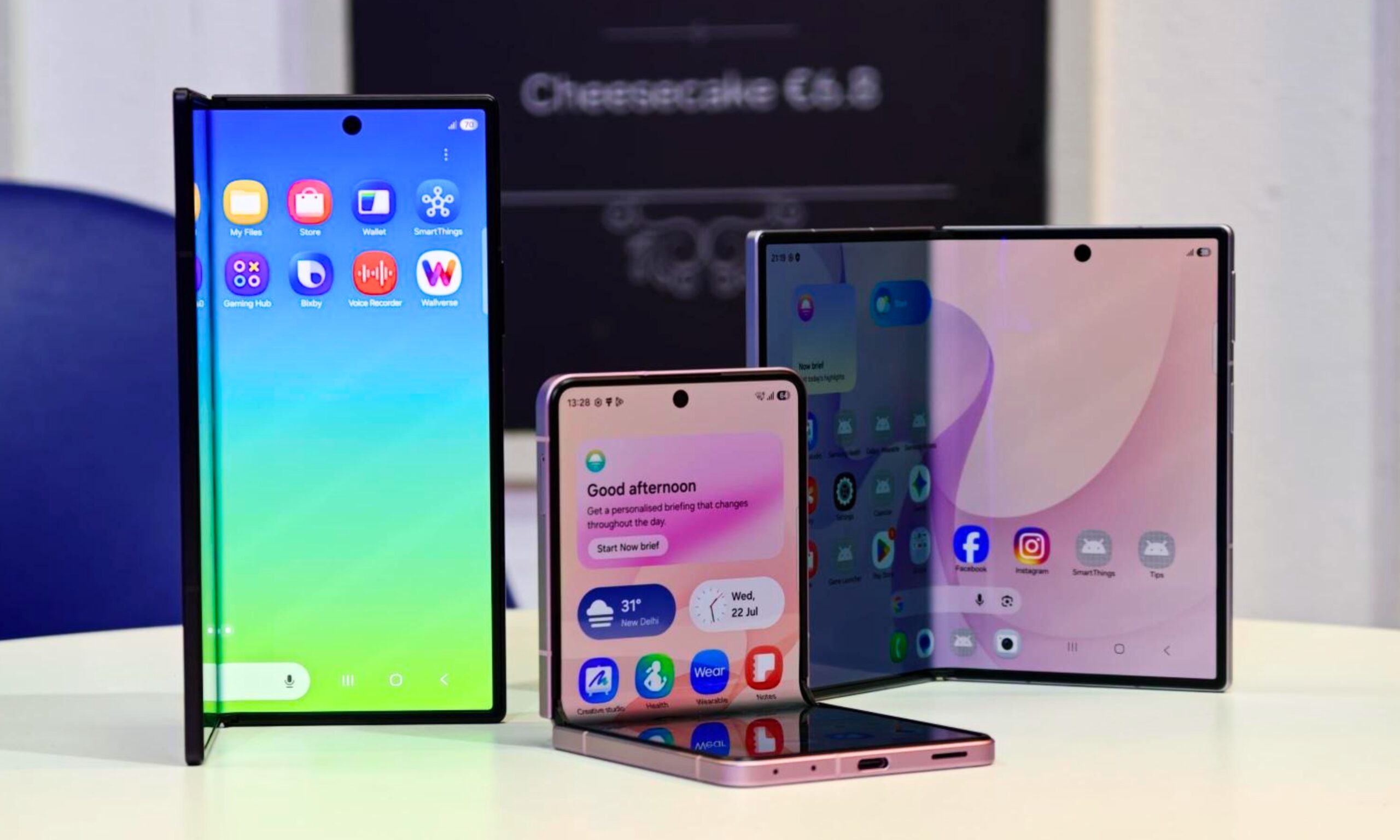
I’ve used foldable phones for years. Here’s how to pick the right one between the Galaxy Z Fold 8 and Flip 8
Samsung’s three new foldables solve very different problems
Galaxy foldables with its screen visible

After years of reviewing foldable smartphones, I have learned that choosing one involves much more than what looks pretty or how large you want. Book-style foldables are usually sold as productivity machines, while flip phones cater to people who value portability. Samsung’s latest lineup complicates that choice by introducing two very different book-style models alongside its familiar clamshell.

Most of their shared specifications fade into the background once you start using them. Their shapes and screens have a much greater impact on daily life. So here's how I'd make a decision when choosing between the new Galaxy Z Fold 8 Ultra, Galaxy Z Fold 8, and Galaxy Z Flip 8.

Read more
How to set up selfie video sign-in for your Google account
Your face can now serve as a way to get back into your Google account. Here's how to set it up.
Google account selfie sign in tutorial featured

Losing access to a Google account is rarely a quick fix, but Google has been actively working to make things easier. Last year, the company introduced a feature called Recovery Contacts that lets you designate a trusted friend or family member to verify your identity if you ever get locked out. Now, Google has introduced a new option, one that uses your face to get you back in instead of a phone call to a friend.

Like Recovery Contacts, the new selfie video authentication feature requires some setup before you can use your face to sign into your Google account. This involves recording the reference video that Google will use to verify your identity whenever you attempt to log in this way. Here's how to set up selfie video sign-in for your Google account.

Read more
Samsung stirred the wide foldable race, but I’m more excited for an upcoming exotic rival
Samsung went bold and wide, but Xiaomi's rumored Mix Fold 5 has my attention
Computer, Electronics, Tablet Computer

Samsung’s Galaxy Z Fold 8 brought a major redesign to the company's foldable lineup. We now have a shorter, almost passport-like body that opens into a 7.6-inch display with a more media-friendly 4:3 aspect ratio. This feels like a more natural fit than Samsung's squarer last-gen foldables. It also has a more portable 201 grams heft and a decent 4,800mAh battery capacity.

All of this makes it one of Samsung's most interesting foldables yet. However, an upcoming Xiaomi device may take the same wide-screen formula and blend it with a Chinese phone's typical madness.

Read more