“Why you can trust Digital Trends – We have a 20-year history of testing, reviewing, and rating products, services and apps to help you make a sound buying decision. Find out more about how we test and score products.“
For photographers on the go, even the most compact bags can be a hassle. If you don’t want to be constantly taking out your camera and putting it back in the bag, your options include wearing it uncomfortably around your neck or shoulder on a strap, or simply forgoing it altogether and – the horror – sticking with your phone. The SpiderLight camera holster from Spider Holster aims to find a happy medium between those two options.
As the smaller version of the popular SpiderPro, the $95 SpiderLight is designed specifically for compact DSLRs and mirrorless cameras. It’s a product that many photographers seemed anxious to get their hands on. Funded via Kickstarter, it raised over $70,000, more than double the original $30,000 goal.
We can now confidently say that the SpiderLight delivers on the promises made during its campaign, but whether or not the convenience it affords is worth the price depends on what type of photographer you are.
Design
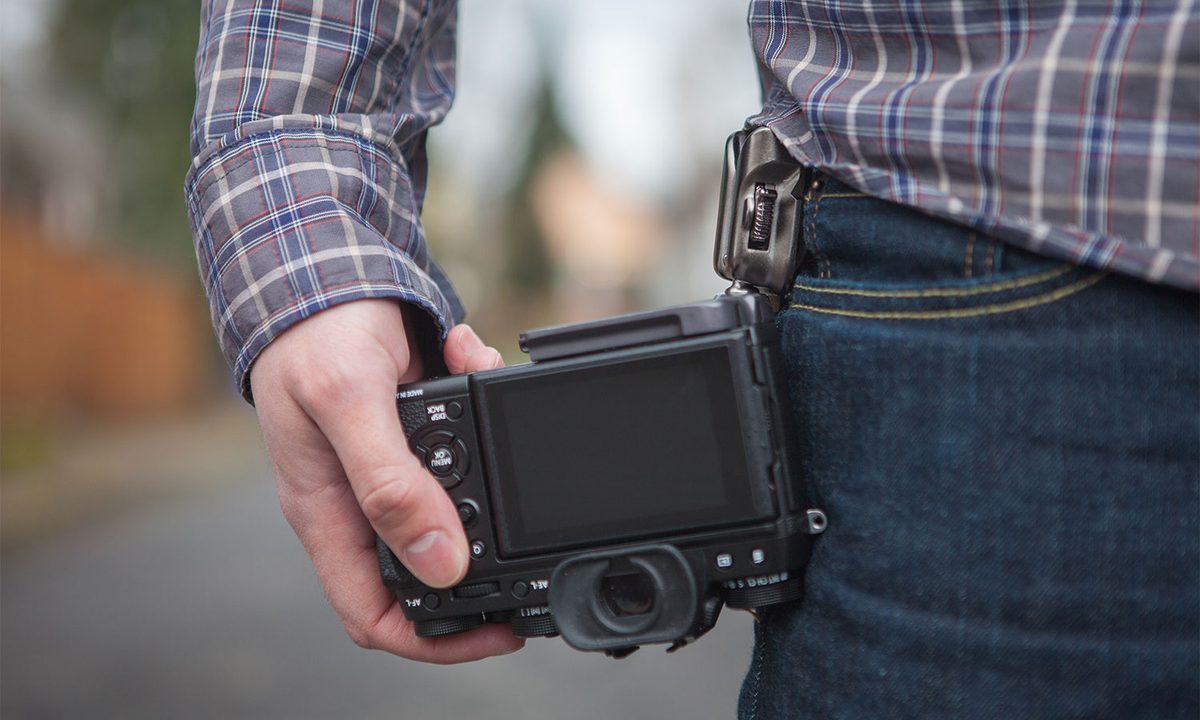
Like its larger sibling, the SpiderLight consists of two pieces: a plate that attaches to the bottom of your camera and a holster that clips to a belt or strap. A metal pin on the plate slides into a socket on the holster, making ball joint connection that lets gravity hold your camera securely in place. A switch on the side of the holster locks the ball in place for extra safety, but can be left open for easier access.

The plate can be adjusted forward or backward to accommodate the width of different camera bodies and is designed to not block the battery door, so you should be able to leave it attached indefinitely. It doubles as an Arca-Swiss style quick-release plate for easy tripod mounting, but also has a 1/4-20 thread for other tripod plates or accessories to be attached.
The SpiderLight delivers on the promises made during its Kickstarter campaign.
We tested the SpiderLight on a Fujifilm X-T2 mirrorless camera and found it to fit well. The first thing we noticed is how solid the components feel. Both the plate and the holster are metal and appear to be very well made; we didn’t have any worries about the camera coming loose. We also appreciated that the plate attaches with a screw that can easily be tightened by hand, although you can opt to use a screwdriver if preferred.
User experience
After a short time getting familiar with the SpiderLight, holstering the camera became second nature, to the point where we no longer needed to look down to verify the connection. We much preferred using it with the lock in the off position, as this allowed the camera to easily be raised and replaced with one hand. Obviously, in situations where you need to be conscious of security, we’d recommend keeping the lock on. A little peace of mind is well worth the extra second or so it takes to access your camera.

Having your camera at arm’s reach is definitely much nicer than needing to dig it out of a bag, but the experience isn’t perfect. The added bulk on your hip interrupts the natural swing of your arm as you walk, although we adjusted to this somewhat over time. There’s also the purely mental issue of trusting the device: you know the camera is secure, but you can’t help but feel that it is going to pop out of the holster and crash to the ground if you take a wrong step. Perhaps these unwarranted fears would recede over time, but we never quite got there in our short hands-on period.
After a short time getting familiar with the SpiderLight, holstering the camera became second nature.
Additionally, the protruding pin makes holding the camera in shooting position a bit awkward. This may be different based on your particular camera, lens, and the size of your hands, but you will likely need to readjust how you hold your camera with the SpiderLight plate attached.
While using the holster attached to your belt is certainly convenient, the optional Backpacker accessory will let you attach it to the strap of a backpack, which may be even better. Of course, the Backpacker doesn’t make sense if you don’t normally wear a camera backpack, but if you do, then we feel this could be the better setup for the SpiderLight. With your camera attached to a shoulder strap, it won’t interfere with your arms while you walk (nor will have you to adjust your pants when they start to slide down under the weight). We didn’t actually get to test the Backpacker component, so our opinion here remains speculative, but we’d wager it’s worth the extra $30 if you commonly take a backpack with you.
Bottom line
There may never be a way to make carrying a mirrorless camera as convenient as a phone, but the SpiderLight comes close. For outdoor, travel, and street photographers, it provides a secure method to keep your camera always at the ready while letting your hands take a break. We do think the $95 entry point will limit appeal somewhat, but this is a product that targets professionals and advanced amateurs, and it’s built to last. This isn’t a tool that every photographer will want or need, but those who do will certainly appreciate having it.
Spider Holster also offers a variety of other accessories for the SpiderLight that will increase the overall value for some photographers, including a purpose-built belt with a pad that rests between the camera and your hip. Users with larger cameras or lenses should opt for the heavier duty SpiderPro, which can also accept the add-on Spider Lens Collar Plate designed to support lenses with their own tripod mount, such as a 70-200mm f/2.8.
Highs
- Great build quality
- Easy to set up and use
- Optional lock for added security
Lows
- Makes using camera slightly more awkward