
Google Cloud Platform (GCP) is the search engine giant’s cloud services offering that competes with Amazon Web Services and Microsoft Azure. Companies use GCP for a variety of tasks, from running simple websites to creating highly complex computing and network applications. To accomplish such functions, it utilizes Google’s data analytics, machine learning, computing, and other services, which are built into it.
On Thursday, at its Google Cloud Next ’17 event, the company detailed a number of updates to its cloud computing platform. One of the most important updates pertain to security — Google is implementing a number of new features aimed at making GCP and its G Suite productivity apps less prone to exploits.
First up is the new Identify-Aware Proxy, which lets GCP administrators manage access to applications running on the service on a more granular basis. This provides more secure application access than the “all-or-nothing” controls provided by VPN (virtual private network) access. Admins can allow access based on users, identity, and group, and it can be integrated with phishing-resistant security keys. The Identify-Aware Proxy is currently in beta.
.gif)
Next up is the Data Loss Prevention (DLP) API, also in beta, which lets GCP admins scan for more than 40 sensitive data types for identification and redaction. The Data Loss Prevention API uses deep content analysis and allows admins to write policies managing sensitive data, and follows DLP for Gmail and Google Drive.
The Key Management System for GCP, which is now generally available, lets admins generate, use, rotate, and destroy symmetric encryption keys that are used throughout the system. GCP customers can now manage multi-tenant encryption keys without a hardware security module or without having to maintain an on-premise key management system.
Security Key Enforcement is the next feature being added, and is generally available for both GCP and G Suite. It lets admins force users to use security keys as the two-step verification factor when signing into either service.
Google Drive, Team Drives, and Google Groups now have general access to Google Vault, allowing users to establish retention policies, place legal holds, and perform searches across Drive, Gmail, Hangouts, and Groups. Search results can also be exported for legal and compliance purposes.
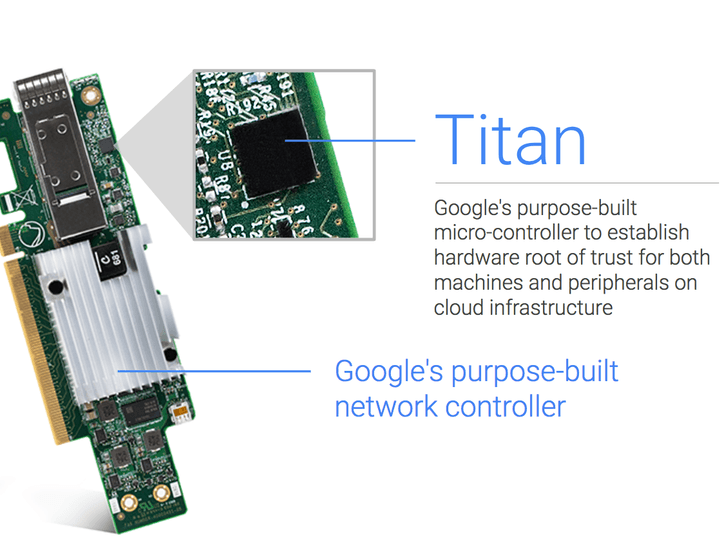
Finally, Google has introduced Titan, a new micro-controller that the company built specifically to “establish hardware root of trust for both machines and peripherals” in Google’s cloud infrastructure. Titan allows the secure identification and authentication of legitimate access via hardware.
If you’re a GCP or G Suite customer, these new security features are intended to both prevent and help defend against cyberattacks, and will help users enact robust enterprise security policies. To find out more about the new security features and other enhancements to Google’s cloud platform, make sure to follow along with Cloud Next ’17.



