  1. Home
  2. Audio / Video
  3. Mobile
  4. News

Fine-tune your audio with Audyssey MultEQ Editor app for Denon and Marantz receivers

Add as a preferred source on Google

The Audyssey MultEQ software used by Denon and Marantz makes setting up A/V receivers from either company a breeze. That’s great if you’re looking for a set-it-and-forget it-system, but some home theater enthusiasts want more control over their systems. For this type of person, the companies have announced a new Audyssey MultEQ Editor app that allows for much more fine-tuned control.

“The Audyssey MultEQ Editor app enables users to enjoy reference sound that is free of room acoustics problems and also apply their own listening preferences,” Audyssey Laboratories CTO Chris Kyriakakis said in a statement. “We are very pleased to be working closely with Denon and Marantz to deliver this unique capability for fine-tuning these AV receivers.”

Recommended Videos

When Audyssey first runs, it measures the size, type and configuration of speakers used, as well as the acoustic response of the room, then automatically tweaks settings for the best response. Denon and Marantz say that the new MultEQ Editor app allows users to go “under the hood,” adjusting every setting that is touched by the automatic setup process.
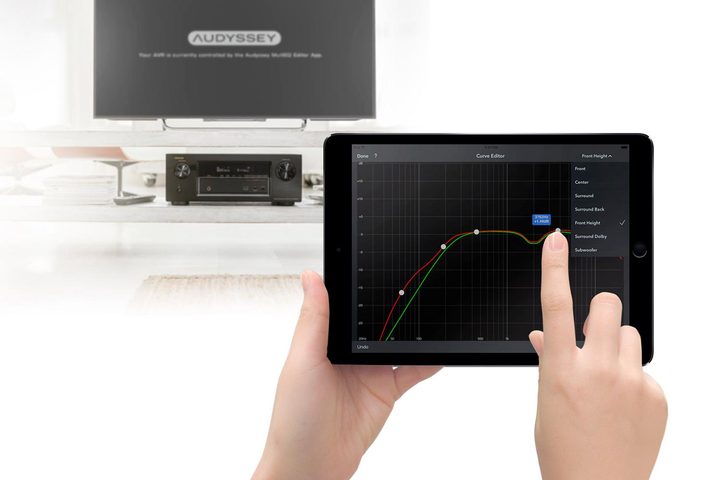
Image used with permission by copyright holder

This doesn’t just mean adjusting EQ — though that can be done, including enabling or disabling midrange compensation for a brighter or mellower sound. You can also examine the speaker layout detected by the setup process and tweak it, based on your own preferences or to correct for any unusual speaker placement, which is a fairly common occurrence since living rooms aren’t often designed with an A/V-first mentality. Before making changes, the software allows you to save calibration results, so you don’t have to worry about being stuck with any changes you make.

Currently supported Denon A/V receiver models include the AVR-X6300H, AVR-X4300H, AVR-X3300W, AVR-X2300W, AVR-X1300W, AVR-S930H, AVR-S730H, AVR-S920W, and AVR-S720W. Supported Marantz models include the AV7703, SR7011, SR6011, SR5011, and NR1607. Older receivers not on this list likely won’t support the app, though some future releases from both companies will.

The Audyssey MultEQ Editor app sells for $20 and is available for both iOS and Android devices.

Updated on 04-05-2017 by Kris Wouk: Edited to clarify that Chris Kyriakakis is CTO, not CEO, of Audyssey Laboratories.

Kris Wouk
Former Contributor
Kris Wouk is a tech writer, gadget reviewer, blogger, and whatever it's called when someone makes videos for the web. In his…
Proton reveals how smart TVs track you and the escape situation is pretty grimĀ 
Modern smart TVs fingerprint your screen content at the chipset level.
Google TV applications on the Sony A95K TV.

Your smart TV may know far more about your viewing habits than you realize, even if you rarely use its smart features. In a new privacy explainer, Proton warns that many modern TVs quietly collect data about everything displayed on the screen and share it with manufacturers, advertisers, and analytics companies.

The worrying part is that escaping this tracking is becoming increasingly difficult because many privacy controls are buried deep in settings or enabled by default. Proton argues that buying a smart TV today often means accepting a level of surveillance that most people never knowingly signed up for.

Read more
LG is cracking down on smart TV apps that quietly turn your TV into a secret proxy
LG OLED Settings

If you own an LG smart TV, there's a chance one of your harmless-looking apps has been moonlighting as an internet relay for someone else's traffic. According to a report from KrebsOnSecurity, LG says it's finally stepping in to stop this menace. This week, the company confirmed it plans to suspend any webOS app that turns a TV into what's called a residential proxy node.

The move follows a report from security firm Spur, which found that more than 42 percent of apps on LG's webOS store include SDKs that quietly reroute internet traffic through your TV, indefinitely. Samsung isn't spared either, with over a quarter of Tizen apps carrying similar code.

Read more
The LG C6 OLED is great out of the box. These settings make it even better.
From Filmmaker Mode to shadow detail and AI Sound Pro, these are the settings that made the biggest difference after a month of testing the LG C6 OLED.
LG OLED Settings

The LG C6 OLED is one of the best mid-range OLED TVs you can buy right now. After spending the past month testing and using it every day, one thing became clear: straight out of the box, you're leaving picture quality on the table.

The good news is that getting more out of the TV doesn't require professional calibration or hours spent digging through menus. A handful of small adjustments can make movies look more cinematic, improve shadow detail, smooth out motion and even make the built-in speakers sound noticeably better. Here are the exact settings I've been using after living with the LG C6.

Read more

