“Why you can trust Digital Trends – We have a 20-year history of testing, reviewing, and rating products, services and apps to help you make a sound buying decision. Find out more about how we test and score products.“
The Acer Predator Triton 700 is weird, innovative, and very fast.
Acer has never been one to shy away from a challenge, and delivering a gaming laptop that didn’t compromise on slimness was one of the toughest it’s tackled. But the company triumphed in the Triton 700, a new notebook that’s just as lightweight and attractive as it is powerful. We took an up-close look at the during Acer’s annual press conference in New York City, and came away impressed.
A tri-tantic achievement
From a distance, you might mistake the Triton 700 for a generic model in Acer’s Predator series. The Triton 700’s hard angles, contoured edges, and matte finish are longtime hallmarks of the company’s gaming lineup, as are the oversized hinge and stylized grates on the rear outflow panel. But inside the Triton’s clamshell cover are where things get interesting.
Perhaps the highlight is Acer’s dual 2nd-generation AeroBlade cooling system, a five-pipe array that boosts airflow without producing more noise. Thanks to a “three-dimensional” low-profile fan, Acer said it can decrease temperatures by 35 percent.
The improved design also helped the Triton 700 achieve its incredible lightness and thinness. It measures about 18 millimeters (0.74 inches) at its thickest point, thinner than the Razer Blade. And it weighs just 5.7 pounds, light enough to pick up with one hand.


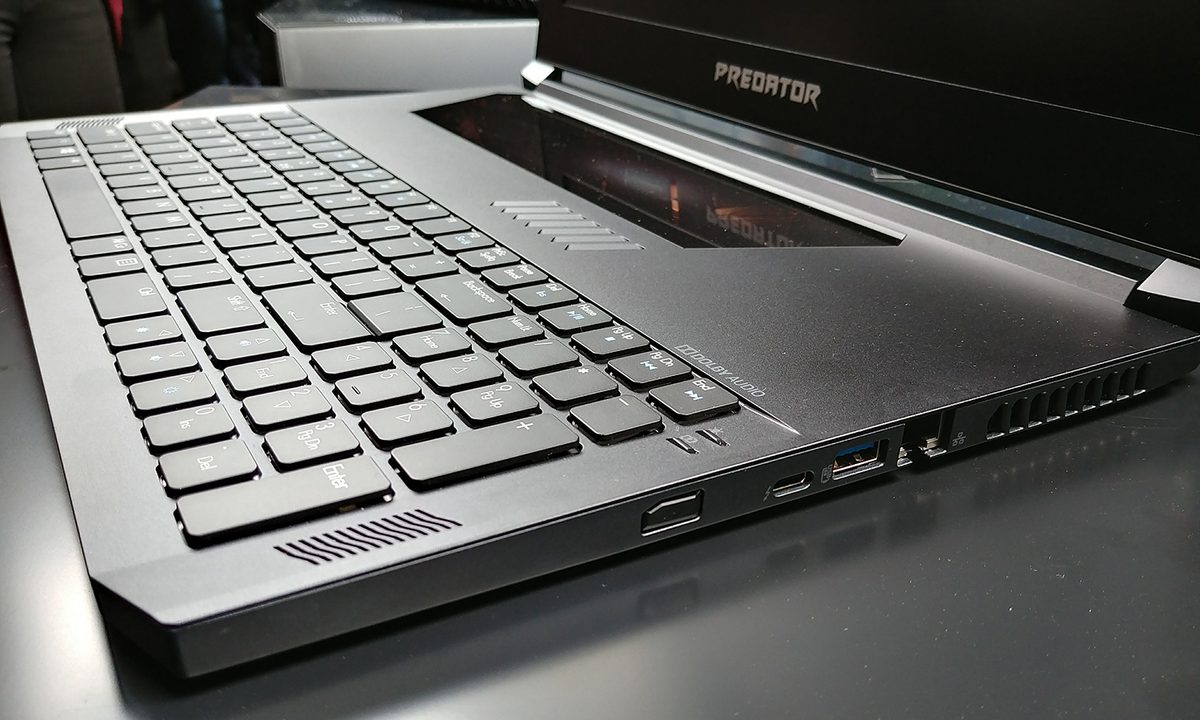
Acer’s unconventional touches don’t stop with Triton’s cooling. The company has positioned the Triton 700’s mechanical keyboard near its bottom half, toward the edge, with the touchpad above it — the reverse of what you’ll find on most machines. It has extended the length of said touchpad from one end of the keyboard to the other.
The Triton 700’s touchpad doubles as a window into its chrome-accented innards. It’s a genius touch. We also found the Triton 700’s keys to be responsive and springy. Strangely, the unique touchpad is located above the keyboard, rather than below it, as with most laptops. We know, we know – that seems insane. However, gaming laptops are generally used with an external mouse. The Triton 700’s arrangement puts the keyboard forward, and that may be preferable for gaming.
Packs a punch, too
You wouldn’t guess it from the Triton 700’s diminutive frame, but the laptop packs powerful hardware under its all-metal hood. There’s a seventh-generation Intel Core processor (at least at Core i5-7300HQ and optionally a Core i7-7700HQ). Acer says graphics are driven by Nvidia 10-Series graphics, but it declined to be more specific. We suspect, given the secrecy, that it’s a mobile implementation of the GTX 1080 Ti – but that’s speculation on our part.
Acer says the rig can hit a score of 17,000 in 3DMark. Unfortunately, it failed to specify what version of 3DMark it used beyond 3DMark 11, which might be used in a few different ways. The company did put that figure side-by-side with figures from the Razer Blade, though. The Triton is 40 percent quicker, if the scores are accurate.
Storage is provided by two NVMe PCIe SSDs in Raid 0 configuration. It also supports up to 32GB of DDR4 2400MHz memory (split between two modules).
The transparent touchpad is a genius touch.
The Triton 700 isn’t lacking in the connectivity department, either. There’s a Thunderbolt 3 connector that can transfer files at speeds up to 40Gbps, three USB ports (two USB 3.0 ports and one USB 2.0), an HDMI 2.0 port, and a DisplayPort connector.
The Triton 700 will ship with a 15.6-inch Full HD (1,920 x 1,080 pixels) IPS screen, which we couldn’t test — none of the Triton 700 units we handled were charged. But we were a bit disappointed by the screen’s bezels, which measure about an inch thick on all four sides. We would’ve liked thinner design. However, most of Acer’s competitors suffer the same problem.
Finally, Acer boasted to use of the Triton’s software optimizations, which we didn’t have an opportunity to try. The Triton 700 ships with TrueHarmony, which Acer says delivers “immersive” audio. It’s certified for Skype for Business. And it comes preinstalled with Killer DoubleShot Pro technology, which picks the fastest network connection (Ethernet or Wireless) and sends all “high-priority” traffic over it and standard traffic over the other.
The Triton 700 was designed to be the most powerful computer of its size. Of course, that means it won’t be cheap. It will start at $3,000 in North America when it launches in August. That’s a lot of cash, but if you desperately want a gaming laptop you can fit in a shoulder bag, this might be your best bet.
Highs
- Beautiful touchpad
- Responsive keyboard
- Light and thin body
- Great internal hardware
Lows
- Strange keyboard layout
- Pricey base configuration