“Why you can trust Digital Trends – We have a 20-year history of testing, reviewing, and rating products, services and apps to help you make a sound buying decision. Find out more about how we test and score products.“
Project Linda wants to turn your Razer Phone into a laptop, but it’s very much a prototype.
Razer surprised smartphone fans by releasing its own gaming-focused phone this year. It focused on powerful hardware and debuted a 120Hz display, making it a unique option for Android fans. Out of nowhere, Razer has become a player in the smartphone space.
The phone’s successor hasn’t even been hinted at, but Razer has found a way to take its phone and spin it into a weird, exciting new idea with a prototype project its calling ‘Project Linda.’ What is it? Put simply, the company wants its Razer Phone to also be your laptop.
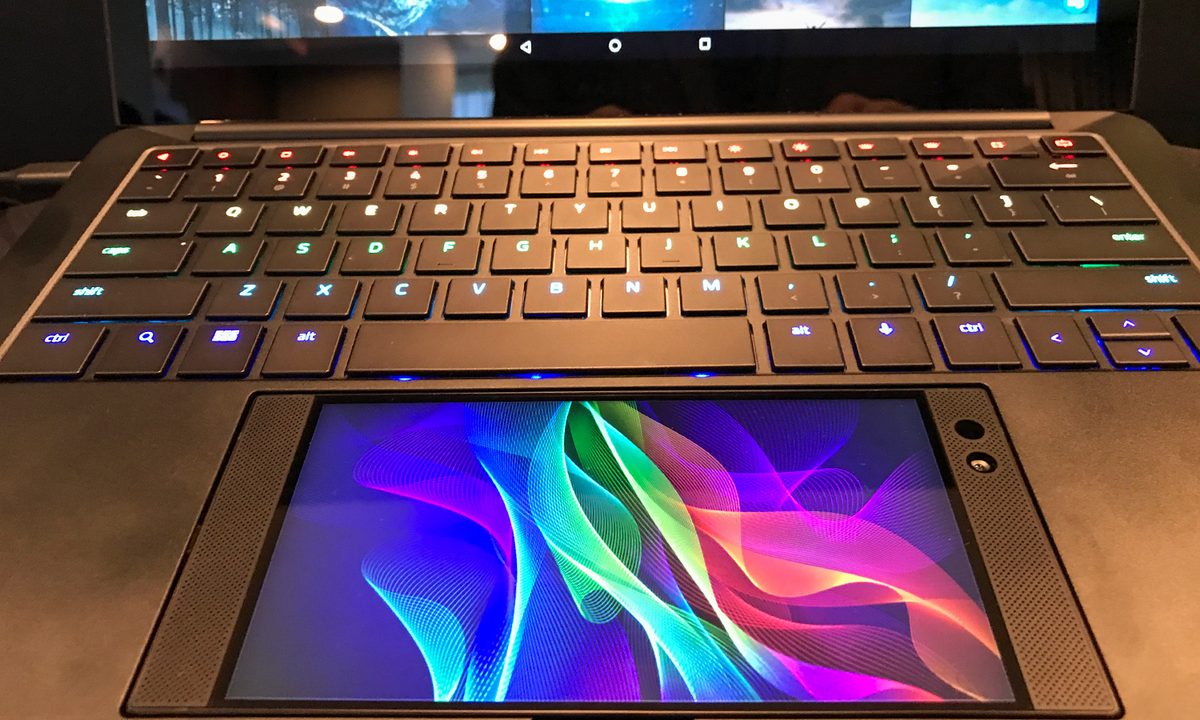
That’s not a new concept. Asus debuted its similar PadFone three years ago, and there’s a variety of third-party docks on the market. What sets Project Linda apart from these is how the Razer Phone is used. It becomes the laptop’s touchpad. If you’re thinking that means the touchpad is also a 5.7-inch, 2,560 x 1,440, 120Hz display – you’re right. And Razer intends it to be used exactly as that.
A touchpad that’s also a touchscreen sounds intriguing, but what would you actually use it for?
If you’re finding this hard to imagine, we don’t blame you. A touchpad that’s also a touchscreen sounds intriguing – it’s a similar idea to the MacBook Pro’s Touch Bar, only bigger – but what would you use it for?
That’s a good question, and one Razer had some trouble answering. We used the Project Linda prototype to play a game of Vainglory, edit a photo, and navigate Android’s interface. It worked as a touchpad in all cases, but none of the demos made good use of the Razer Phone’s screen. It remained dim throughout, usable as a touchpad, but it didn’t display useful information. Razer did have one demo machine playing a video of what it hopes the feature would look like when complete, and we liked what we saw – but could that become reality? No one can say, including Razer.
We can understand why. Project Linda requires developer support to function, yet it’s a prototype, built deep in Razer’s R&D labs. Still, we hoped to see at least one knockout, interactive demo that proved its use – and we didn’t.
What about the rest of it?
Project Linda’s unusual use of a phone’s touchscreen is the headline feature, but the dock it attaches to is worth discussion. You can dock or detach the phone with the press of a button, which causes a USB-C port to appear and connect to the Razer Phone. It’s a neat piece of engineering that comes complete with a cool mechanical whir.

The laptop dock looks great. It’s basically a Razer Blade with the internals stripped out, except for a small battery. It offers a slick black look, thin design, pleasant keyboard, and Chroma backlighting. In these respects, at least, it’s the best Android laptop dock we’ve seen.
We left our time with Razer’s Project Linda feeling equal parts interest and bewilderment. It’s an eye-catching demo, no doubt, and the idea seems fun. Yet we have a hard time imaging how we’d use it. This is an idea that’s never been tried, so there’s no prior examples of it working in the real world.
Whatever you think of the idea, you shouldn’t expect to see it for sale soon. Razer has a long history of introducing concepts, like last year’s Project Valerie and 2014’s Project Christine. These rarely translate literally to a product you can buy, but they do become features on future Razer devices.
If we had to bet – and CES is held in Vegas, so we do – we’d say this will lead to a new touchpad/screen for the Razer Blade. The company in fact had a Blade model that used a touchscreen as a touchpad, but it was small, and quickly dropped from future models. Perhaps the lessons learned from Project Linda can help Razer perfect a bigger, better version of that concept.