After months of testing with Windows Insiders, Microsoft has finally pushed out the Windows 10 October 2018 Update to the general public. This update comes packed with plenty of cool new features, and you might not want to miss out.
There are more than a few ways to download the update today. Be it Windows Update, the Update Assistant, or the Windows Insider Program, here’s how you can grab latest and greatest version of Windows.
Windows Update
The best way to grab the Windows 10 October 2018 Update right now is to wait for it to automatically appear in Windows Update. Microsoft pushes out these large featured Windows 10 update out in phases, so not everyone will be seeing it right away. This method ensures maximum compatibility with millions of Windows PCs and ensures you won’t lose files or have hard drive or program trouble when you’re installing.
Step 1: First in this process is to first head to your Start menu, click on the settings cog and then click Update and Security. That should load up Windows Update.
Step 2: Click on “Check for Updates” to see if the Windows 10 October 2018 Update is ready for you.
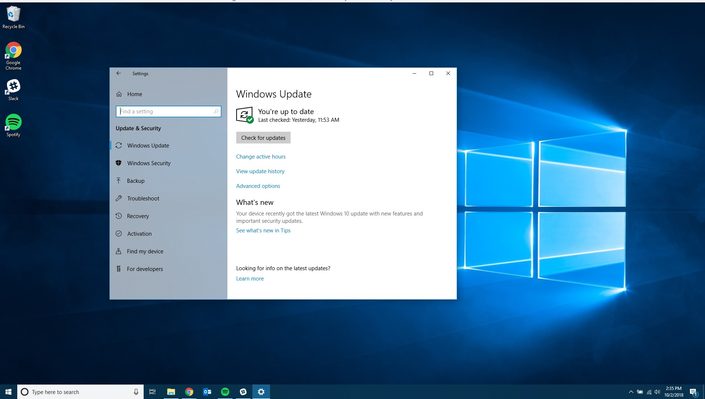
Step 3: If ready, the download will automatically initiate, but take a while since the file is large.
Step 4: Once downloaded, you’ll get a pop-up prompt to restart your PC. Once you agree, your PC will then reboot several times as part of the update process. This can take anywhere between 10-15 minutes, depending on the age of your PC and processor, so please be patient!
Update Assistant
If you’re not seeing the Windows 10 October 2018 Update in Windows Update, another way to proceed is to use Microsoft’s Update Assistant tool. It might take a while for the Microsoft website to show the new version of the tool, but once live, you can grab it by checking here. From that website, click on the “Update Now” button, and then save the downloaded file.
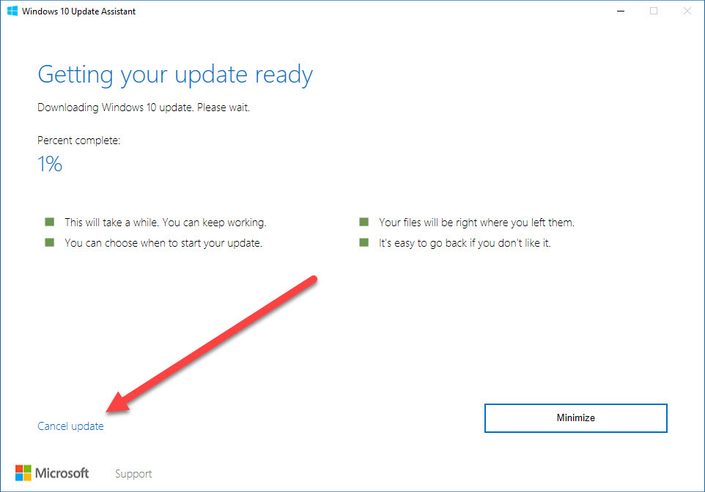
Next, find the location of the file, double click to run, and then press Update Now. Your device will do some checks, and then download the update, verify and install it. This takes a while, and your PC will restart several times, so grab a cup of coffee and relax. Keep in mind you have an automatic 30-minute buffer period to install the update, and you always can choose “Restart now” to install right away. Also, bear in mind you won’t lose any files as part of the update process.
Windows Insider Program
Worst comes to worst, you might not be able to download the Windows 10 October 2018 Update at all with the methods above. If that’s the case, you can opt your PC into the safest “slow ring” of the Windows Insider Program to proceed. Please be aware this method involves installing beta versions of Windows 10, so you might want to be careful.
To do this, head to Windows 10 Settings, and click on “Update and Security.” You can then “opt” into the Insider Program by clicking on the Windows Insider Program icon. After that, you can click the “Get Started” button and choose your Microsoft Account. Be sure to select “Just fixes, apps, and drivers” to ensure you’re in the Slow ring.
Your computer will then restart, and you can then revisit Windows Update and Press “Check for Updates” to have the Insider build to install on your PC. Again, keep in mind that these builds are very unstable and are beta, so you might not want to take the risk.