While advertising helps to fund the free content that we all enjoy, sometimes, it’s overly intrusive and can ruin your online experience. Few things are more frustrating than accidentally tapping on a pop-up ad as you scroll through a story. Fortunately, it’s possible to stop these annoying ads dead in their tracks.
Read on as we take a closer look at the steps you can take to dramatically reduce the amount of pop-up advertising you’re forced to see on your Android phone. If you want to know more, you can also check our guide on how to uninstall Apps in your Andriod.
How to stop pop-up ads in Chrome
Chrome is the best of the best browsers for Android and it has a couple of built-in options to help you kill unwanted adverts. You should find that Chrome blocks pop-up ads by default, but let’s check you have it set up correctly. Start by opening up Chrome.


You need to open the More settings menu by tapping the three vertical dots at the top right. Tap on Settings in the drop-down menu that appears and then tap Site settings.


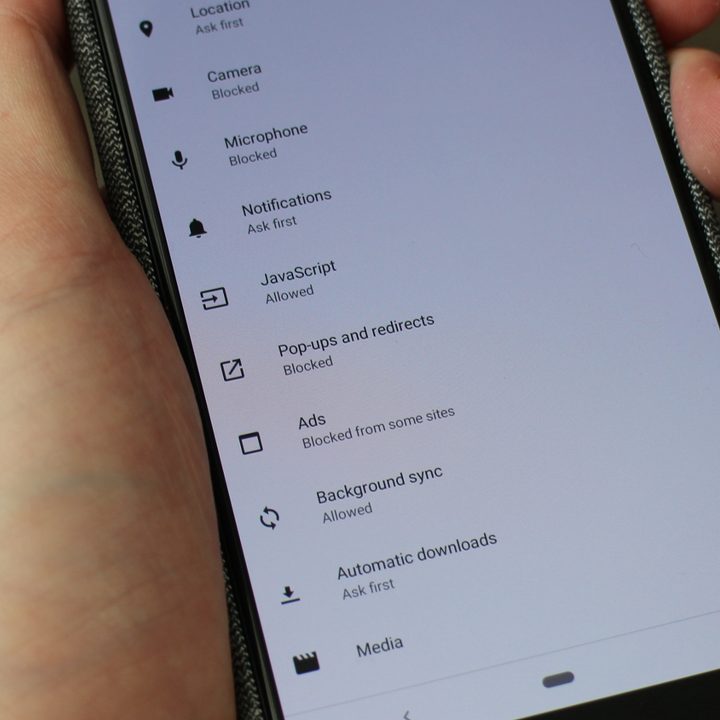
There are two options here that we want to look at, but start with Pop-ups and redirects. Make sure that it’s toggled off to Block sites from showing pop-ups and redirects.
It’s also worth looking at Ads to ensure it’s also toggled off to Block ads from sites that show intrusive or misleading ads.
That’s all there is to it in Chrome. You should now be free of annoying pop-up ads when you’re browsing the web on your Android device.
How to check permissions for a website in Chrome
It’s possible that you’ve already granted some notification permissions for a website and now you’d like to revoke them. If that’s the case then open Chrome and navigate to the website in question.


Open the More settings menu by tapping the three vertical dots at the top right. This time you want to tap the information icon “i” at the top and then tap Site settings. If you see Notifications listed under Permissions, then you may want to tap it and turn it off.
You may also be interested in the best ad blockers for Chrome.
How to stop pop-ups with other browsers
If you’re using another browser, then there’s likely a similar option to stop pop-ups there. For example, here’s how to stop pop-ups in Samsung’s internet browser.


Open the More settings menu by tapping the three vertical dots at the top right. Tap Settings, then Advanced, and toggle on Pop-up blocker.
Some other browsers offer dedicated plug-ins or add-ons that will handle pop-up ads for you. If that’s the case you should see an option to search plug-ins somewhere in the settings.