iTunes was the reason I purchased my very first Apple MacBook. Not because I wanted to use the software in particular, or because I was so keen to buy music through it. I’d just got my first iPhone, and syncing it with iTunes on a Windows laptop was so hateful, I’d have done anything to avoid it.
Back then, in around 2008, the only way to update, backup, or transfer content to an iPhone was through iTunes. It was an essential piece of the puzzle, and because over-the-air software updates didn’t arrive until 2011 with iOS 5, there was no way other option. iTunes on Windows at that time was truly awful: Slow, frustrating, and fond of crashing.
My aging, but still capable HP laptop was replaced by a white MacBook, and although iTunes still had its idiosyncrasies, it was infinitely better than the agonizing Windows experience. Owning an iPhone was already like owning the future, and Windows was spoiling my utopia. Now my iPhone and MacBook could make sweet, digital love together. The world was a better place, and I was less likely to hurl myself from the balcony when it came time to install iOS 4.
This pivotal decision went on to influence my entire computing life, therefore Apple’s decision to kill off iTunes-as-we-know-it makes me nostalgic. Not only because it was instrumental in bringing me into the Apple family; but because I still rely on iTunes today for the same reason it was created back in 2001.
Life was easier with iTunes
Yes, iTunes made, and continues to make my life easier. There will be people who balk at this statement, claiming iTunes was bloated, tedious, poorly optimized, and largely outdated. I’m not denying these points. Many people these days will only listen to music through Spotify, Apple Music, or any other streaming music service, but I still buy CDs. As it turns out, iTunes was great at keeping them in order, and making sure I can listen to them across many different devices. When Apple launched iTunes in 2001, it did so with the tagline, “Rip, mix, burn,” and that’s what I still do.
My current MacBook is from 2011, and I have no wish to buy another, as it has a SuperDrive CD/DVD drive built-in. When my CDs arrive, they get slotted into the MacBook and ripped onto the SSD. Here, I can listen on my laptop, stream to wireless devices, and make sure they’re ready to be transferred over to my iPhone, and various microSD cards for use in Android phones and music players. One of my cars has a CD player without any kind of Bluetooth connectivity or a USB port. I recently burned CDs using iTunes for use on a long journey. I diligently add album artwork, and iTunes becomes a colorful, easy-to-use music management program.

That’s before digging into the playlists that I make, or iTunes generates, and the way it has stored and managed my podcasts since those dark days in 2008 when it was installed on my Windows laptop. Outside of music, having a complete backup of my iPhone is also very reassuring. When I broke the screen on my iPhone XS Max recently, it was a good feeling to know I had a backup on the computer, rather than solely rely on iCloud. There are other pieces of software that can do these things; but it’s quick and easy on a Mac with iTunes. So, what happened?
What happened to iTunes?

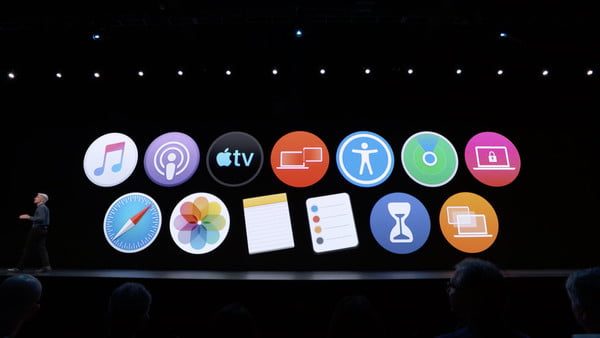
Apple has retired the iTunes name, and the software has been reborn within MacOS as Apple Music, Apple TV, and Apple Podcasts. It’s most of the functionality we’re used to in iTunes, split into three different programs for ease of use. What about the fourth function of iTunes: Device syncing? That’s going to live in MacOS, and when you plug in your iPhone, iPad, or iPod, the familiar device management page from iTunes appears in Finder.
Because this was only announced at WWDC 2019, I haven’t tried out the new apps and features yet, nor is it absolutely clear what features will live where; but the fact it’s happening at all is not a surprise.
Disappearing functionality
iTunes made sense in 2001, and throughout the era of the iPod. Music distribution and ownership was changing though, assisted by piracy, MP3s, and services like Napster. It continued as podcasts, books, apps, and movies all arrived in Apple’s digital arsenal, subsequently falling under iTunes remit. It became a behemoth. Frustration, and even hate, became the default reaction when the subject came up. Doing things with iTunes became increasingly long-winded, and when problems occurred, finding and implementing a fix was complex and difficult.
Like what? Have you ever tried to migrate away from iTunes? Deal with the multiple files it creates? How about the DRM, despite owning the track that iTunes refuses to recognize? Or, what about when the library corrupts and you have to rebuild it, or worse, try to deal with problems related to the iCloud library and worrying warnings about deleting songs and movies when you try to sort it out? Or, for the very brave, what about splitting off a gigantic, increasingly unmanageable iTunes library to an external hard drive?
All the above will strike fear into anyone shackled to iTunes. Apple’s newly split up iTunes will hopefully solve these issues, and many will rejoice. However, they’re not the main reasons for its downfall. Instead, it has simply become outdated, and in its current form, entirely unnecessary. Streaming music and movies — Apple Music alone has 56 million subscribers, and Netflix has 139 paying subscribers around the world — means fewer reasons to visit the iTunes Store, and fewer people ripping CDs to play on an iPod or iPhone, for example.
The best thing to happen to iTunes
Does euthanizing iTunes mean certain functions viewed as anachronisms will be removed and forgotten? Like the 3.5mm headphone jack on the iPhone itself? No, it doesn’t appear so. It’s not really dying, it’s transforming, and in doing so transcending to the next plane of existence.
By killing iTunes and resurrecting it as something new, Apple isn’t simply taking pity on those jaded by it. It’s an attempt to make buying, subscribing, owning, and using content more logical and easy to use. The App Store launched in basically the same way in 2008, and has gone to rake in billions for Apple. Simplicity makes buying easier, while showcasing the content in a more logical way helps Apple shift perception away from it being solely a hardware company.
iTunes will return as Apple Music, Podcasts, and TV; and to what it once was — a way to organize, digitize, and manage your music and media. The difference is it’ll be in a modern way, understanding that needs and requirements are different from 2001. Now you’ll only need to use the parts you actually use, without having to deal with all the parts you don’t. If you want podcasts, you go to Apple Podcasts, not another tab inside iTunes.
This means I can hopefully go on ripping and enjoying my antiquated CDs across multiple devices, and those who only want to sync an iPhone can do so without delving into multiple menus, in software that has to support multiple features that you’d never use. It’s win-win, and the reason I’m only nostalgic about the iTunes of old, and not sad about its demise, because it’s returning to its roots in the best way imaginable.