Thanks to software updates in 2019, PlayStation 4 and Xbox One owners can now use their respective console controllers to play games on Apple devices.
The iOS update allows you to easily pair a DualShock 4 or select Xbox One controllers via Bluetooth with your favorite Apple products — including the iPad, Apple TV, or any other device with the iOS 13 software installed.
Although there are no restrictions as to which games you can use with either controller, the new update is ideal if you play a lot of Fortnite on your phone or want to check out the offerings available on the Apple Arcade.
When it comes to setting up the controller with the device, it is incredibly straightforward. However, the pairing process will vary depending on the OS on each Apple product and controller you’re using.
Step 1: Place your controller in pairing mode
Regardless of which controller you use, you’re going to need to place it in pairing mode.
For DualShock 4, simultaneously press and hold both the “Share” button and the PS home button (the center button below the touchpad). You’ll know the controller is ready to pair when the light bar on the top of the device begins to blink.
To pair your Xbox One controller, first, you’ll need to make sure it’s ready for Bluetooth pairing. What’s interesting about the Xbox One controllers is that you can quickly identify which controller offers Bluetooth. Controllers that support Bluetooth have the plastic around the Xbox button that has the same color as the controller’s primary color. Non-Bluetooth controllers are easily spotted as the plastic around the Xbox button has a color that matches the bumpers, as shown in the photo below.
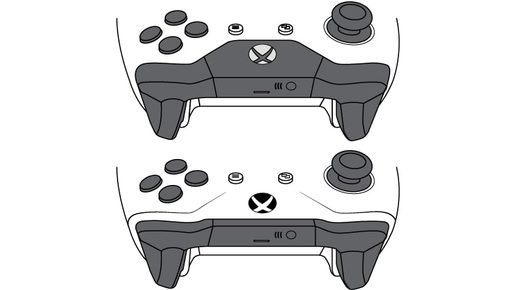
If you have a Bluetooth Xbox One controller, hold down the button shaped like the Xbox One logo on the top of the controller until the logo’s backlight begins to flicker.
Step 2: Pairing the controller with iOS devices and Apple TV
Once your controller is ready to pair, head over to the settings on your Apple device and tap Bluetooth. It’s one of the first options you see in your settings. After you click Bluetooth, you should see the controller listed. Depending on which one you are pairing, it will either display DUALSHOCK 4 Wireless Controller or Xbox One Wireless Controller. Click the applicable controller and you’re ready to go. If you want to use the controller to play a game, just hit the controller’s button symbol (Xbox One symbol or the PlayStation symbol). At this point, select the game you want to play and you’ll be ready to use a controller instead of touch controls.
The Apple TV setup is very similar but with a few slight differences. Boot up your Apple TV and head to the settings. Scroll down until you find Remotes and Devices. Once you are there, you should see a Bluetooth option. Click on that, and either controller should appear under Other Devices. Then click on the respective controller shown, and you’ll be officially set up.
Step 3: Unpairing the controllers
To disconnect the controller from the device, head back to the Bluetooth option in your Apple settings, and click on the i next to the applicable controller. Then click Forget This Device to unpair, just like you’d do with any other Bluetooth device.
Keep in mind, not all games feature controller support. You can, however, check to see if a game supports controllers by finding it on the app store. When you’re on the game’s landing page, scroll down to the bottom, under the Supports section. Here, you can tell if a game will let you use a controller.