Amid the constant flurry updates to Google Chrome, extensions now available for Safari 5, and previews of Internet Explorer 9, you may have missed Mozilla Firefox 4 peeking its head over the horizon. Although still ambling along in beta form, the next milestone release from the company that commands more market share than other non-Microsoft browser will bring with it a number of significant upgrades, including some that may sway recent converts to Safari and Chrome. What’s new and worthwhile? We gave it a test drive to find out.
More Security
Whether you consider yourself a complete saint on the Web, or admit to a will easily plied by curiosity, we’re guessing you wouldn’t want your Internet history splayed open and examined by a random stranger. But an interesting loophole in CSS can do just that, testing up 210,000 URLs per minute and potentially even identifying you by triangulating between the social networking groups you visit. The latest Firefox will slap a much-need patch over this (rather disturbing) security hole, keeping knowledge of your visits to sewing and knitting forums safe. For now.
 Tabs on Top

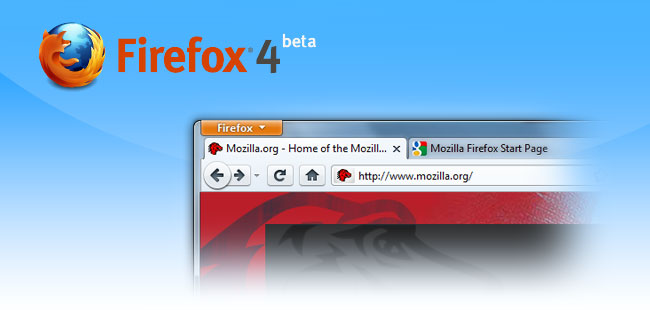
Or as we like to call it, “Chrome style.” Firefox 4 will do away with the current (and rather dated) interface that places tabs below a slew of other information to put them up top, prioritizing the names of the sites you’re browsing. Not surprisingly, it looks a lot like Google Chrome, which may be a saving grace for a browser that has started to show its age after the latest round of competitor redesigns.
App Tabs
Where Tabs on Top brings Firefox 4’s interface on par with Chrome’s in some ways, App Tabs might actually be a genuine step forward. For users who keep a number of tabs open all day – like Pandora, Gmail and Facebook – App tabs allow you to make a persistent tab that will never go away, kind of like pinning an application to your start bar in Windows 7. It also shrinks to the size of a mini icon, saving space and helping differentiate app tabs from your other tabs.
Menu Button
Where do you put all the options for a browser when you strip them off the top in favor of tabs? Under a single menu button, of course. The orange Firefox button on the upper left of a Firefox window now offers access to every Firefox command you need, including history, print, and customizations.
HTML5 Support
If HTML5 weren’t the wave of the future, devices like the iPhone 4 and iPad that support it instead of Flash certainly rewrote the course of history to make it so. While Firefox 3.6 includes some basic support for HTML5, it remains rudimentary compared to both Chrome and Safari. Firefox 5 will include a brand new HTML5 parser built from the ground up, support for Google’s WebM HD video format, and more HTML5 form controls.
Improved JavaScript speed
Like every new version of every new browser, Firefox 4 should improve the speed of running JavaScript. Early reports peg the gains somewhere around 25 percent, but we’ll wait for the real version to perform our own benchmarking and compare it to speed demons like Chrome.
Revamped Add-Ons
A new manager for add-ons will allow developers to code them more easily, and you to install them more easily. Perhaps most noticeably, the interface for installing and managing add-ons has completely changed (it’s just another tab now) and you’ll no longer have to restart Firefox to apply a new add-on.