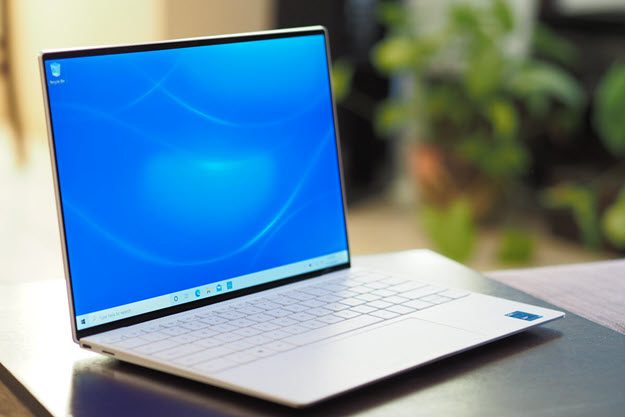
Dell’s XPS 13 tops our lists of the best laptops and the best 13-inch laptops. It’s a sleek, well-built, and overall solid performer that’s represented the pinnacle of laptop design for a few years. Apple recently released its MacBook Pro 14, which is slightly larger than the XPS 13 but still a viable competitor. We haven’t reviewed it yet, but it’s almost identical to the larger 16-inch version and likely will make our list of the best 14-inch laptops.
These two outstanding products deserve our praise, but only one can win a shootout like this one. Which is the better laptop, the Dell XPS 13 or the Apple MacBook Pro 14?
Specs
| Dell XPS 13 | Apple MacBook Pro 14 | |
| Dimensions | 11.64 inches x 7.82 inches x 0.58 inches | 12.31 inches x 8.71 inches x 0.61 inches |
| Weight | 2.8 pounds | 3.5 pounds |
| Processor | Intel Core i3-1115G4 Intel Core i5-1135G7 Intel Core i7-1185G7 Intel Core i7-1195G7 |
Apple M1 Pro Apple M1 Max |
| Graphics | Intel Iris Xe | Integrated |
| RAM | 8GB 16GB 32GB |
16GB 32GB 64GB |
| Display | 13.4-inch 16:10 IPS Full HD+ (1,920 x 1,200) 13.4-inch 16:10 IPS Full HD+ touch 13.4-inch 16:10 IPS UHD+ (3,840 x 2,400) 13.4-inch 16:10 OLED 3.5K (3,456 x 2,160) touch |
14.2-inch 16:10 Liquid Retina XDR 3,024 x 1,964 |
| Storage | 256GB SSD 512GB SSD 1TB SSD 2TB SSD |
512GB SSD 1TB SSD 2TB SSD 4TB SSD 8TB SSD |
| Touch | Touch optional | No |
| Ports | 2x USB-C with Thunderbolt 4 3.5mm audio jack MicroSD card reader |
3x USB-C with Thunderbolt 4 HDMI 2.0 3.5mm audio jack SD card reader |
| Wireless | Wi-Fi 6 and Bluetooth 5.1 | Wi-Fi 6 and Bluetooth 5.0 |
| Webcam | 720p | 1080p |
| Operating system | Windows 10 Home or Pro | MacOS Monterey |
| Battery | 52 watt-hours | 70 watt-hour |
| Price | $950+ | $1,999+ |
| Rating | 5 out of 5 stars | 5 out of 5 stars |
Design

Both laptops certainly look different, but they’re both incredibly well-built. Neither has any bending, flexing, or twisting in the lid, keyboard deck, or bottom chassis, and you’ll find little to distinguish them in terms of their physical design. The XPS 13 uses machined aluminum in the lid and chassis and carbon fiber in the keyboard deck (in the black version) or glass fiber (in the white version). The MacBook Pro 14 is made entirely from machined aluminum, and the only real difference is that the XPS 13’s palm rest is warmer and more comfortable than the MacBook Pro 14’s colder metal.
In terms of their aesthetic, the XPS 13 is the more extravagant design thanks to its choice between black and white interiors, but the MacBook Pro 14 has its own understated elegance. It’s a bit boxier and not as streamlined, and it comes in just the one dark silver color, but that’s quibbling. Both are elegant and attractive laptops.
The XPS 13 is smaller and thinner, thanks in part to its 13.3-inch 16:10 display compared to the MacBook Pro 14’s 14.2-inch 16:10 display. The Dell comes in at 0.58 inches thick and 2.8 pounds compared to the Apple’s 0.61 inches and 3.5 pounds. Again, though, both are small enough to carry around easily, and they both feel great in hand.
Apple took a positive step backward with its latest MacBooks, making them slightly thicker to fit in more connectivity. The MacBook Pro 14 has three USB-C with Thunderbolt 4 ports, a full-size HDMI 2.0 connection, and a full-size SD card reader. The XPS 13 is all-in on USB-C with Thunderbolt 4, offering two of the ports and a microSD card reader. Both will require dongles for USB-A devices, but the MacBook Pro 14 still has a better set of connectivity. Wi-Fi 6 and Bluetooth 5.1 or 5.0 provide wireless duties.
Performance

The XPS 13 uses 11th-gen Intel U-series CPUs that are popular in thin and light Windows machines. You can choose from the 2-core/4-thread Core i3-1115G4 with Intel UHD graphics up to the 4-core/8-thread Core i7-1195G7 with Intel Iris Xe graphics. That makes the XPS 13 a solid performer for productivity work but underpowered for creators.
The MacBook Pro 14, on the other hand, equips Apple’s latest M1 CPUs, the M1 Pro with either 8 CPU cores and 14 GPU cores or 10 CPU cores and 16 GPU cores and the M1 Max with 10 CPU cores and either 24 or 32 GPU cores. That variety makes choosing between versions a bit of a challenge.
However, even the “entry-level” M1 Pro is considerably faster than the XPS 13’s choices. We tested the M1 Pro in the MacBook Pro 16, and it blew away the Windows competition. In Geekbench 5, it scored 1,773 in single-core mode and 12,605 in multi-core mode compared to the XPS 13 running a Core i7-1165G7 that managed just 1,540 and 5,432. In Cinebench R23, the MacBook Pro 16 scored 1,531 single-core and 12,343 multi-core compared to the XPS 13’s 1,399 and 4,585. The MacBook Pro 14 is likely to perform similarly, making it a much faster laptop than the XPS 13 and suitable for demanding creative tasks in addition to churning through productivity workflows.
Display

The MacBook Pro 14 comes with just one display option, a 14.2-inch 16:10 Liquid Retina XDR panel running at 3,024 x 1,964. We haven’t tested it, but we imagine it will perform as well as the similar display on the MacBook Pro 16. That is, it will demonstrate extremely wide and accurate colors, spectacular contrast offering inky blacks and a ton of brightness. It’s a creator’s dream display.
The XPS 13 offers four different 16:10 displays, a Full HD+ (1,920 x 1,200) IPS non-touch, a Full HD+ touch panel, a 4K+ (3,840 x 2,400) screen, and a 3.5K (3,456 x 2,160) OLED display. The first two options will provide average colors, contrast, and brightness, and better battery life. The 4K+ display has somewhat wider colors and higher contrast, and then the OLED panel will rival the MacBook Pro 14’s offering with the same wide and accurate colors, extreme contrast, and high brightness.
If you choose the XPS 13 OLED display, then you’ll be on par with what the MacBook Pro 14 offers. Creators who demand the best colors and contrast will want to stay away from the other three display options, while productivity users will be happy with all of them.
Portability

As mentioned in the design section, both of these laptops are small and light enough to slip into a backpack without feeling overburdened. The XPS 13 is the smaller laptop for sure, but the MacBook Pro 14 is small enough.
Battery life is another matter entirely. Depending on which XPS 13 display you configure, we got between five and 8.5 hours on our web browsing test that cycles through a series of popular and complex websites. You’ll get between seven and 12 hours on our video test that loops through a local Full HD Avengers trailer. On the high end, those are acceptable scores for Windows laptops, while on the low end, they’re disappointing.
The MacBook Pro 14, though, is likely to get a considerably longer life. Again, we haven’t tested it, and it’s not as easy to extrapolate from our MacBook Pro 16 because of its larger display and 100 watt-hour battery (compared to 70 watt-hours in the MacBook Pro 14 and 52 watt-hours in the XPS 13). However, the M1 Pro is a very efficient CPU, and you should get at least double the battery life compared to the XPS 13’s high-end results. You don’t have to sacrifice display quality or performance to get a laptop that will last more than a full day’s work.
The Apple MacBook Pro 14 outshines the XPS 13, but at a cost
The Dell XPS 13 starts at just $979 with a Core i3-1115G4 CPU, 8GB of RAM, a 256GB SSD, and a Full HD+ non-touch display. That’s a reasonable price for such a well-built laptop. It tops out at $2,029 for a Core i7-1195G7, 32GB of RAM, a 2TB SSD, and a 3.5K OLED display, which is firmly in premium laptop territory.
The Apple MacBook Pro 14, on the other hand, has an entry-level price of $1,999 for an 8-core CPU/16-core GPU M1 Pro CPU, 16GB of RAM, and a 512GB SSD. Maxed out, it costs an eye-popping $5,899 for a 10-core CPU/32-core GPU M1 Max CPU, 64GB of RAM, and an 8TB SSD. It’s a costly laptop.
The Dell XPS 13 might have just lost its place on our list of best laptops. The Apple MacBook Pro 14 is incredibly fast and long-lasting, and it’s built just as well. The only thing holding it back is its price, which takes it out of the mainstream and makes it most attractive to creative professionals for whom that much power will be worth the investment.