  1. Home
  2. Computing
  3. Trash
  4. News

Windows 11 makes some noise with oft-requested design change

Add as a preferred source on Google

Microsoft is making a long-requested design change to Windows 11. As part of the latest Windows Insider Dev Channel build, the company is beta testing an updated volume slider, which now matches up with the look and feel of the rest of the operating system.

A change from the previous versions left over from Windows 8, the Windows 11 Dev Channel beta editions of the hardware indicators (sliders) for brightness, volume, camera privacy, camera on/off, and airplane mode now look more modern. These are the flyouts that appear as you click the volume or brightness keys on your laptop and will even honor the dark mode or light mode settings of your system.
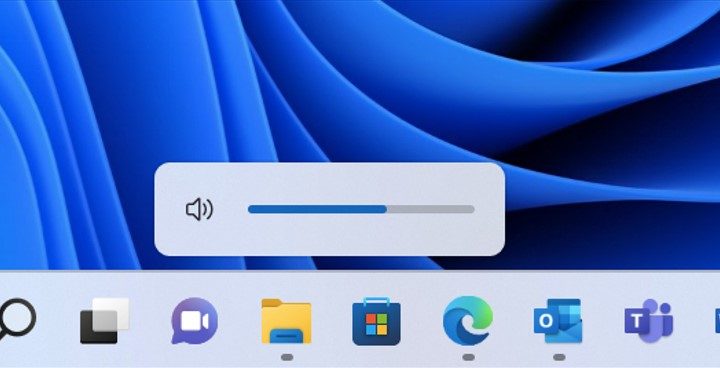
The new Windows 11 Volume Slider.
Image used with permission by copyright holder

Microsoft moved these sliders from the top-left corner of the screen to the bottom. All of the sliders now float on top of the taskbar, appearing as a round shape with a blue level in the middle to indicate a specific percentage (see above for an example).

It’s important to note that this change is still in beta testing in the Dev Channel of the Windows Insider Program, so it’s not linked to a specific Windows 11 release. This means that it might not be until late this year until everyone gets to see it for themselves.

It’s not only the big change that Microsoft is testing in Windows 11. After users complained that a full-screen Alt + Tab experience in the operating system is too distracting, Microsoft responded with yet another beta test of a new experience. In the current Dev Channel version of Windows 11, Alt + Tab now summons a thin strip with a slightly blurred background.

It’s looking as though it is a big goal for Microsoft to clean up Windows 11 so that the visual looks of apps and other experiences are more in sync with each other. For example, today’s Windows 11 Dev Channel build also improves the call experience with the Your Phone app. The call-in-progress window now includes new fonts, icons, and design changes that match Windows 11’s user interface. Rumor has it that cleaning up dark mode in Windows 11 is another focus for Microsoft this year.

Arif Bacchus
Arif Bacchus is a native New Yorker and a fan of all things technology. Arif works as a freelance writer at Digital Trends…
Shopping for Back-to-school? These are the gaming laptops I’d recommend
Powerful enough for AAA games, practical enough for everyday lectures, assignments, and everything in between.
oled gaming laptop

Every gamer knows the pain of trying to do too much with the wrong hardware. Back-to-School is the perfect excuse to fix that. A good gaming laptop shouldn’t just hit high frame rates -- it should also survive endless browser tabs, assignments, coding sessions, video edits, and everything else college throws at it. These five machines strike that balance better than most, which is exactly why they’d be my picks this semester.

Alienware 16 Aurora

Read more
Google’s AI just recreated the best goal ever by Pele that was never actually filmed
My heart is full after watching the clip, and it will bring tears of joy to every true football fan.
Pele footballer.

If you look at the AI landscape, a majority of its usage in the film and television industry has been pretty controversial. Bringing dead actors to life on a screen, using AI to record vintage songs that were never completed, or just using it to film scenes or handle any other part of the creative process — the backlash has been pretty vocal. But there are a few slivers of hopeful AI usage, too, and Google just delivered one of those in a heartwarming fashion using Gemini AI.

I wonder the world never archived

Read more
OpenAI patches ChatGPT desktop after user backlash over its recent redesign
ChatGPT's desktop app gets synced history, projects, and a new Chat and Work mode switch
Man using ChatGPT on a laptop

ChatGPT's desktop app is getting a much-needed course correction. When OpenAI merged Chat, Work, and Codex into one unified desktop app roughly a week ago, the experience came with more issues than intended, burying basic features like chat history and making it awkward to switch between modes. Now OpenAI has rolled out a batch of fixes based on feedback to make the app feel consistent regardless of which device you use.

https://twitter.com/thsottiaux/status/2077928427936710901?s=46

Read more