I first reviewed the Nanoleaf Lines in October 2021 — roughly six months ago. Since that time, I’ve used them almost every day. The Lines have become a part of the decor of my home; they turn on automatically at sunset and turn off at midnight each night. I rarely change the pattern or even think about their presence.
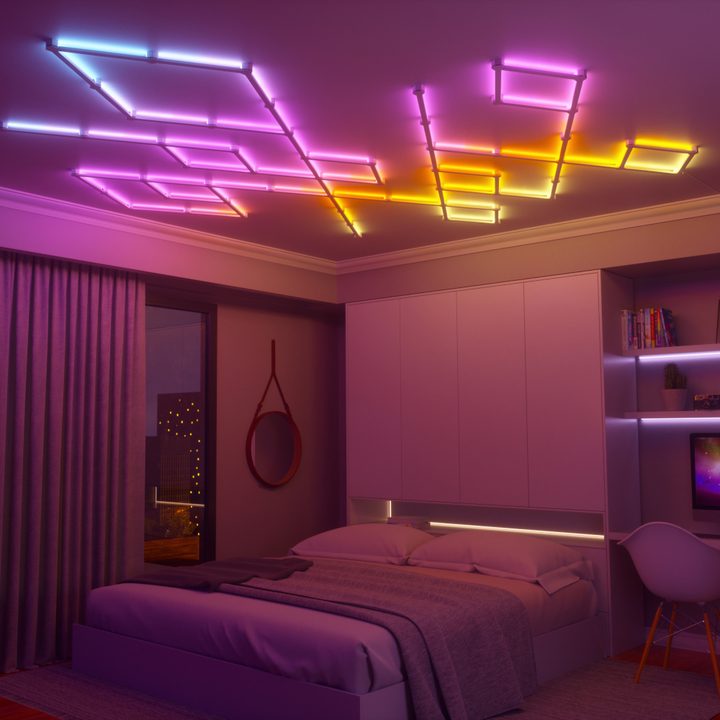
The Lines just are — and that’s exactly how a smart device should be. If I have to think about it on a routine basis, it stops offering the same level of convenience.
So how do they hold up, and are they still worth it after six months?
Smooth performance with minimal glitches
In six months of use, I’ve only had two problems with the Lines, and both were the fault of a random power outage. When the power went out (thanks, Georgia storms), the Lines became unsynced from my smart home system. I had to go into the Alexa app and reassign them to the loft, a process that took all of 15 seconds to do.
Beyond that, there have been no errors or problems of any kind. The lights haven’t dimmed or gone out, and that’s with six hours or so of everyday use.
In my original review, I mentioned the two-year limited warranty and concerns over the flimsy feeling of the light bars. That concern is almost a nonissue, as there’s rarely any reason to touch the bars once they’re installed.
In comparison, I’ve had multiple smart devices simply disappear from the system or lose connection to Wi-Fi, among other annoyances. The fact that the Lines have continued to work flawlessly is a major win.
A few new changes
The majority of features around the Nanoleaf Lines are the same. The app looks about the same, and if there are more patterns, I’m not aware of them — there were already so many to begin with that it would be hard to keep track.
The biggest change comes in the form of new hardware. Nanoleaf recently released Lines Skins — snap-on covers that change the colors of the system. These Skins fit right over the top of the light bars, although you will need to remove the existing hexagonal covers for the connectors and snap the new one into place. The Skins are $20 for a pack of nine, which will cover a standard Nanoleaf Lines kit.
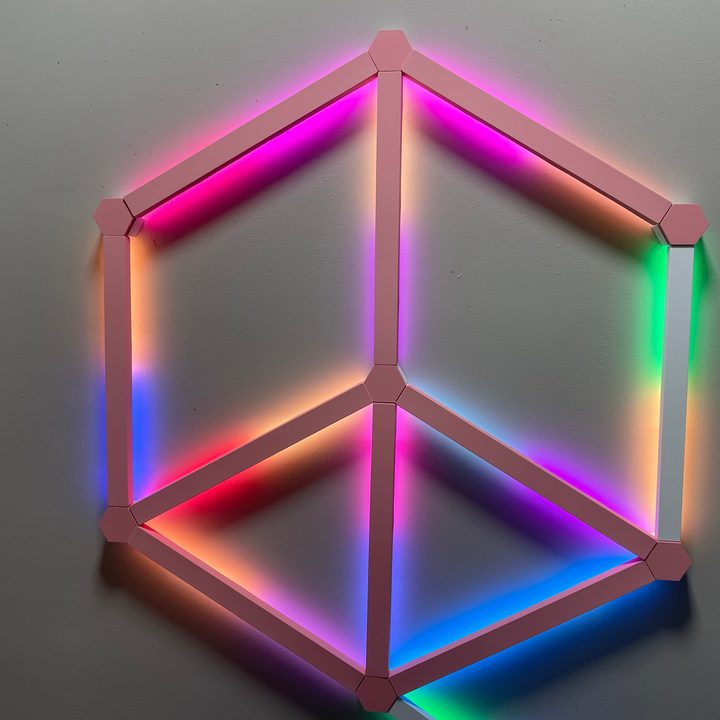
The Skins are currently available in pink and black, but more colors should be on the way soon. Nanoleaf also plans to release Flex Connectors in the future that let you bend your design around corners or onto the ceiling.
The Skins are great, but the Flex Connectors will open up the options for designs in a huge way. I might reconfigure the layout once they release and run the lines up the wall and onto the ceiling for effect.
Another change to note is that the Nanoleaf Lines now work as a Thread Border Router. This means any other Thread-enabled devices you own are connected to the Lines as well; they act as a relay point to strengthen the overall integrity of your network.
Are the Nanoleaf Lines still worth it after this time?
Definitely. Like I said before, these aren’t lights for utility. You could technically read by them, but it wouldn’t be the best experience. The Nanoleaf Lines are a great decor piece and should be thought of as such.
If you’re looking for a snazzy, unique way to decorate your bedroom, office, or game room, the Nanoleaf Lines give you flexibility to choose your own design and color palette.
They’re pricey. At $200 for a starter kit with nine light bars, you’re looking at just over $22 per light. That said, it’s one of the more affordable options for decorative lighting, and it certainly holds up to continued use.