
 While we’ve known for quite some time that Google likes to take account of our activity across its products for personalization purposes, consumer concern has been heightened by its new singular privacy policy system.
There are benefits to the upgrade, but some are worried about getting too much customization in with your search queries. If you generally want to keep your Google applications free of personalization, here are a few ways to circumvent the system.
Ad Preferences
Here you can find out the categories that Google has tied to your Web activity. You can edit or remove any or all of this (via the opt-out tool on the edit and remove page). Also interesting is how exactly Google has pegged you—and in cases (ahem, personal cases) they will be very, very wrong. Check this out under “your demographics,” where your assumed age and gender are listed.
If you opted out entirely, be sure to go here so that it’s permanently saved.
You can also disable cookies entirely–it’s available in your browser privacy options, located in “under the hood” for Chrome users.
+1 settings
Much ado has been made about the +1 button, and while we know it does affect personalized search, to what degree is still a little uncertain. Visit this page if you want to disable Google from using your +1’s “and other profile information” to affect content and ads on non-Google properties. Just to be clear, this means that on outside sites, you won’t see +1s from people you know and yours won’t be shown to others.
Mobile
You’ll have to take a different route when using Google products via smartphone. Android uses should go to the Android Market, select Menu and then Settings. Under here you should be able to adjust ad preferences.
iOS uses will need to visit this link and use the QR code to follow the next steps.
Gmail
Here are a few ways you can control Gmail. First of all, if you don’t want to be subjected to ads when perusing your inbox, you can view via an HTML, POP1, or IMAP interface. It’s not an elegant solution, but it’s a simple one. There are also webmail blocker apps, like this one, that can help.
Google also introduced some new personalized features to Gmail this year. Most of these have to do with priority and shuffling your email into certain categories based on an automated system. If you’d rather forego this, visit your inbox preferences center. Under “Inbox Type” choose “classic,” which should change it from “Important first.”
Search Plus Your World
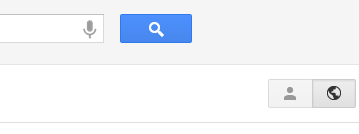 Recently introduced, Google’s latest go at combining social and search was less than well-received and has garnered some controversy. You could use the Don’t be evil button to see what social sites you’re missing out on, or you could use the Google-given toggle (at right) to decide whether or not you want Google+ content pulled into your search results.


