

We weren’t treated to a new version of Android at this year’s Google I/O conference, and that means Android 4.2 Jelly Bean (launched Nov. 2012) is still the most up-to-date version of Google’s smartphone and tablet operating system. Most Nexus phones and tablets already run, or can be modified to run, Android 4.2, as well as some very new phones like the Galaxy S4. An update will be coming soon for the HTC One, and rumors have spread of 4.2’s impending arrival on the HTC One X, Galaxy S3, Note 2, and other high-end, modern Android phones. In anticipation, here are five reasons why you should be counting the days until a notification from Software Update appears on your phone. Though it isn’t as hyped as Android 4.0, Android 4.2 adds some cool new features. Here are our favorites.
Gesture Typing
We’ll start with the cool new keyboard, which no longer needs you to tap out your words, but recognizes what you’re typing as you swipe your finger across the keyboard. At first, it’s disconcerting, and it does take a while to get used to, but once you’ve had a little practice, it’s a fast and convenient way to use a touchscreen keyboard.
There’s a chance you’ve used something similar in the past. The Swype keyboard is available through Google Play, and comes pre-installed on some phones. It works using the same method, but this is the first time Google has implemented the technology in its own standard keyboard.
Here’s a neat twist with this Android 4.2 feature. Google has released its keyboard in the Google Play Store, and it incorporates Gesture Typing, so provided your phone has Android 4.0 or later installed, you can enjoy this feature right now.
 Photo Sphere
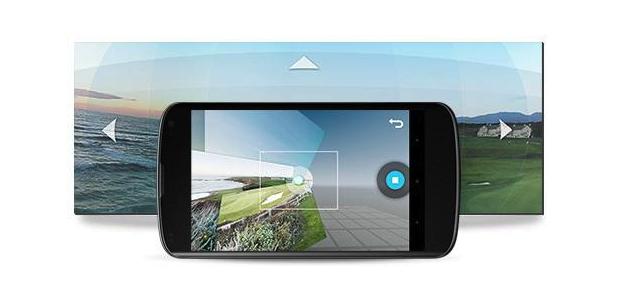
This is one of the most exciting features in Android 4.2. With the camera app you can take panorama photos to the next level. Android 4.2 can take 360 degree scenic shots instead. Taking a Photo Sphere is similar to taking a panorama shot. On-screen hints help you align your picture, but the difference is you can add in views from above and below your viewpoint.
It takes a short while for the app to render the final shot, but once it’s done, it’s viewable on your phone, or easily shareable on Google+ or on a specially created section of Google Maps. Take a moment to see some of the great examples that were posted there already.
Daydream Screensavers
A screensaver is a reason to be excited about Android 4.2? Yes, really. Daydream is activated through the Display settings page in the OS, and lets you choose an animated screensaver to show when your device is charging or placed into a dock. The standard options include a clock, your Google Currents feed, or a collage of images from your Gallery. But what makes Daydream interesting is it can be incorporated into third party apps. Flipboard is one of the first to incorporate this feature.
Also, don’t forget to activate the “Beanflinger Daydream Easter Egg” by repeatedly tapping the Android Version information under Settings, then tap and hold the giant Jelly Bean that should appear. Then, fling the beans on your new Daydream screensaver to your heart’s content.
Multiple accounts for tablet users
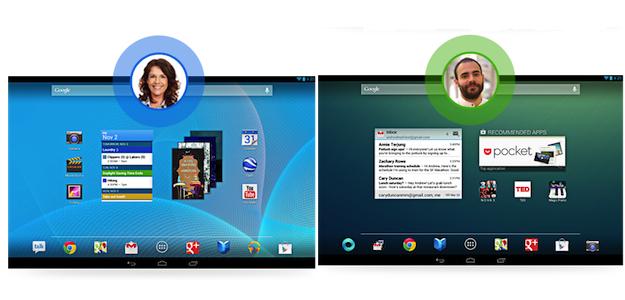
Tablets are often shared by several people, particularly by parents and their kids, so the introduction of multiple user accounts is most welcome. This feature is still a pain, as it’s hidden under Settings > Users and Other Users, but once you’re there, it’s simple to set it up. A total of eight different users can be added, and each one gets their own personal Android experience, right down to wallpaper, home screen setup, widgets, and installed apps.
Lock screen widgets
Widgets are an established part of the Android experience, so it’s great to see them extended for use on the lock screen and the home screen. There are five stock Android widgets ready to be added, including messages, Gmail, a clock, and one which provides instant access to the camera. Additionally, widgets used on the home screen now automatically resize themselves, or move other icons around, so they fit perfectly.
Version 4.2 isn’t the most extensive Android update we’ve seen, but there’s enough there to make it worthwhile, and you can find a complete rundown of its feature list here. When your phone will be graced with its presence, that’s another story entirely.


