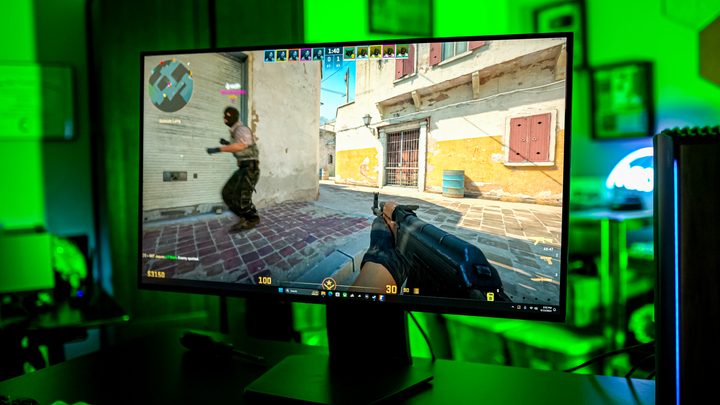
Borderless or fullscreen? It’s a question every PC gamer has run up against, either out of curiosity or from friends trying to get the best settings for their PC games. Following surface-level advice, such as what we lay out in our no-frills guide on borderless versus fullscreen gaming, will set you on the right path. Borderless is more convenient, but it might lead to a performance drop in some games. In theory, that’s all you need to know. But the question that’s plagued my existence still rings: Why?
If you dig around online, you’ll get wildly different advice about whether borderless or fullscreen is better for your performance. Some say there’s no difference. Others claim huge improvements with fullscreen mode in games like PlayerUnkown’s Battlegrounds. More still say you’ll get better performance with borderless in a game like Fallout 4. You don’t need to follow this advice, and you probably shouldn’t on a more universal basis, but why are there so many different claims about what should be one of the simplest settings in a graphics menu?
I wanted to find out, and I sure tried. What started as a data-driven dissection of borderless and fullscreen gaming, however, quickly turned into a research project about how images show up on your screen. This isn’t a debate or even a topic worth discussing in 2024 if you proverbially (or literally) touch grass, but if you’ll pull your shades shut for a few minutes, I’ll guide you down a dense, extremely nerdy path of how games show up on your screen.
Showing my work

I tried testing games. I really did. My original plan for this article was to run through as many modern games as I could -that were released in the last five years and benchmark them in fullscreen mode and borderless mode. I ran five passes of each game for each display mode, hoping to get an average that would show even minor performance differences. They just weren’t there.
You can see the handful of games I made it through above. I planned to test far more, but run after run, game after game, I kept seeing the exact same results. Maybe there are a few games like PlayerUnknown’s Battlegrounds and Fallout 4 where there’s a difference, but if I wasn’t able to even stumble upon a minor difference in big games like Horizon Zero Dawn and Red Dead Redemption 2, it’s hard to say there’s a consistent trend.
The only exception was Hitman 3. It’s not a massive difference, but it is a measurable one. Hitman 3 is an oddity in the games I tested — I also did one run each on Black Myth: Wukong and Returnal without any difference in performance — but that’s not just because there’s a performance difference. Unlike the other games I tested, Hitman 3 doesn’t have a borderless option. Instead, it has a fullscreen option and an exclusive fullscreen option.
That difference in nomenclature means a lot, and it’s something most games don’t pay attention to.
What fullscreen means

You probably don’t know what “fullscreen” actually means in your games. I can say that with confidence, too, because there’s a good chance that the game itself isn’t clear about what fullscreen means. In years past, the fullscreen setting would refer to exclusive fullscreen. That means the display adapter — your graphics card — has full control of the display. If you boot up an older game and switch to fullscreen mode, you’ll see your screen go blank for a few seconds. That’s your graphics card taking over.
If you’re not running an exclusive fullscreen application, your display is controlled by the Desktop Window Manager, or DWM, in Windows. It was first introduced in Windows Vista as a way to enable the Aero features in that operating system. It’s a desktop composition service, where the entire screen is rendered (or drawn) to a place in memory before being displayed onscreen. Previously, windows would draw directly to the display.
The traditional wisdom around fullscreen and borderless gaming comes back to DWM. The idea is that, in borderless mode, you’ll have to spend some amount of resources on DWM, even if the game is taking up your full display. To ensure the best performance, you’d want to run in fullscreen mode, bypassing DWM entirely and any potential performance loss it could bring.

There are two issues with this wisdom in 2024. First is that games aren’t consistent about what fullscreen and borderless actually mean. Games like Horizon Zero Dawn, for example, don’t use an exclusive fullscreen mode, despite offering both borderless and fullscreen options. And newer games, such as Black Myth: Wukong, don’t have a fullscreen option at all. There’s a reason Hitman 3 showed a performance difference — it has an exclusive fullscreen mode.
The second issue is more involved, and it has to do with how images actually show up on your display. DWM could represent a performance loss in years past, but today, it’s a little smarter than that.
Flipping frames
With the release of Windows 8, Microsoft introduced the DXGI flip presentation model. DXGI is the DirectX Graphics Infrastructure, and it’s one component in a long stack of middleware between your game and your graphics card. The flip presentation model, according to Microsoft’s own documentation, “reduces the system resource load and increases performance.” The idea is to “flip” a rendered frame onto the screen rather than copying it from a place in memory.
Let’s back up for a moment. In graphics rendering, there’s something known as the swap chain. Graphics are rendered in a back buffer, and then that buffer is flipped onto the display. Imagine a pad of sticky notes. There’s an image being drawn on the sticky note beneath the top one. Once it’s done, the front note will flip out of the way, displaying what’s underneath. That’s how a swap chain works.
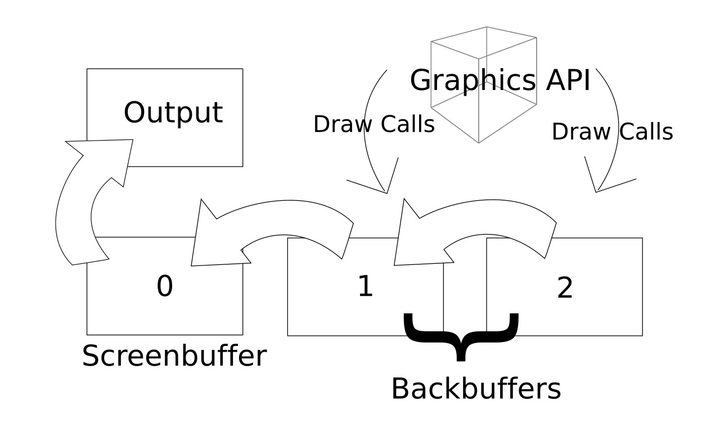
It can flip instantly, too. When your graphics card is displaying a frame, it’s showing what’s known as the front buffer. This image has a pointer attached to it. The back buffer is being drawn off screen. When the frame is ready, all that’s required is a pointer change. Instead of pointing at the front buffer, we’re pointing at the back buffer, which in turn becomes the new front buffer. The old front buffer (now the back buffer) is used to render the next frame, and back and forth they go. You can have a more involved series of these buffers, but that’s how the swap chain works at a high level.
It’s important to understand what a flip means because it’s the critical change that Windows 8 made for rendering borderless games. Prior to the flip presentation model, DWM would use a bit-block transfer. This required copying the back buffer over to DWM where it would then be composed onscreen. The flip model allows DWM to see a pointer to a frame. When the next frame needs to be composed, all that’s required is a pointer change, just like the swap chain. You avoid a read and write operation.
This change has shifted how games actually work within Windows. Now, most games, even when running in fullscreen mode, will still be composed with DWM. It enables you to quickly Alt+Tab out of games, and ensures overlays work properly. Particularly for older games, you’ll see some advice to “disable fullscreen optimizations,” which is built into Windows to give the graphics card full control over the display if any issues arise.
Settling a debate that doesn’t matter
Before the flip presentation model, there was an argument that exclusive fullscreen was the way to go for the best performance, even if that performance advantage was small. Today, it really doesn’t matter. It’s possible you’ll run into a particular game — especially if it’s older — where there’s a performance difference. Or, you may need to disable fullscreen optimizations to fix performance issues depending on your configuration. But when it comes down to if you should choose borderless or fullscreen, you can choose whatever your heart desires.
Maybe that should be a disappointing answer given the rabbit hole this topic sent me down, but it really isn’t. It adds nuance to the discussion, and it fills in the gaps left by decades of forum posts dancing around the borderless debate without ever nailing it on the head. If nothing else, now I can just stick with borderless mode without ever wondering if I’m leaving performance on the table.