  1. Home
  2. Computing
  3. News

WhatsApp Web finally lets your laptop handle calls instead of forcing you back to your phone

Other new features include Waiting Room, QuickHD, and background Noise Suppression.

Add as a preferred source on Google
Adult, Female, Person
WhatsApp

I’ve lost count of how many times I’ve had to awkwardly grab my phone mid-task just to take a WhatsApp call my laptop couldn’t handle on the web version. Today’s update changes that for good.

So what’s actually rolling out today?

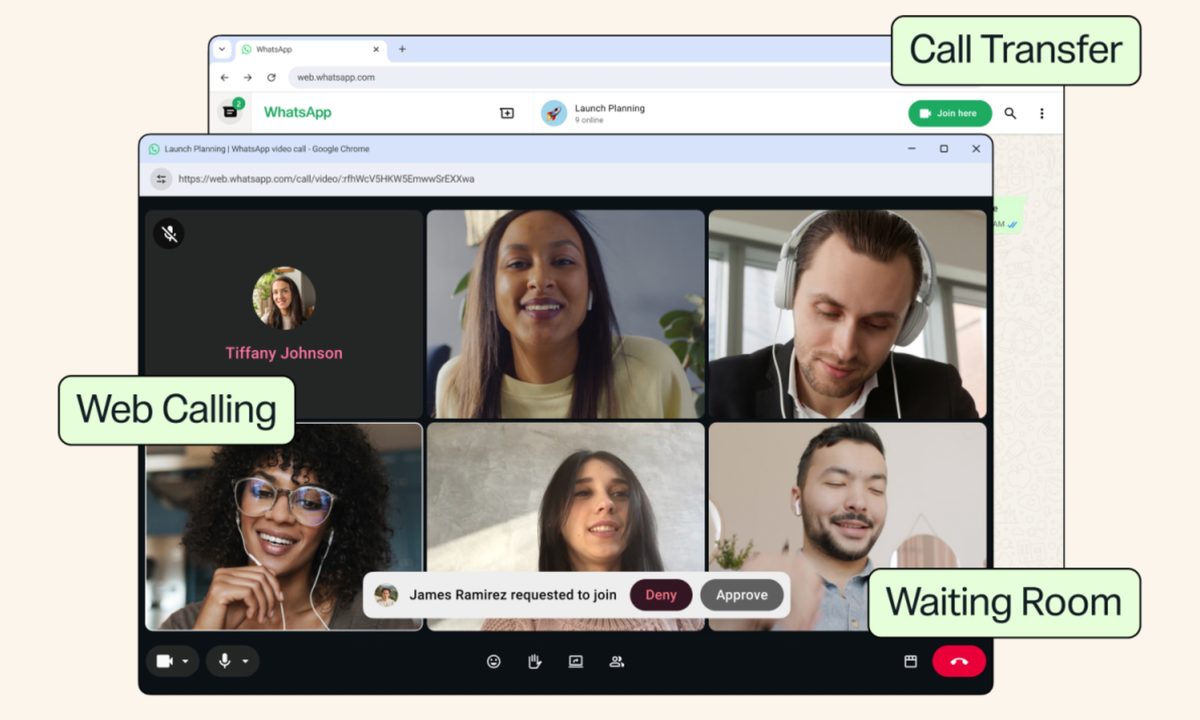
WhatsApp Web is getting voice and video calling, covering both one-on-one and group calls with zero app downloads required (which was the case previously). It’s been in testing for months. The feature extended to group chats back in June. Now it’s rolling out broadly to reach every user. 

We’re introducing new features that make @WhatsApp calls even easier, like calling from WhatsApp Web, call transfer, background noise suppression, and more. https://t.co/4HKD5xjxZb

— Meta Newsroom (@MetaNewsroom) July 28, 2026

Once it hits your account, web calls bring screen sharing, reactions, and a dedicated Calls tab pulling in your full call history and favorites, matching what you already get on mobile. 

Recommended Videos

Every call stays end-to-end encrypted too, with no time limits and no cost, exactly like WhatsApp everywhere else.

What about the extra features WhatsApp mentioned?

Call Transfer is the standout here. It lets you move an active call between your phone and the web or desktop app without hanging up or rejoining. The feature could come in handy if you start a call on the go. Once you’re home, you can switch to a bigger screen.

Waiting Room gives hosts control over who joins a call link, holding participants until approval before letting them in. Another new feature, QuickHD, speeds up how fast video reaches full HD at the start of a call. 

Then there’s a new Noise Suppression toggle that strips out background noise so your voice comes through clearly. All the new additions build on recent additions like Voice Isolation and Wide Spectrum audio controls on iPhone

To me, it looks like WhatsApp is finally treating call quality as a real priority. With Zoom and Google Meet long comfortable in browsers, WhatsApp closing this gap feels overdue more than groundbreaking, but it’s a welcome one regardless.


Shikhar Mehrotra
For more than five years, Shikhar has consistently simplified developments in the field of consumer tech and presented them…
Google gives Gemini Live its own Deep Research upgrade
Researching complex topics on the move just got a lot easier for Gemini Live users
Gemini Live on a phone atop a keyboard.

Google is giving Gemini Live a pretty meaningful upgrade with the addition of Deep Research. The feature is rolling out today to all Gemini app users, letting you start a full research task through a voice conversation and come back to the finished report later.

Deep Research has already been available inside Gemini for some time. Instead of giving you a quick chatbot answer, Gemini can dig through multiple sources, follow useful leads, and put together a much more detailed report with citations. The process can take several minutes, but you don’t have to keep Gemini open while it works. Once the research is finished, you’ll receive a notification.

Read more
Meta’s AI assistant finally lands on Mac, but it has some catching up to do
The new desktop assistant can analyze what's visible on screen and accept voice input across macOS.
Meta AI App on macOS Featured with logo

Meta has finally brought its Meta AI assistant to the Mac with a dedicated desktop app, giving users another AI chatbot to keep open alongside all those other tabs. The app can analyze a shared window, answer questions about what's on screen, generate content, and accept voice dictation across macOS.

Meta AI can actually see what's on screen

Read more
Avec’s new AI feature makes sure you never miss a deadline again
One swipe is all it takes for Avec to remember your email deadlines now
avec-email-app-never-forget-anything-feature

We have all been there. A deadline gets buried somewhere in a long email thread, life gets busy, and suddenly you are apologizing for a missed follow-up you completely forgot about. Avec, the AI powered email app built around swipe gestures and voice dictation, just rolled out a fix for this problem, and it might be the app's smartest addition yet.

https://twitter.com/jnnnthnn/status/2090104762251497908?s=46

Read more