

I could make a solid argument for calling the RTX 5090 one of the best graphics cards based on looks alone. Nvidia has seriously stepped-up its design game over the past handful of generations, but the latest two-slot flagship might be the most stunning design Nvidia has created to date.
It’s an almost perfect marriage of form and function, all executed to near perfection rather than strapping a chunky cooler on the PCB and calling it a day. It’s only near perfect, though. For as gorgeous as the RTX 5090 Founder’s Edition is, it has one annoying change that’s made it a pain to integrate into my PC.
This is just a first look at the design of the RTX 5090. If you want to see how the card performs — and if you should buy it — make sure to read my full RTX 5090 review.
One little problem
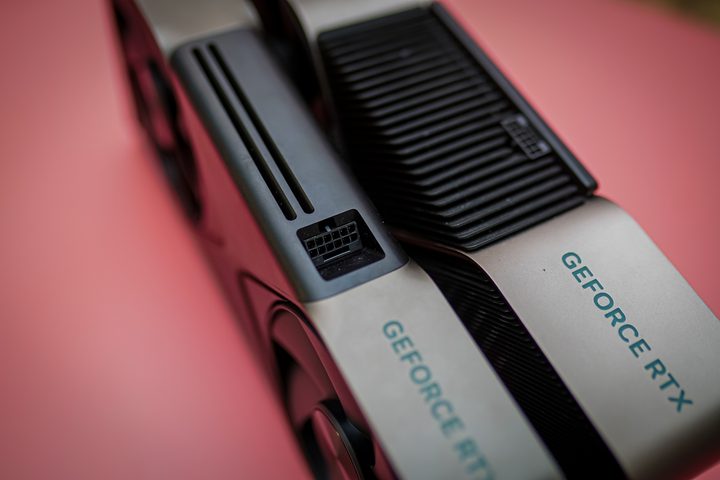
There it is — the infamous 16-pin power connector that Nvidia has championed since its RTX 30-series GPUs. Here, on the RTX 5090, you can see the problem. The connection is angled. Maybe you see that as a good thing. After all, cable bulk was a problem on RTX 40-series GPUs, and it’s hard to forget about melting RTX 4090 connectors.
The new angled connector is a bit more elegant, covering up a bit of the chunky 16-pin connector and angling the cable out and away from the GPU. It certainly helps with Nvidia’s new 16-pin to 4×8-pin cable that’s included with the Founder’s Edition model, which now includes a lightweight braid to leave the cable malleable.
So, why am I complaining? With all RTX 40-series GPUs, not just the Founder’s Edition, you got a straight 16-pin connector. With the previous generation, Nvidia used an angled 12-pin connector on the RTX 3090 Founder’s Edition, though third parties were free to change the placement if they wanted. As Nvidia has gotten PC gamers on-board with a new power connector, they’ve had to adapt their builds accordingly. And now, going back to an angled connector, that work is undone.
Let me provide an example. I use a Fractal Terra case. It’s a small form factor, mini-ITX PC, and considering the RTX 5090 Founder’s Edition is certified with Nvidia’s small form factor program, it seemed like a match made in heaven. But there’s the power connector to contend with.
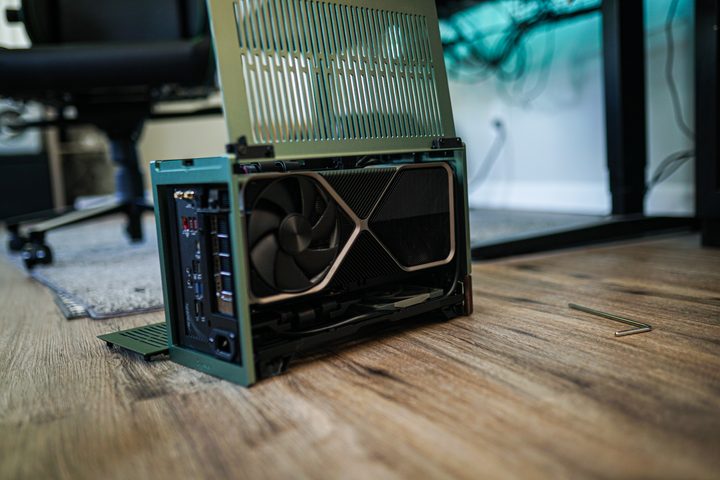
Given that the RTX 4090 had a flat connector, I specifically bought an SFX power supply with a right-angled 16-pin connector. That cable no longer works; the recessed, angled port on the RTX 5090 Founder’s Edition blocks the cable from fully connecting. And in a small form factor build like this, I don’t have room for four 8-pin connectors and an adapter.
My story isn’t exactly unique, either. Given the flat connector on the RTX 4090, and the risk of potentially burning up the GPU, a small industry of right-angle 16-pin connectors sprung up. You had adapters from CableMod, too many unbranded cables on Amazon to count, and PSU brands like Cooler Master angling toward a right-angle future.
It’s not the end of the world. 16-pin connectors should be universal — please check your PSU before plugging anything in, though — and the worst thing that happens is that you need a new cable. It’s just a shame that so many products were launched to combat a bad design, and now that Nvidia has fixed the design, those products aren’t needed. If nothing else, Nvidia says that the new power connector won’t burn up.
Still a stunner

Thankfully, that’s my only criticism of the RTX 5090 externally. The graphics card is a beast, but it’s clearly a tame one. At only two slots, it’s shocking how thin the card is compared to the RTX 4090 and RTX 4080, especially considering the power Nvidia claims the GPU has.
It’s somewhat of an engineering marvel, which became abundantly clear with the breakdown Nvidia recently did with Gamer’s Nexus. The RTX 5090 is split into three separate PCBs, each connected with a ribbon cable, in order to provide clear airflow through both sides of the graphics card.
It doesn’t really seem like a big innovation until you stop to think about air typically moves through a GPU. It’s forced out of the sides or the back, or maybe the heat sink if just big enough that you hope the heat works its way out. Nvidia is doing a true flow-through design here; the fans bring cool air in and pass them over a heatsink, and that air can flow out of the back without any restrictions.
This design, presumably, is a big reason why Nvidia was able to shrink the size of the RTX 5090. I can’t share any performance details yet, but the fact that Nvidia went with a two-slot design on a GPU that’s rated to draw up to 575 watts speaks volumes on its own.
Although the outside of the card looks largely unchanged, Nvidia did make some subtle adjustments. For instance, the edges of the card are now curved in, while on previous Founder’s Edition designs, they were flared out. It’s a small change, but it makes the RTX 5090 feel more manageable compared to the strict rectangle previous Founder’s Edition designs maintained.


