  1. Home
  2. Computing
  3. Emerging Tech
  4. Photography
  5. Legacy Archives

Fujitsu makes paper interactive with touchscreen interface

Add as a preferred source on Google
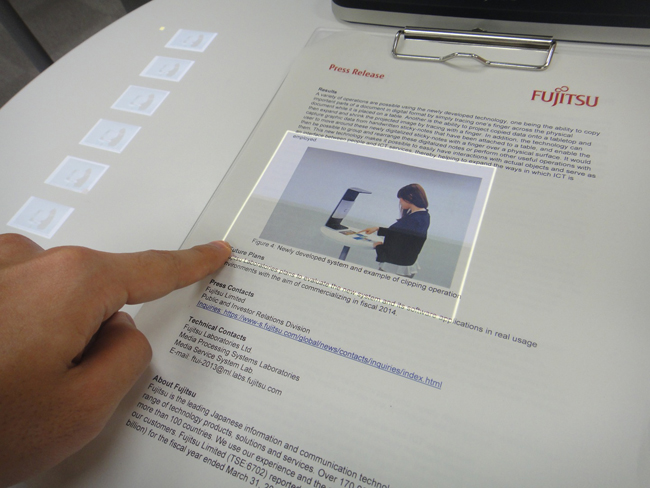
Fujitsu touchscreen interface for paper
Image used with permission by copyright holder

After showing off its high-tech walking cane and invisible tablet keyboard at Mobile World Congress in February, Fujitsu Laboratories is back with even more tech-wizardry up its magical sleeves. This time, the Japanese company is demoing gear that brings touch and gesture controls to physical things like paper and 3D objects.

Think of this technology as something that gives you the ability to overlay anything in the real world with a touchscreen, so you can manipulate any object the same way you would on your touch-based device with your fingers. That’s probably why the Japanese company has dubbed this technology “touchscreen interface.”

Recommended Videos

Using a low-resolution webcam (just 320 x 180 pixel resolution) and a commercial projector, the Japanese company is able to project an interface onto a surface, and then use the camera to track both the shape of the item as well as your fingers to determine what to do. For example, in the video demo from DigInfoNews, the Fujitsu rep is able to digitally crop out just the photo on the printed piece of paper by sliding the sheet under the device, and using only his finger to manipulate the interface projected onto the paper.
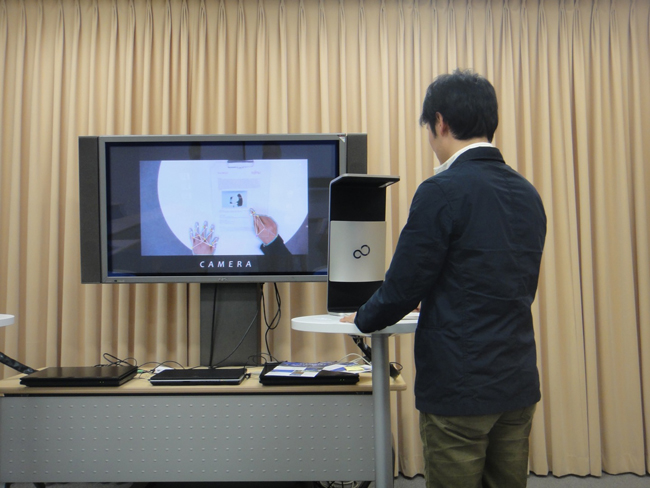
Fujitsu touchscreen interface_demo
Image used with permission by copyright holder

Unlike the current crop of gadgets like Leap Motion that lets you control your computer with gestures, this touchscreen interface from Fujitsu lets you do things like spin and flip a 3D CAD drawing with your hands rather than with  your mouse. As the researcher said in the video, “[With this technology,] we’re not operating a PC, but touching actual objects directly, and combining them with ICT equipment.”

In fact, toward the end of the video demo, you can see the Fujitsu rep use his fist rather than his finger to rotate his 3D rendering. He’s able to do this because the technology is smart enough to detect objects in all their multi-dimensional glory, so the touchscreen understands gesture controls as well as to touch.

According to DigInfo, Fujitsu hopes to bring this touchscreen interface to market by 2014, but it won’t be something that consumers can buy for their homes. The Japanese company thinks the technology could make filling out forms at your local city hall more palatable. What other ways do you think you can make good use of this touchscreen interface?

[Images via DigInfoNews]

[Updated on April 15 at 6:38pm ET to embed the video demo from DigInfoNews’ YouTube channel]

Gloria Sin
Former Contributor
Gloria’s tech journey really began when she was studying user centered design in university, and developed a love for…
You’ll finally be able to try OpenAI’s GPT-5.6 Sol, Terra, and Luna models this week
The GPT-5.6 family will become publicly available on July 9, ending the restricted preview that lasted nearly two weeks.
OpenAI Sol Terra Luna featured

OpenAI is ready to expand access to its latest GPT-5.6 model family. In a recent post on X, the company confirmed that GPT-5.6 Sol, Terra, and Luna will become publicly available on Thursday, July 9. If you've been itching to try the new models since the limited preview began in late June, you won't have to wait much longer.

Why the rollout took longer than expected

Read more
A Windows 11 bug may be quietly eating hundreds of gigabytes of your storage
Windows 11’s storage-eating bug now has a fix from Microsoft
Windows 11 suffering from RAM crisis

If your Windows 11 PC suddenly looks low on storage, your downloads folder or game library may not be the problem. According to Windows Latest, a bug tied to a Windows system file can silently consume tens or even hundreds of gigabytes on the system drive.

The file in question is called CapabilityAccessManager.db-wal, and it sits inside Windows’ Capability Access Manager folder. Windows Latest says the issue may appear as unusually high “System files” usage in Windows 11’s storage breakdown, even though the Settings app does not clearly identify the exact file responsible. In some reported cases, users saw it grow to 200GB, and even more.

Read more
Your next Teams meeting could have an AI teammate that answers questions for you
Teams is getting smarter, cleaner, and quieter about it. The AI features are opt-in, the chat cleanup is automatic.
Computer, Electronics, Laptop

Microsoft Teams is getting a meaningful update that overhauls almost every part of how you use the app, from AI-assisted meetings to a cleaner chat layout. Most of the changes are already in testing, and several are scheduled to roll out before the end of the summer.

Starting with the most interesting addition: an upgraded AI Facilitator that can listen to your meeting, spot when someone seems confused, and generate a response (via Windows Report). 

Read more