

“What’s for dinner?” is a question as old as time itself – and it’s one of the most frustrating. Now, technology has an answer. A slew of Web and phone apps take into account what you have in your fridge, what you’re in the mood for, and how much time you have before answering that question. Many, also offer great grocery list features so that even when you’re at the grocery store, you’ll know that a bunch of fresh basil and take you from roast chicken breasts to Caprese salad.
Mobile apps
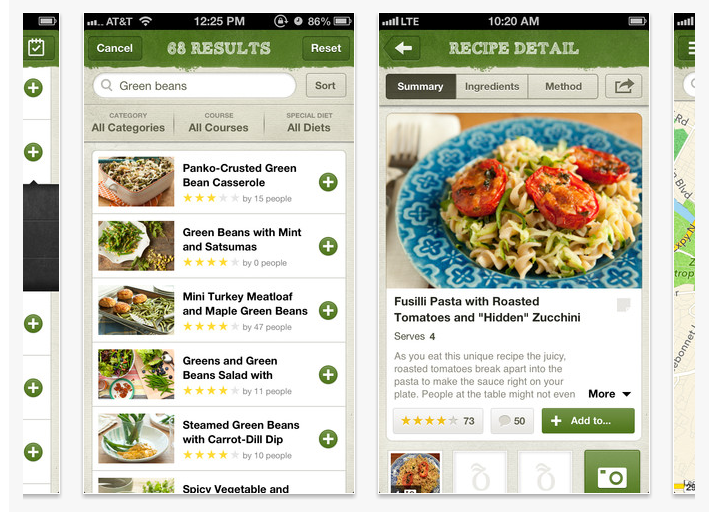
Epicurious
When it comes to well-vetted recipes, Epicurious’ free app offers the best of the best with recipes from Bon Appetit, Gourmet (R.I.P.), and star chefs from around the world. Choose from a variety of categories from “Low-Carb Mains” and “Family Reunions” to recipes based on skill levels, including “I Can Barely Cook.”
Or, start with a main ingredient, then choose a course, cuisine style, dietary restrictions, and even season or occasion. While some recipes require a well-stocked fridge and pantry, many are easy enough for a weeknight meal. But with its limited features for the pantry and fridge specifics, this is more of a “What can I make with X?” app than “What can I make with what I have?” app.

Ratio
Based on the Michael Ruhlman book Ratio: The Simples Codes Behind the Craft of Everyday Cooking, this is a great choice for the kitchen enthusiast who doesn’t need a lot of hand-holding but likes a lot of options and creativity.
The $4.99 app provides 32 ratios (sugar to fat to flour, for example) on how to make doughs, batters and sauces as well as a calculator that makes it easy to determine how much of everything you need and how many servings you’ll have based on it. But again, not for someone who’s wondering if lard would be a good fat in a cookie, at least not for most cookies.
AllRecipes.com
Much like the Epicurious app, the essential recipe features of this are: Choose a type of dish and choose a main ingredient (as well as up to seven other ones). Time is on the front page of the app as well so you can decide between a 20 minute meal or a slow-cooker set it and forget it morning.
There’s a robust grocery function as well as a recipe box to keep the fan favorites in. Dietary filters such as low sodium, low fat, no dairy, vegan, vegetarian, and no wheat are also available.
Whole Foods
Whole Foods offers a collection of 3,000 plus recipes, all of which you can filter through its “On-Hand” function (of three ingredients). The free app, though made by the notoriously pricey grocery store, even has an entire section dedicated to “Budget-Friendly” meals like Braised Chicken with Mangoes and Risotto with Asparagus which help you prepare meals within your price range and not just Gwyneth Paltrow’s.
And of course, as that it’s made by a grocery store, the grocery list apps are top notch. And for a naturally-focused store, has sections of recipes dedicated to fat free, dairy free, vegan, vegetarian, wheat free, and even raw recipes.
Cocktail Flow
And while the main course is important and all, when it comes to cocktails, Cocktail Flow takes into account your booze pantry to suggest drinks (with recipes, of course). Some of its features are a little gimmicky (like the ability to browse recipes by color) and its cocktail library not the most comprehensive nor sophisticated, it’s shopping feature which shows which ingredients you need for specific recipes and even about how much they’ll cost makes this free app a worthy addition to your Android or iPhone.
Web Apps
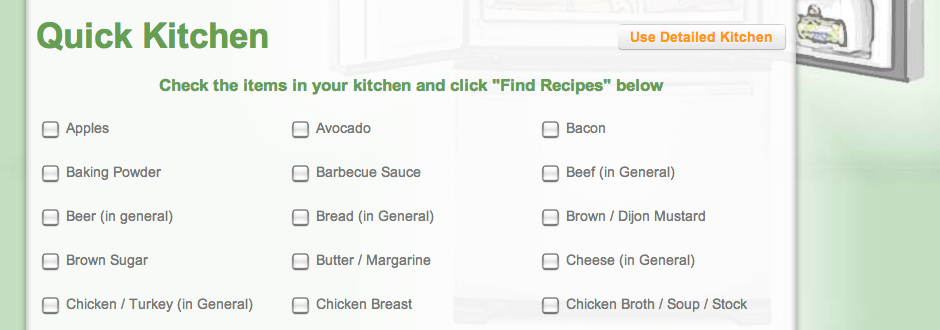
Check the boxes on what you have you in kitchen and find a list of dishes you can make. The app will let you know if you have all the ingredients needed for a dish or are a few short. And while the recipes range in how seemingly well-vetted they are (and many don’t have pictures), it’s a handy idea book.
Though, the fact that the Web app throws everything from cocktails to desserts to main courses into the same mix, makes it less efficient that it could be.

Add ingredients to the list of “My Kitchen,” save recipes, set dietary restrictions and even create shopping lists with this Web app which will present recipes from the likes of Rachel Ray Magazine and Epicurious and Martha Stewart.
While choosing based on course or meal type isn’t all laid out for you and requires a bit of browsing, with its handy login feature which allows you to save your ingredients and bring them up at a latter time, this is a go-to.
What the F*ck Should I Have For Dinner
Perhaps you want some blind inspiration – then look no further than this beyond simple Web app. It will auto-generate a random dish with its recipe, to which you can respond that you don’t eat meat, you don’t like it, or you’re thirsty and want a drink recipe. If you want to endlessly click until something sounds good – and don’t want to be swayed by beautiful photos of a meal that won’t resemble what you’re able to throw together – then check out this site. Also, if you’re a fan of cursing for no reason other than to curse, you’ll like the off-putting recipe advice.


