Sony’s not getting off the hook! Check out our post on five things we’d like to see changed on the PS4.
The Xbox One is going to change. This is a fact. So will the PlayStation 4, for that matter. Just think back to the state of the Xbox 360 when it launched, and compare that with where it ended up. Remember the awful, hideous blades user interface? And how that eventually transformed into the promise of NXE? All of those changes were implemented on a console that was designed in an era before high-speed Internet was serious enough business to allow for streaming video. The Xbox One is greeted by a very different world, and it’s been designed with flexibility in mind. What you saw on day one probably isn’t going to resemble what you’re going to see on day 365.
Once you accept that change is inevitable, you’re free to think about what should change. Which aspects of the console that aren’t as streamlined or user-friendly as they could be? We’ve been spending a lot of time with the Xbox One and we’ve come up with a few things that need to change or improve, preferably in a “sooner rather than later” sort of way. The console works and it works well, sure … but it could always work better. Here’s our feedback for Microsoft after a few weeks of intensive use. Please go ahead and share your own suggestions in the comments!
Xbox, improve Party mechanics
The Xbox 360’s party system is a thing of beauty. Up to eight people can squawk at each other in a private chat lobby, regardless of which game or app everyone is using. That aspect of Xbox parties hasn’t changed. You and up to seven friends can all gather together for headset banter, same as before. What’s odd, however, is that each participant has to manually turn on party chat upon joining the party. This just doesn’t make sense. It’s great that Microsoft carried forward the option to switch between game chat and party chat, but if you’re joining a party, you probably want to chat with the people in that party. Why create an extra step to getting there?
Xbox, make friends easier to connect with
On the Xbox 360, it was easy to see what your friends were doing. You could see who was in parties, what people were playing, you had Beacons letting you know who was up for which games, and you could get notifications whenever a friend signed on. You could also pop into any friend’s Playercard and easily invite them to a game or join whatever party they might be in. Most of these features are scaled back or flat-out removed on the Xbox One.
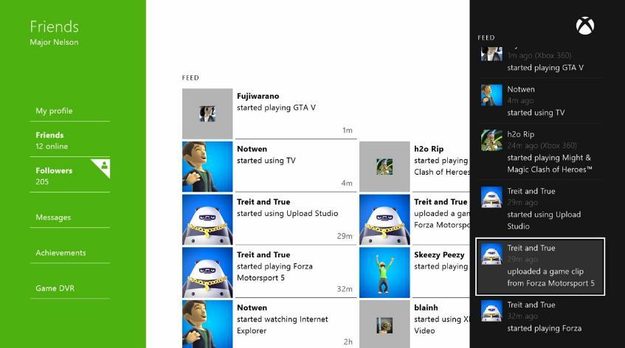
You can still see which friends are online and what they’re playing, and you can join them if they happen to be in a party (depending on privacy settings), but that’s about the extent of it. There’s no option on a friend’s Playercard for inviting them to a game or joining a session in progress, and there’s no way to see which friends are grouped up together in parties. Add to that the fact that your friends list is now a separate app, which means you need to switch away from whatever you’re doing in order to see who’s online. You can’t snap your active friends list for quick access either, only your party. We’d like to see general improvements to the way friend connections and communications work, including a more direct route to seeing who’s online and a wider range of invite/join options.
Xbox, more Kinect flexibility
This is another relatively broad category. Kinect v2.0 is a great step forward for Microsoft’s motion/voice recognition hardware, no question. Still, it’s got a range of features, including some that people might prefer not to use. The Xbox One settings menu already allows you to turn off the chat-via-Kinect feature completely, but we’d like to have more granular control over the Kinect’s functions. An option for turning off the camera, or turning off the microphones to voice commands, for example. As much as this new Kinect represents an evolutionary leap forward for gaming hardware, not every feature suits every person’s living situation.
On top of that, we also want to see a deeper vocabulary for the voice commands. Even something simple, like “Xbox, turn off,” requires very specific phrasing. “Xbox, off” won’t work, nor will “Xbox, shut down,” or any number of others. There’s just the one command for shutting your console down. There’s little question that the Kinect’s ability to recognize phrases will improve and expand over time, but as an integral aspect of dashboard navigation, it’s a change that we think should happen quickly.
Xbox, manual game invite
After revising this section a few times, it’s clear what the problem is: Smart Match is confusing. The feature is ostensibly there to perform matchmaking for you in the background, leaving you free to multitask. What you could possibly accomplish in the minute or so it takes to connect to an online game is beyond us. We’re also not entirely clear on how Smart Match works in relation to parties. It seems to associate a single party with one particular game, and then sends invites to those in the party for that game. This runs counter to the idea of cross-game play in a party.

There’s a simple solution here: manual game invites. Perhaps turn Smart Match off inside of parties? Or make it an optional feature? Whatever needs to happen behind the scenes in order to make manual game invites work, that’s the ideal approach. Smart Match needs some sprucing up too, make no mistake. The feature was supposed to include some sort of filter element that would allow a gamer to choose how to search for open lobbies, but that’s nowhere to be seen at launch. Microsoft might have it right that gamers like to multitask, but they also like transparency. It’s not easy to trust a machine to do exactly what you want it to in terms of game invites/matchmaking, especially when every party arrangement is going to have different people looking for different things. Manual invites would solve all of that.
Xbox, snap Achievements
This is among the Xbox One’s biggest backward steps. On an Xbox 360, you can hit the Guide button on your controller when you unlock an Achievement to almost immediately see what the Achievement is, what you did to get it, and how much Gamerscore you earned. You can still get all of this information on Xbox One, but the process is considerably more complex. First, you hold down the Guide button when you unlock an Achievement. Then you’re taken to the notifications page, where you can see the name of the Achievement and the Gamerscore value. Not why you got it though. To get that info, you need to select the Achievement item from the notifications menu to launch the separate Achievements app, which in turn tells you what you did to get the award. Then, finally, you select the “Play” button at the bottom of the screen to get back to your game.
Much like the changed approach to displaying your friends list, lumping all Achievements into a separate app creates too many barriers. You’ve got a half-dozen steps to get through just to see information that was previously accessible with the push of a button. What’s more, if Achievements are chronicled in a separate app, why in the world can’t you snap that app, an app that’s genuinely useful to have open next to your play? It doesn’t make sense, and it’s probably the most frequently echoed complaint that we’ve heard during the post-launch days.