
  1. Home
  2. Web
  3. Photography
  4. Legacy Archives

Google Street View explores Angkor’s 1,000-year-old temples

Add as a preferred source on Google

From student backpackers traveling on a shoestring to retirees crossing off another place on the bucket list, Angkor in Cambodia is on the itinerary of just about every keen globetrotter. And now it’s on Google Street View, too.

The historic location, famous for its prominent role in the nation’s ancient Khmer empire that once took in large parts of south-east Asia, as well as for its numerous 1,000-year-old temples, has been captured by the Street View team in more than 90,000 panoramic images, Google Maps’ Manik Gupta said in a blog post announcing the new content.
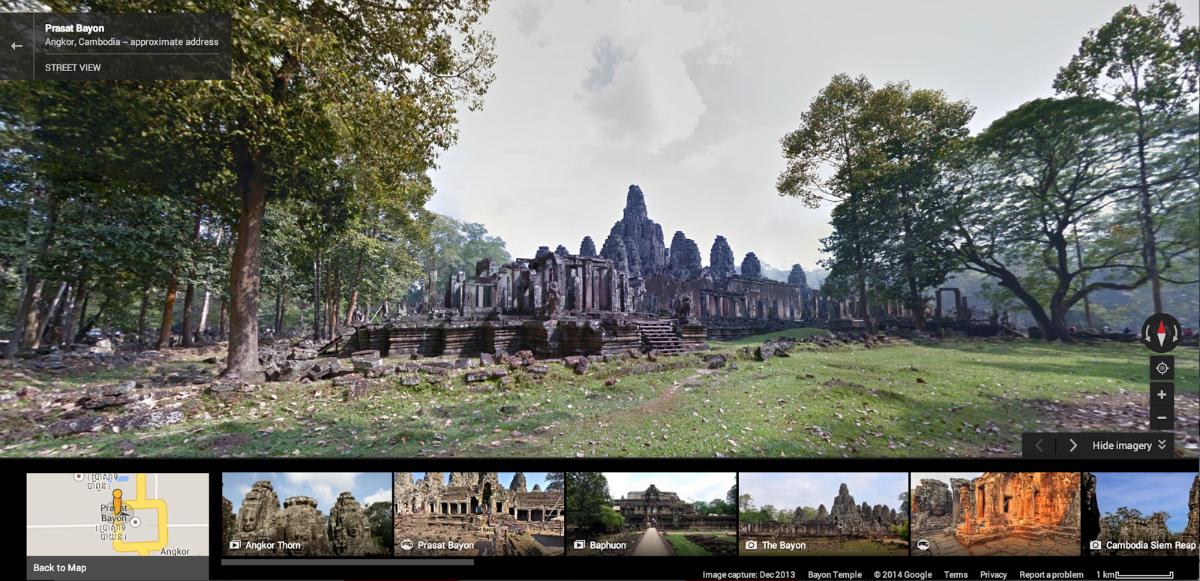
angkor on street view
Image used with permission by copyright holder

“The temples at Angkor each have a unique story – whether it’s the way they were built, the ancient Khmer cities they sit on, or the artwork they contain,” Gupta wrote in the post.

Recommended Videos

To gather the material, which includes both the exteriors and interiors of Angkor’s many historic buildings, Gupta said the team used all available equipment, including Street View cars, body-based Trekker cameras, and good old-fashioned tripods.

“Whether it’s revisiting iconic sites such as Bayon Temple in time for the Khmer New Year or studying the Ramayana’s Battle of Lanka bas-relief carvings within Angkor Wat, Street View can help you more easily explore Angkor’s rich heritage,” Gupta wrote.

And once you’re done exploring the temples and surrounding area of this unique UNESCO World Heritage site, you can find out more about Angkor’s historical and artistic heritage by visiting the Google Cultural Institute, online of course, here. The bundle of material includes everything from images of 12th-century sculptures and mid-20th-century photography to modern-day renderings of medieval Angkor life, all of which offers an insight into Khmer culture through the ages.

Google’s Street View team has been rolling out a ton of new content for armchair explorers in the last couple of years, with recent additions including a gondola ride through the waterways of Venice, a stroll around the Galapagos Islands, a rafting trip through the Grand Canyon, and a visit to a Lamborghini museum in Milan. Last month the team even went polar bear spotting in Manitoba.

[Top image: Matt Ragen / Shutterstock]

Trevor Mogg
Contributing Editor
Not so many moons ago, Trevor moved from one tea-loving island nation that drives on the left (Britain) to another (Japan)…
The best free VPNs for 2026
The best free VPNs still come with compromises, but a few offer enough privacy and flexibility to be genuinely useful.
Proton VPN UI

A virtual private network (VPN) encrypts your internet traffic and routes it through a server run by the VPN provider. Websites see the VPN server’s IP address instead of yours, and you can get around geo-blocks, censorship, and ISP throttling. The best VPN services are paid, but there are still a handful of free options that do the job well. 

Most free VPNs come with a hidden cost, because running servers isn’t cheap and a company that doesn’t charge you has to make its money somewhere else. Many do so by logging your browsing activity and selling it to advertisers, while others flood you with ads and track you across apps. 

Read more
How to clear your browser cache in Chrome, Edge, Firefox, Safari, or Opera
A cluttered cache can slow you down and break websites, so here's how to clear it in every major browser in just a few seconds.
How to delete browser cache

A stocked computer cache may be convenient for logging into and out of go-to sites in seconds flat, but a major buildup of these tracking codes could significantly impact your PC’s performance. If you’ve noticed that your PC has been running rather slow of late, or you’re using a new browser and don’t know how to clear its cache, we’ve got you covered with the following guide.

Read more
How to find archived emails in Gmail and return them to your inbox
Archived emails in Gmail are easier to find than you think—once you know where Google hides them
Gmail icon on a screen.

If you’re looking to clean up your Gmail inbox, but you don’t want to delete anything permanently, then choosing the archive option is your best bet. Whenever you archive an email, it is removed from your inbox folder while still remaining accessible. Here’s how to access any emails you have archived previously, as well as how to move such messages back to your regular inbox for fast access.

Read more