
  1. Home
  2. Computing
  3. Gaming
  4. Web
  5. Legacy Archives

How to make a Skype group video call for free

Add as a preferred source on Google

If you routinely participate in group calls on Skype with friends, co-workers, and/or family, you know how frustrating it can be to have to rely on audio and hope that everyone pays attention and stays on the same page. Fortunately, if you’re a Windows, Mac, or Xbox One-based Skype user, these frustrations are now a thing of the past. Microsoft announced that group video calls would be free for users of these three platforms starting today.

Though you may not be familiar with the feature if you’ve never been subscribed to the Premium version of Skype, luckily, it’s easy to pull off a group video call. We’ll show you how below.

Recommended Videos

How to make a Skype group video call for free

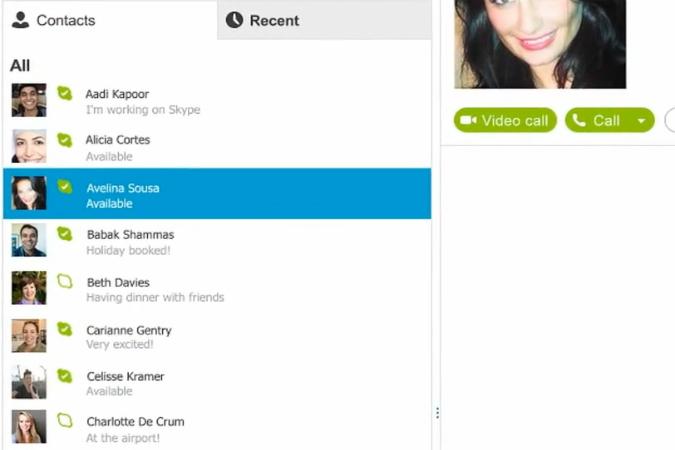
1. Once Skype is open, select one of the people that you want to add to a group call.
skype how to 1
Image used with permission by copyright holder

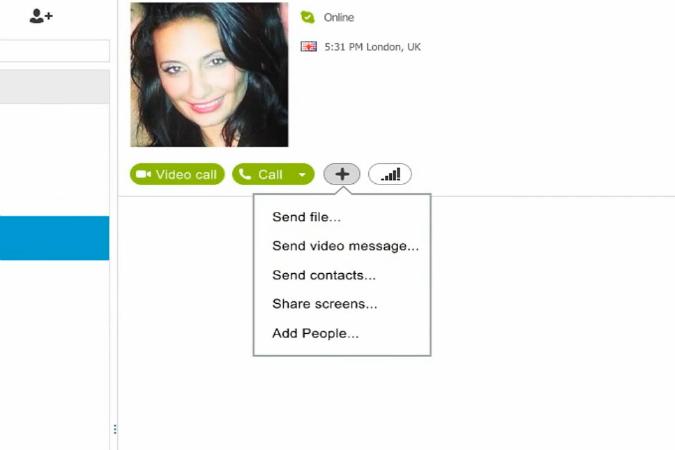
 2. Then, click the + or Plus menu to the right of your friend’s list, and click “Add People….”
skype how to 2
Image used with permission by copyright holder

3. From there, a new window will open up, allowing you to choose the other people that you want to include on this call. Click the people you want to add under the list labeled “Choose contacts,” then click “Select” to add them. 

skype how to 3
Image used with permission by copyright holder

In order to remove anyone from the call, select them from the list labeled “People in this group” located on the right side of the window, and click “Remove” below. You can also add someone to the call by typing in their phone number in the field below the “Select” button that’s under “Choose contacts.” Once you’re done, click “Add” on the bottom right corner of the window.

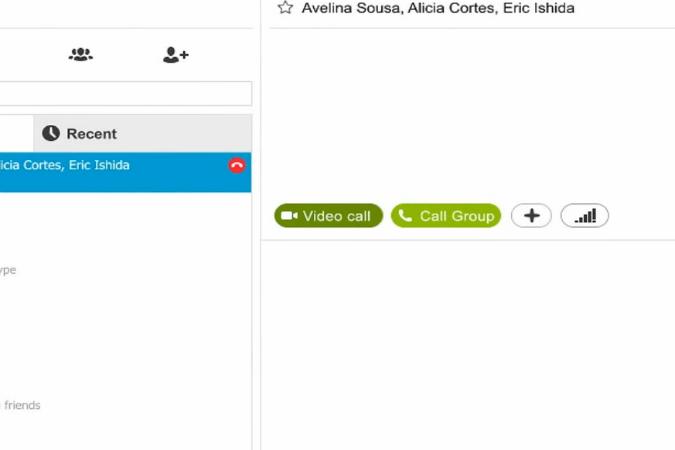
4. Now, all you need to do is hit “Video call,” which is located between the top of your Contacts list and the “Call Group” button.
skype how to 4
Image used with permission by copyright holder

From here, it’ll be up to the people in your group to pick up once they get the call on their end.

Alternatively, you can check out the clip below, which also demonstrates how to make group video calls in Skype. The clip is courtesy of Microsoft and YouTube.

Konrad Krawczyk
Former Computing Editor
Konrad covers desktops, laptops, tablets, sports tech and subjects in between for Digital Trends. Prior to joining DT, he…
You can now check if a Google ad was made using AI
Google will auto-label its own AI ads, but third-party AI ads still rely on advertisers to come clean.
google-ads-ai-label

Ever looked at an ad and wondered if a real person made it or if it was AI generated in seconds? Google is now giving you a way to find out.

The company just announced a new AI transparency label that tells you whether an ad was created or edited using generative AI tools. The label lives inside Google's My Ad Center, and it is rolling out across Google Search, YouTube, and Discover globally.

Read more
Outlook will soon warn you before you answer an outdated email
Microsoft is bringing reply alerts, rule-based templates, and improved categories to Outlook
Computer, Electronics, Laptop

Microsoft has recently been cleaning up some longstanding Windows 11 pain points, including parts of the Start menu and Search. According to a new report from Windows Latest, the company is also preparing several useful changes for the new Outlook app on Windows 10 and Windows 11, which became generally available in 2024.

Microsoft is adding a warning for users who start replying to an older email after a newer response has arrived in the same conversation. The alert is meant to stop people from replying without seeing the latest information in the thread.

Read more
Google just changed how it grades the AI models you use for Android coding
Android Bench has a new testing framework and eight new models, so the rankings you remember are now out of date.
Android Bench featured.

Google just changed how it measures which AI models are best at writing Android app code, and the update has shuffled the rankings developers use to pick their tools. The company's Android Bench leaderboard, which launched in March, now runs on a new testing system called Harbor. Google says this replaces the older, more generic testing tool it used before, and gives a better read on how models perform on real Android tasks, like updating old code to Jetpack Compose or handling wearable device networking.

New models shake up the top of the list

Read more