  1. Home
  2. Phones
  3. News

Google Maps is finally escaping its battery hog roots, but you must pay dearly for it

Its new Power Saving mode can help extend battery life during navigation, but only if you own a Pixel 10 series device.

Add as a preferred source on Google
Google Maps running on a Pixel 8 Pro, showing the new colors as of November 2023.
Joe Maring / Digital Trends

What’s happened? Google Maps just received a new Power Saving mode with the November 2025 Pixel Drop that reduces battery drain during navigation. However, most Android users won’t benefit from it, as the feature is exclusive to Google’s latest flagships.

  • The Power Saving mode simplifies the map view into a black-and-white, minimal layout that displays only the essentials and uses the Always-On Display (AOD) capability to minimize power consumption.
  • Google claims that it can extend battery life by up to four hours, which can make a noticeable difference during long drives or when you’re low on charge.
  • But unlike some of the other features included in the November Pixel Drop, Maps’ Power Saving mode is limited to the Pixel 10 series.

Why is this important? Navigation is one of the most battery-intensive tasks on a smartphone. By switching to the AOD and simplifying the map layout to show only the essentials, Google Maps’ Power Saving mode should significantly cut down battery drain.

  • Unfortunately, Google’s decision to limit it to the Pixel 10 series means most Android users won’t reap the benefits of this improvement.
  • Additionally, a support page for the feature notes that it’s only available in driving mode and doesn’t support navigation while walking or biking. Since most cars these days feature USB ports for charging, the feature may not be all that useful even for those who spend hours driving with Maps navigation on.
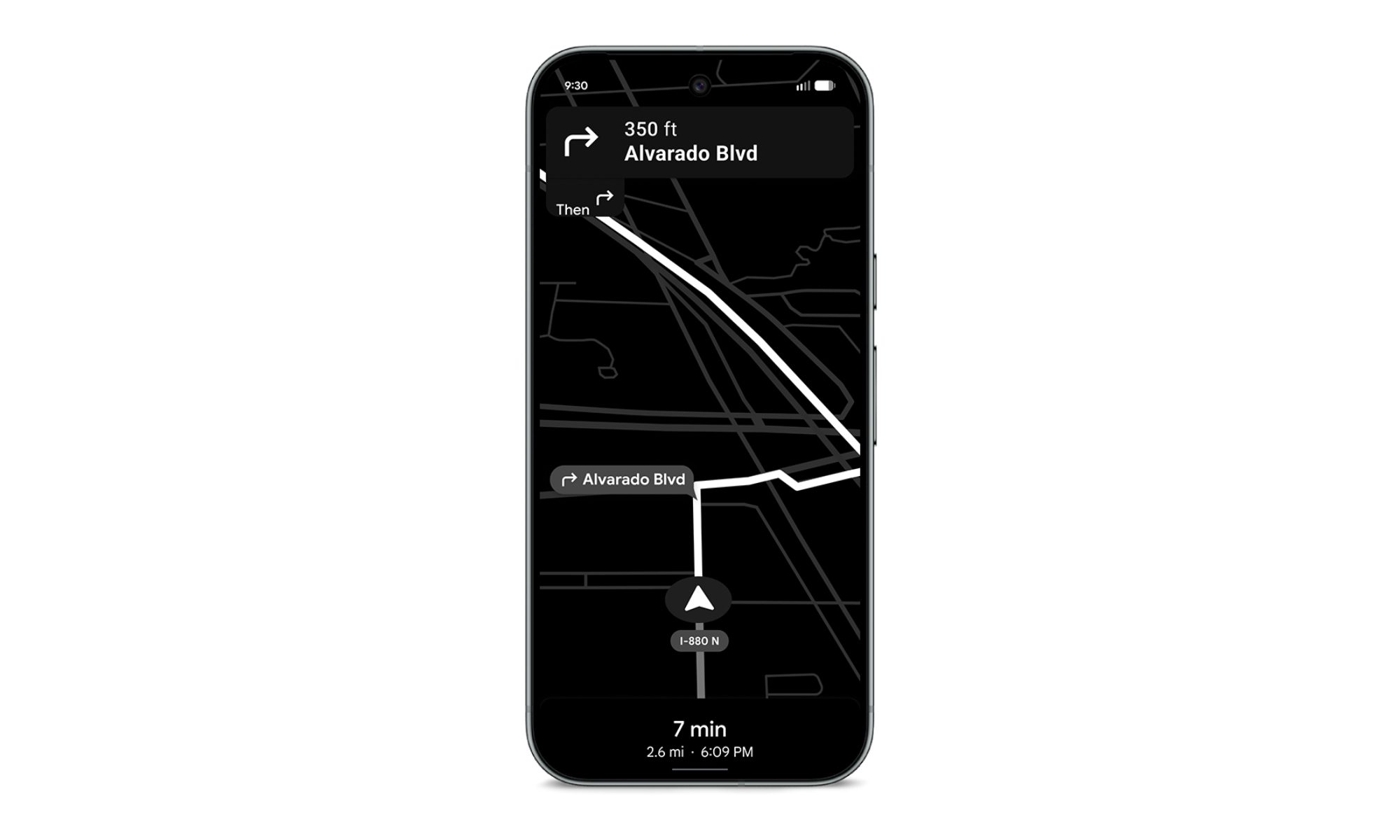
Why should I care? If you own a Pixel 10 series device, you can enable Power Saving mode by pressing the power button after starting navigation. It will help your phone last longer during long trips or when you forget to bring a charger.

  • The minimal black-and-white interface will also make it easier for you to focus on driving directions.
  • But if you don’t own a Pixel 10 series phone or often navigate while walking or cycling, you’ll have to wait for Google to expand availability and add support for more travel modes.
Recommended Videos

What’s next? Google Maps’ Power Saving mode is rolling out to Pixel 10 models with the November 2025 Pixel Drop, and it’s enabled by default. You can try it out by pressing the power button after starting navigation. To exit the mode, simply tap the screen or press the power button again. And if you don’t want to use it, you can disable it entirely by heading to the Driving options in Navigation settings.

Pranob Mehrotra
Pranob is a seasoned tech journalist with over eight years of experience covering consumer technology. His work has been…
Meta just launched a vibe-coding app for games, and it’s called Pocket
The new AI-powered app lets users create, play, and share mini-games using natural language.
Pocket by Meta featured image

If "vibe coding" wasn't already everywhere, Meta is making sure it is now. The company has quietly launched Pocket, a new AI-powered app that lets users generate, play, and share interactive mini-games simply by typing what they want. No game engine, no programming language, and definitely no debugging at 2 a.m. Just prompts.

Turn prompts into playable games

Read more
OPPO’s Bubble made me wish magnetic accessories were this fun
This magnetic OPPO accessory is more useful than it looks
Oppo Bubble Featured

Some smartphone accessories, like power banks, are quite useful, while others are cute for about five minutes before the novelty wears off. The Oppo Bubble looked like it was going to be part of that latter, but I had too much fun with it, and now I want more accessories to be this way. One that doesn't take itself too seriously, without missing out on some well-thought-out functionality.

I used it with the Oppo Reno 16 Pro, which already has one of the flashier phone designs I have seen this year. The Pop White version has Oppo’s 3D Pop Planet look on the back, giving it this floating, toy-like visual effect. Snap the Bubble onto the rear, and it's all iced out.

Read more
The Galaxy Z Fold 8 Wide could fix the Fold’s biggest problem, if these leaks are right
Electronics, Phone, Mobile Phone

The Samsung Galaxy Z Fold 8 Wide just leaked again, and this time the biggest takeaway isn't the cameras or the color — it's the shape. Two fresh leaks are painting a clearer picture of Samsung's next book-style foldable, suggesting the company may finally be addressing one of the Galaxy Z Fold lineup's longest-running complaints.

Sometimes wider really is better

Read more