  1. Home
  2. Phones
  3. News

WhatsApp on iPhone is about to get a game-changing update

A welcome update for side-hustles, work chats and dual-SIM users.

Add as a preferred source on Google
Whatsapp on iPhone
Dimitri Karastelev / Unsplash

What’s happened? The long-teased feature of managing more than one WhatsApp account on an iPhone is now showing up in beta builds. Earlier this year, expectations were set when code hints and leaks suggested multi-account support would come. Now, as reported by WABetaInfo, with the latest beta for iOS version 25.34.10.72 via TestFlight, the feature is actively rolling out to select users.

  • A new “Account List” section appears in the app’s Settings menu, letting testers add a second account.
  • The beta supports up to two accounts on one device, each with its own chat history, backup config, and notifications.
  • Users can link an existing WhatsApp number, a brand-new number, or a companion account via QR code scanning.
  • The feature is currently limited to select beta testers, with wider rollout timing yet to be announced.

Here’s what it looks like in action:
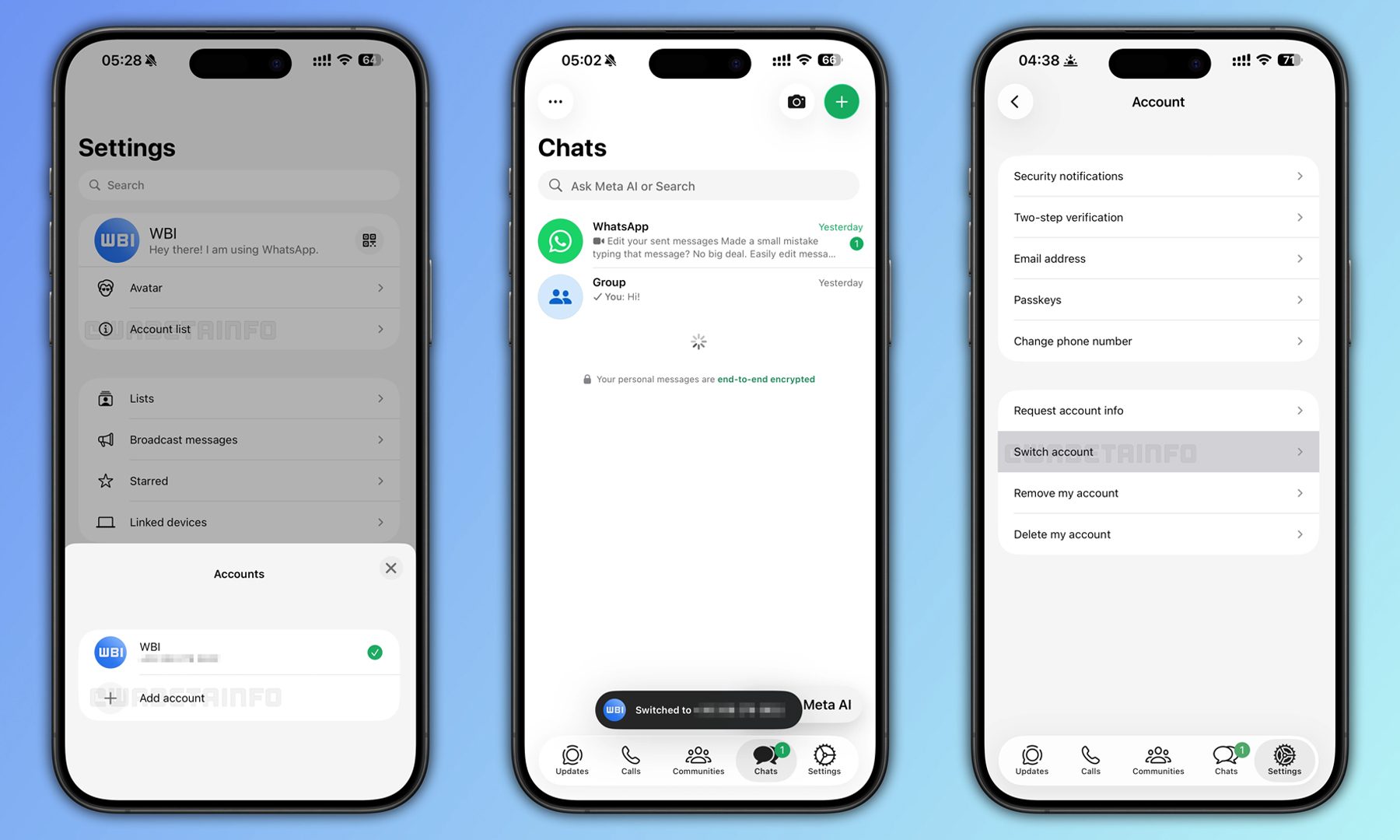
Why this is important: For many iPhone users managing personal and business lives (or juggling two numbers), having to log in and out or use separate apps made things awkward. This update brings iOS up to speed with Android and streamlines the experience, making WhatsApp a more flexible tool.

  • It gives users a single app instead of needing a separate business version or a workaround for dual-SIM setups.
  • It ensures separate data spaces: chats, backups, and preferences are isolated for each account.
  • It hints at WhatsApp’s evolving role: no longer just a one-number messenger but a multi-profile communications hub.
  • For enterprises and heavy users, switching between profiles becomes less disruptive and more seamless.
Why should I care? If you use WhatsApp on an iPhone, especially if you handle work + personal life, side projects, or dual-SIM numbers, this feature could change how you use the app and device. It’s a practical upgrade with real everyday impact.

  • You’ll be able to switch between two numbers quickly without logging out or reinstalling apps.
  • You can maintain privacy and separation: one account for work, one for personal chats, each with its own settings and notifications.
  • You may not need to carry two phones or rely on older, clunky solutions to manage multiple numbers.
  • If you’re planning devices or workflows, this could influence your decision, e.g., keeping one phone and one app but still handling two identities.
Recommended Videos

Okay, so what’s next? We’re now waiting for WhatsApp to share when this feature will roll out to everyone, along with details like how many accounts you can add and whether there will be any limits. The company may also improve companion-device support and notifications to make switching even smoother. If testing goes well, multi-account support should arrive in a future stable update, so iPhone users should keep an eye out for new versions. And if you’re already on the TestFlight beta and use more than one number, it’s worth trying now — the convenience upgrade is right around the corner.

Varun Mirchandani
Varun is an experienced technology journalist and editor with over eight years in consumer tech media. His work spans…
Setting up your dorm desk? These are the phone stands I’d actually spend my money on
From a $2 folding stand to a three-in-one Apple charging dock, these are the phone stands worth setting up this semester.
Analog Clock, Clock, Electronics

A phone stand is one of the smallest purchases on any back-to-school list, but it's also one of the easiest to get wrong, especially since there are dozens of options available on Amazon. A good phone stand is one that does its job well and, more importantly, doesn't put much of a dent in your budget.

This is one of those product categories where you don’t need to spend big, unless a MagSafe dock or a multi-device charging stand is genuinely useful for your desk or dorm setup. That is why this list begins with the most affordable options and works its way up to the more expensive ones. From a two-pack that costs about as much as a coffee to a three-in-one Apple charging station, I picked eight of Amazon's best-reviewed phone stands worth considering this back-to-school season.

Read more
I picked four wireless chargers so you can stop making your iPhone, AirPods, and Apple Watch fight over one dorm outlet
The best back-to-school wireless chargers for dorm desks, study spaces, and travel
Computer, Electronics, Laptop

A dorm-room desk can disappear surprisingly quickly beneath a laptop charger, phone cable, Apple Watch puck, and the growing collection of adapters required to power them all. Add textbooks and other academic materials, and finding enough room to study becomes the first assignment of the semester.

A wireless charging stand can consolidate several of those cables into one station. It also gives your phone a dedicated place to sit, which helps when you are checking the time or watching a lecture. Every charger here still needs one connection to the wall. So finding a peripheral that works with all of your gadgets isn't just convenient, it's smart. I picked four models ranging from an inexpensive two-device stand to a fast 25W wireless charger capable of powering an entire Apple setup.

Read more
Your backpack needs one of these power banks before classes start
I picked 4 power banks that can survive your longest day on campus
Anker Nano 3-in-1 10,000mAh portable power bank for iPhone.

Finding an empty outlet on campus can require more patience than registering for a popular class. Common spaces like libraries or lecture halls rarely have sockets in the right places. So a good power bank gives you far more freedom. It gives you the option to choose the quiet corner of the library, work outside between classes, or even finish an assignment without worrying about your laptop's battery.

The right model depends on what you carry, since a phone needs far less power than a MacBook or gaming laptop. I picked four Anker power banks that cover everything from everyday phone charging to running several demanding devices at once.

Read more
