
For those photo editors looking for the Snapseed app to make a desktop release, it’s probably not going to happen. Instead, Google has drawn inspiration from that popular photo editing app by Nik Software (which Google acquired) and incorporated several changes to Google+ Photos, which can be accessed from your Chrome browser.
Google+ Photos is easy-to-use and offers several Snapseed-esque editing tools that are both selective, letting you target specific aspects of your image, and non-destructive, letting you revert changes you’ve made at any time. To start editing, you’ll need a Google+ account, a mind open to creativity, and a bunch of your images (0f course).
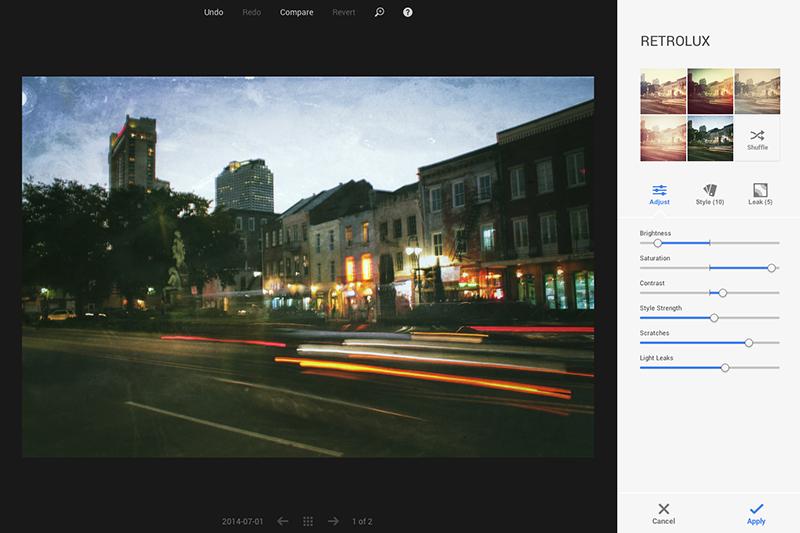
The user interface is straightforward – different adjustment tools are on the right side of your browser; the functions Undo, Redo, Revert, and Compare (which lets you see your edits compared to the original image) are located at the top; and on the bottom, a navigation bar lets you scroll through your images. Google+ Photos lets you add location data to your images and also has an auto-enhance feature, when you don’t feel like using the selective adjustments.
Basic adjustments
Tune Image: Gives you access to the familiar settings of brightness, contrast, saturation, shadows, and warmth.
Selective: Add a control point to your image to specifically affect an area’s brightness, contrast, or shadows. You can easily click and drag your cursor to apply different intensities of the selected property to your image. You’re free to change the size and location of the control point, and you can seemingly add as many as you see fit.
Details: Lets you tinker with sharpness and structure settings. You can choose from existing presets ranging from “neutral” to “detailed,” depending on how sharp or blurred you want your image to be.
Crop: A staple among editing tools, you can crop in 360 degrees or choose a cropping ratio of 3:2, 16:9, or others. You can also use a slider to get finer control of your crop.
Creative adjustments
If you’re looking for old-school filter or blur effects, the Vintage and Retro Lux tools are good for that. Vintage lets you add vignettes and various blurs, and Retro Lux can make your image look like it was recovered from 50-60 years ago.
Drama lets you add different shadows, highlights, and tones to your image. It’s good for adding a certain moodiness to your image, and the Black & White setting also helps convey certain emotions.
With HDR Scape, add different high dynamic range effects to your image. The tool has adjustable settings for “nature” or “people,” and after that you might be interested in adding a frame to your image. The Frames tool lets you choose between a range of borders, which are all customizable.
For creating different depth of field effects, you can use the Center Focus or Tilt Shift tool. Center Focus lets you choose the focal point of your image as well as the intensity and brightness of your blur, whereas Tilt Shift uses rectangular or circular transitions to shape your blur effects.
On his personal blog, Google’s digital photography product manager John Nack said Google+ Photos is like “Snapseed for Mac/Windows in all but name.” He also mentioned that new updates to Google+ Photos would be added gradually, so look for more cool features to hit this app in the near future.
It’s clear that Google is challenging Adobe in this space. Is Google+ Photos right for you? Check out this video and see what you think.
(Via Imaging Resource)


