The Apple Watch’s release is getting closer, and more details are coming to light as the day draws near. We’ve already seen an option to pair the Watch with the iPhone in the iOS 8.2 beta, and now we’ve caught a glimpse of the wearable’s companion app, courtesy of 9to5Mac. The Apple fan site discovered screenshots of the app that show how users will manage the Apple Watch and what it will be able to do.
Of course, the companion app discovered is still a beta version, so things could change by the time the device launches. However, chances are, this is what the Apple Watch app will look like for the most part.
You’ll manage your home screen
Remember those cute, colorful bubble app icons Apple showed off at its iPhone event? Well, they won’t just randomly cluster on your home screen — You’ll actually be able to arrange them on your iPhone so that the most useful ones are easily available. A virtual field of unpopulated bubbles will appear in the app, and you can choose which apps you want to place in each one. You can even move them around the screen if you don’t like the layout.


You’ll be able to customize your clock
Apple showed off a bunch of cool watch faces when it first unveiled the Watch, but it didn’t go into great detail about just how customizable the clock app is. You can actually create a personal monogram to place on the watch face. The monogram can be your initials or whatever small bit of text you want, as long as it’s no longer than four letters.


In the app, you can also decide if you want to see notifications on your watch face. The notifications will show up as a small red dots on the watch face, so as to be more subtle. You also have the option to disable notifications, if you can’t bear seeing a red dot on your lovely watch. Alternatively, if you’re obsessed with the stock market, you can get stock news right on your watch face.
You’ll respond to messages in new ways
Although the Apple Watch doesn’t have a keyboard (yet), you’ll still be able to reply to messages with canned responses or via dictation. In the app, you can write your own standard responses, decide if you even want to receive message notifications on your wrist, and enable read receipts. The Watch will even let you send audio replies, which we assume are voice messages, which is a cool feature.


You’ll let your watch will guide you
Turn by turn navigation is one of the coolest features smartwatches have to offer. Based on the companion app, it looks like the Apple Watch will also have this feature. In the app, users can enable or disable the Taptic Engine which “taps” your wrist with a vibration alert when it’s time to turn.
You’ll set a passcode for security
As soon as news broke that users will be able to use the Apple Watch to pay for items in stores with a single tap, security concerns arose automatically. Those concerns may now disappear, as the companion app shows that a passcode will be required to use the Watch with Apple Pay. The Watch must also be on your wrist when you enter the passcode for the payment to go through. It’s unclear exactly how this will work, but it connects with earlier rumors that skin contact will be mandatory during mobile payments.
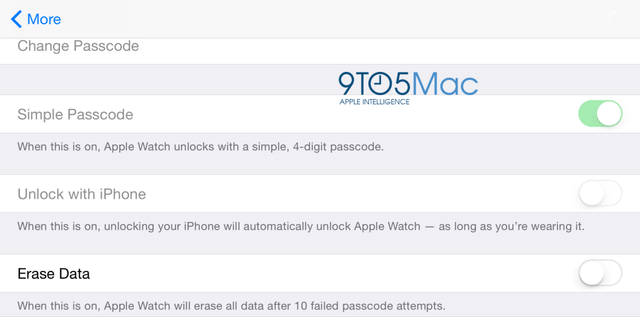
Additionally, if you remove or alter your passcode, you’ll have to re-enter all your credit card details for Apple Pay. There’s also an option to have the Apple Watch wipe its own data if the passcode is wrong 10 times in a row. These security features should make mobile payments made with the Apple Watch even safer than those made with the iPhone.
You’ll know if you’re fit … or not
Apple’s HealthKit app may be a bit of a mess, but hopefully it will improve when you can use the Apple Watch’s fitness tracking functions for data. You can set up reminders to stand up and exercise, notifications for when you’ve reached your goals, and summaries of your weekly activity — all of which will display on the Watch. You can also turn heart rate monitoring on or off.
You’ll have no problem using it


Just like on the iPhone, the Apple Watch will have accessibility settings to make sure it’s easy for everyone to use the device. If you spin the crown three times, the settings will pop right up. There, you can enable Voice Over, which reads text from your Watch screen to you, and activate zoom to see small details, pan through screens, and more. The settings will allow you to reduce motion, control stereo audio balance, limit transparency, enable grayscale mode, stop animations, and bold text.
Other details
Lastly, there’s an About screen in the app, that shows what you have installed on the device, how much storage space you have left, and other key details. So far that’s all we really know about how the Apple Watch will work, but this companion app has given the best idea of what to expect so far. Stay tuned for more details ahead of the anticipated, and still unofficial, March launch of the Apple Watch.