“Why you can trust Digital Trends – We have a 20-year history of testing, reviewing, and rating products, services and apps to help you make a sound buying decision. Find out more about how we test and score products.“
Flipping through a magazine’s glossy pages, high-quality photos, and in-depth articles used to be a pleasure. Now, the magazine is dying, and in its place, we have the Internet, dozens of dedicated apps, and digital subscriptions. It’s a sprawling, messy affair that lacks charm and seems thoughtless. News curation apps like NYT Now, Flipboard, Wildcard, Timeline, BriefMe, and others have all tried to improve the way we read news on mobile devices, but only Flipboard has had much success. Apple’s News app takes another attempt at polishing up online journalism, and while it may not be revolutionary, it is lovely and a joy to use.
It’s been called Apple’s version of Flipboard, and Flipboard’s CEO isn’t happy about the comparison. Indeed, Apple News is different from Flipboard, though it does draw quite a bit of inspiration from the well-loved news reader. In some ways, Apple News is better — more organized, more cohesive, and even more attractive.
Attractive magazine-style news feeds
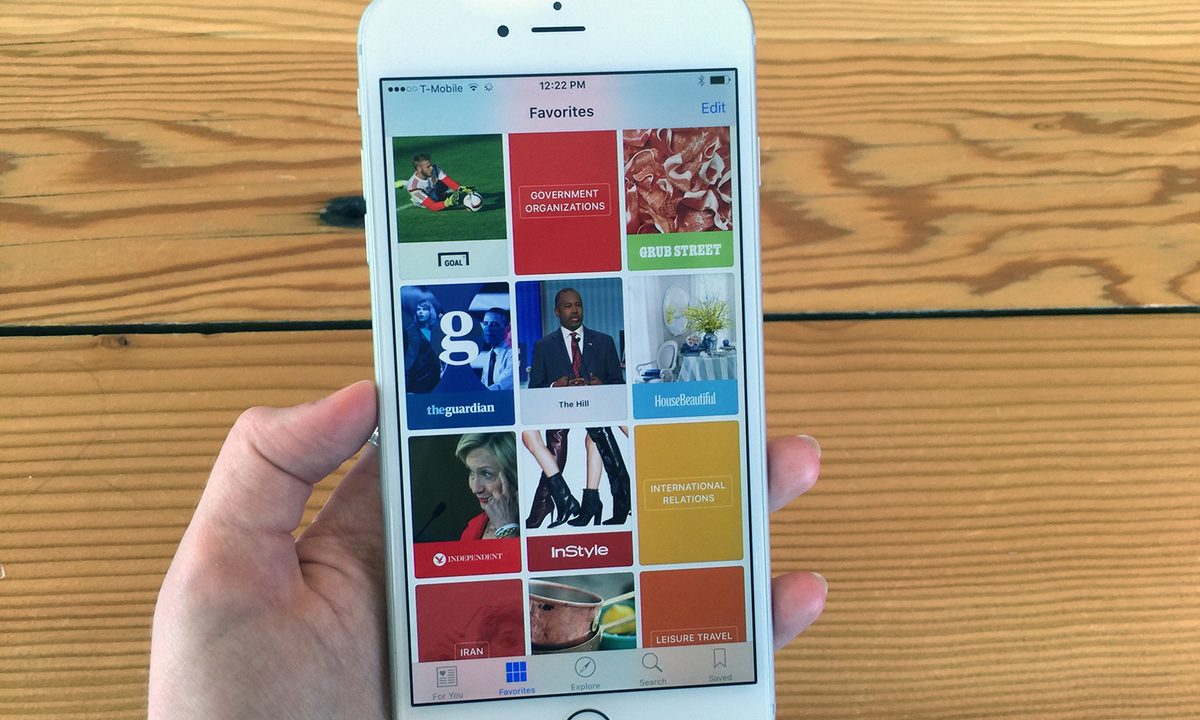
When you first set up Apple News, the app polls you on the publications and topics you like to read about. So if you like food, you’ll get a curated feed of content from sources like Epicurious and Grub Street. You can also select publications like CNN, the New York Times, Wall Street Journal, and others, including Digital Trends. The bigger the publication, the more likely it is that the layout will be optimized for Apple News. The ability to choose either topics or specific sites is nice, and similar to Flipboard. Apple News will also suggest publications and topics as it learns what you like.


There’s also a cool Explore tab, where you can find new suggestions anytime you get bored with what you’ve already got. The search tab will also bring up results quickly, and sort them into Top Hits, Topics, and Channels.
Apple’s partnered with a number of big-name publications to optimize their content for the News app, and those feeds look stunning. Other feeds from publications who haven’t worked with Apple look more generic, but they all match the Apple News look, which makes for a more cohesive and attractive news reading experience. Sometimes on Flipboard, you’ll see odd formatting, or a site will blast you with ads out of nowhere. That doesn’t happen with Apple News. It’s a more peaceful experience, whether you’re reading news from the New York Times or some weird blog.
The News app is one of the nicest apps Apple’s made in a while.
Speaking of the New York Times, it has one of the loveliest designs you’ll find on Apple News. When you open it, you’re greeting with a large picture and a link to a briefing on the most important news items. After that, you see a list of articles to choose from. If there are pictures, they’ll feature prominently at the top of the page, and you can swipe through them in a gallery without clicking on any special link. It’s flawless.
Other news outlets don’t look as polished, but in time, every single publication could look as attractive on Apple News as the New York Times. It’s just a matter of hammering out partnerships. There’s a lot of potential here, and the rest of the interface is a slick and simple.
Offline reading and social sharing
At the bottom of every article, you’ll see three buttons: the share option, favorite heart, and the bookmark. If you tap on the sharing button, you’ll see Apple’s typical sharing menu pop up with the option to AirDrop the article to someone, send it in a message, email, add to your Reminders or Notes apps, Twitter, Facebook, and more. You can, of course, copy the link, too or open it in Safari. Overall, it’s pretty easy to share articles from the News app.


Meanwhile, the bookmark button saves articles for reading offline. It’s an awesome feature that’s really useful if you have a long commute and want to get some reading done on the Wi-Fi-less train or plane. All the bookmarked articles are conveniently located in the Bookmarks section of the News app for easy access whenever you want them.
As a New Yorker whose commute typically involves irritably cursing the MTA’s spotty cell service reception as the subway passes through the many stations on the way to Queens, easy access to offline articles is a blessing. I imagine it’ll also be quite nice for long plane rides and days when my data allowance is running low.
Final thoughts
The News app is one of the nicest apps Apple’s made in a while. Other recent additions like Apple Music seem much messier in comparison, and the News app is the perfect blend of simple and sophisticated. Although it takes a lot of inspiration from Flipboard, Apple News has a nice clean look that many will find appealing, and it seems to cut out interference from ads better than Flipboard does.
It’s a welcome addition to iOS 9, and if you like to keep up on the news, it’ll be one of the few preinstalled apps you don’t thrown into the “Apple Junk” folder we all have on our phones.