“Why you can trust Digital Trends – We have a 20-year history of testing, reviewing, and rating products, services and apps to help you make a sound buying decision. Find out more about how we test and score products.“
People tend to draw the line between mobile and desktop operating systems by a few qualifications. Usually there’s mention of resizable windows, a file manager, and the ability to load apps from external sources, not just one marketplace.
If that’s all it takes, then Remix OS is the desktop version of Android, with all of the functionality users expect. Jide offers a selection of apps built for Remix OS in its own marketplace, and it’s an Android OS, so the Google Play Store works as well.
Is Remix OS the best of both worlds, or a mixtape no one asked for?
How does it work?
Technically speaking, Remix OS is a fork of Android. That means Jide took the open source version of the OS, and rebuilt it with new code for the interface and settings. The goal wasn’t to create a total overhaul like CyanogenMod, but rather to keep the experience as close to stock Android as possible. It feels that way too, and requires basically no learning curve if you’re already familiar with Android.
Remix has no learning curve if you’re already familiar with Android.
It’s easy to install as the main operating system, on a second partition, or even boot straight from a USB thumb drive. The third option is one of the strengths of the OS, because it will save data and apps directly to the USB drive. Plug that USB drive into any computer, reboot, and it becomes your personal system without any extra work.
How well does it work?
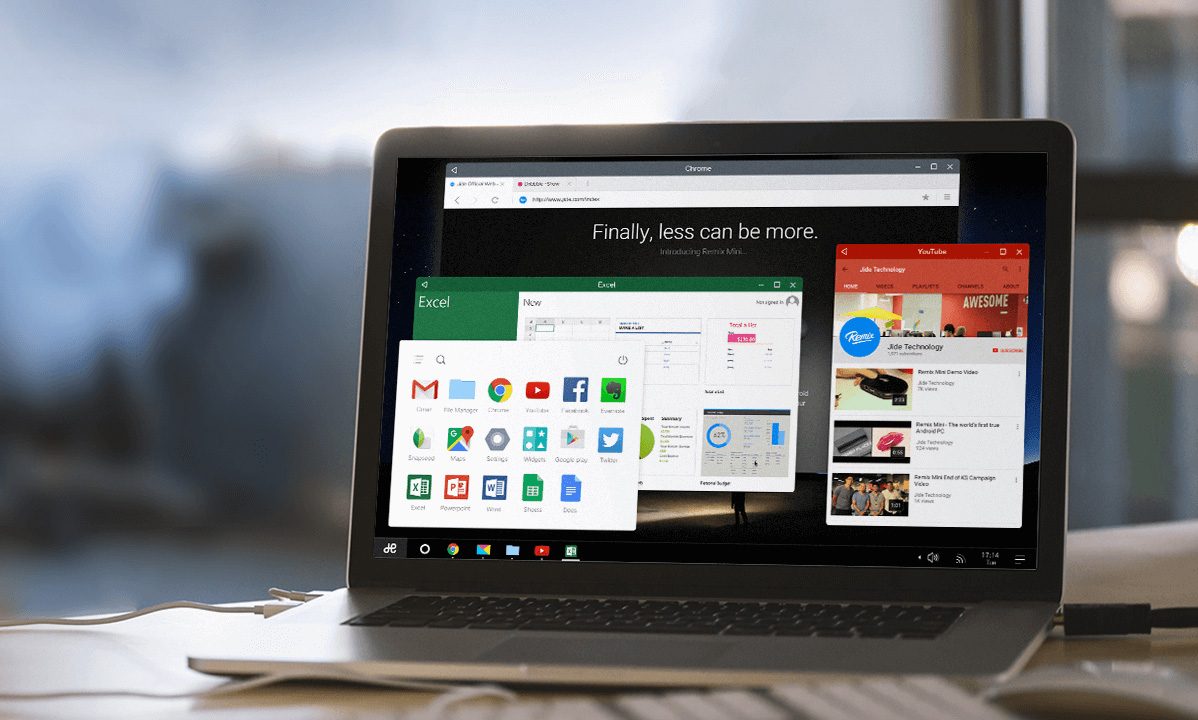
While there are some under the hood changes compared to the version of Android it’s based on, Remix’s most noticeable difference is the interface. There’s now a menu bar similar to the Windows task bar that runs the width of the display, and there’s even a Jide logo button in the bottom left to pull up an app launcher a la the Start Menu. Icons for applications, folders, and files live on the desktop, in much the same way they would on Mac OS X or Windows. There’s even an advanced file explorer.
Everything else users expect from a desktop OS is there. Windows are resizable, and not just in half or quarter screen amounts. Jide has added close, full screen, and minimize actions to every app not just in its store, but in the Google Play Store as well.
The cursor is a hollow circle that fills with each click. It’s a move that makes sense considering Android’s touch-based roots, but it can be a bit disorienting at first because it resembles a loading cursor. On first boot I waited a few minutes before clicking, thinking it was churning away behind the scenes.
Still, the experience is significantly improved from the mouse compatibility in stock Android. Remix OS even boasts right click, allowing for easy access to context menus, plus many keyboard shortcuts you know and love.
Remix is what Chrome OS should be.
Remix is not without its issues. Settings are mostly limited to traditional Android options, with less of a focus on settings that are useful for the new interface. It also didn’t run on our Surface Book, likely because of Microsoft’s custom UEFI and BIOS, but quickly booted up on a MacBook Air. There’s no need to install drivers, connect special peripherals, or change settings based on the current system.
Chrome OS, eat your heart out
In a lot of ways, Remix OS is what Chrome OS should be. There’s a wealth of apps on the Google Play store that open up the functionality of the OS in a meaningful, useful way that Chrome OS extensions and apps can’t compete with. Google says there may be plans down the road for Android compatibility in Chrome OS, but it’s here right now as a working example, not a distant idea.
On the other hand, the user experience varies greatly from app to app. Apps that are usually only run on phones, such as Tinder, don’t play as well unless you keep the window down to a phone-like shape and size. Software designed primarily for a tablet fares better.
While Remix OS is polished and smooth, it’s hard to see the appeal of installing it on a system like a MacBook or Dell. Instead, the Remix OS is most at home when it’s used as a light-weight, portable operating system for special circumstances. It might used to quickly boot into a media center, access your own files on a friend’s PC, or drive a display that can’t easily be connected to a full PC. Outside of these scenarios, its slick interface is held back by the fact most computers are already sold with an OS, so there’s little reason to replace it with Remix.
Pros:
- Easy to install
- Excellent keyboard and mouse support
- Works with most PCs
Cons:
- Not all apps work well
- Won’t replace Windows or OS X