  1. Home
  2. Computing
  3. News

Dashlane’s updated password manager brings in new languages and compatibility

Add as a preferred source on Google

Password manager Dashlane has released its latest re-designed version, Dashlane 4, for Windows, Mac, and mobile devices running Android and iOS.

According to its announcement, Dashlane has over four million users globally, with this latest version adding five new languages (Spanish, Portuguese, German, Italian, and Japanese) via its DashIQ technology which optimizes the user’s app and payment options based on location.

Recommended Videos

The user experience has been largely re-designed with a fresh focus on easy access and usability, along with the addition of the ‘Quick Access’ feature for more refined searching. Payment options have been expanded with more than 250 international banks, institutions, and cards now supported.
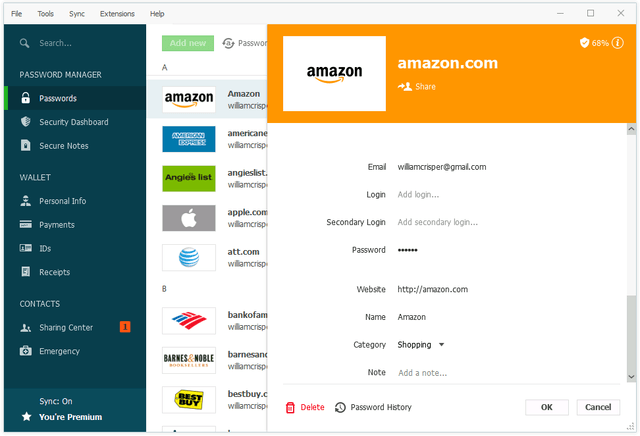
dashlane 4 - password credential view (PC)
Image used with permission by copyright holder

The Password Changer feature, which automates the regular changing of passwords for a number of websites, has been developed further. On its launch over a year ago, it supported automated password changing for around 75 sites. That has now been extended to more than 500.

Password managers are a popular way for managing passwords across multiple online accounts and often promise a more secure solution than remembering passwords or using similar passwords across several sites.

However, they are not perfect systems. Most recently, Google discovered vulnerabilities in Trend Micro’s password manager solution, as part of its antivirus software, where attackers could steal passwords.

Last year, someone developed a tool called KeeFarce that could be used to decrypt password databases in the KeePass manager software.
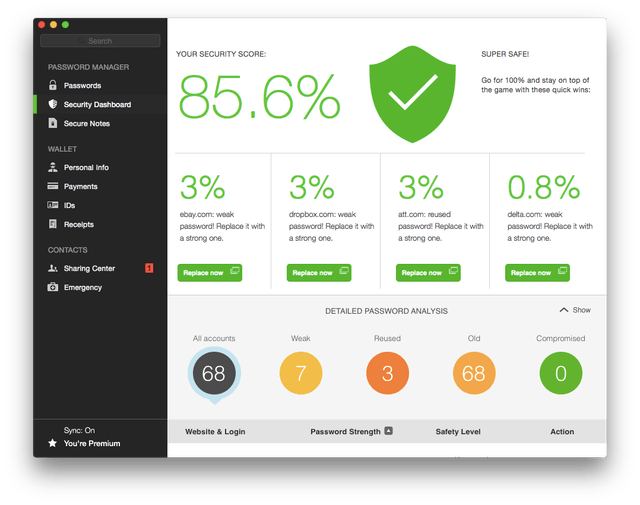
dashlane 4 - security dashboard
Image used with permission by copyright holder

“It’s important to remember that when you connect all computing devices in one network, you are not absolutely secure unless you disconnect,” Emmanuel Schalit, Dashlane CEO, told Digital Trends. “However, if you are connected, and it is a question of relative security, then using a password manager is safe because a service like Dashlane uses security architectures that ensure that encryption keys are not stored.

“Using a password manager to protect your digital identity is safer in the same way as putting money in a bank is safer than putting it under your mattress.”

Buy at Dashlane

Jonathan Keane
Jonathan is a freelance technology journalist living in Dublin, Ireland. He's previously written for publications and sites…
This website is a goldmine if you love Mac menu bar apps
Discover hundreds of menu bar apps, from tiny utilities to powerful productivity tools, all in one place.
MacMenuBar website open on Mac

The menu bar is the most underrated part of macOS. It sits quietly at the top of your screen, and most people never do anything with it other than checking the time and battery percentage. But if you find the right apps, that thin strip becomes the fastest way to get things done on your Mac.

The problem is finding those apps. The Mac App Store is not great at surfacing them, and hunting through random blog lists is a chore. And while I have shared my favorite Mac utilities that include menu bar apps like Supercharge and CleanShot X, there’s an even better place to find the best apps for your Mac’s menu bar.

Read more
How to install macOS 27 Golden Gate public beta on your Mac?
From a smarter Siri to a more reliable Spotlight, here's your full walkthrough for installing macOS 27 Golden Gate's public beta today.
macOS 27 Golden Gate

Along with iOS 27’s public beta, Apple has also released macOS 27 Golden Gate’s public beta build, so that early adopters can get their hands on the new features, including Siri AI, and provide timely feedback to help ensure a stable iOS launch in September. 

If you’re sold on all the new features but don’t want to put your faithful MacBook through developer beta duty, a public beta offers a much more refined experience. To install macOS 27’s public beta, follow the steps given below. 

Read more
Microsoft is finally fixing the worst thing about Windows Search, but you can’t try it just yet
Windows Insiders in the Experimental channel are getting a Search experience that finally feels less of a billboard and more of what users actually need.
Page, Text, Person

Windows Search has been a mess for years, and I do not use that word lightly. Open it to find a file, and you get trending Bing topics, Microsoft Store promotions, and an AI tools tile that just opens a browser. 

That is changing, but not immediately for all users. Microsoft is rolling out a batch of Windows Search improvements to Insiders in the Experimental channel, and for once, this isn't just a fresh coat of paint.

Read more
