“Why you can trust Digital Trends – We have a 20-year history of testing, reviewing, and rating products, services and apps to help you make a sound buying decision. Find out more about how we test and score products.“
At some point, every smartphone user has experienced the trauma of seeing a “low battery” notification pop up on their screen when there’s not an outlet in sight. An external battery can help keep you powered throughout the day, but they’re often clunky and awkward to carry around. Battery cases are another alternative, but they’re always chunky and that huge battery is always attached to your phone — even when you don’t need it. Thankfully, Moshi’s iGlaze Ion case for the iPhone 6 or 6S has a built-in battery that has one big advantage: the battery is detachable.
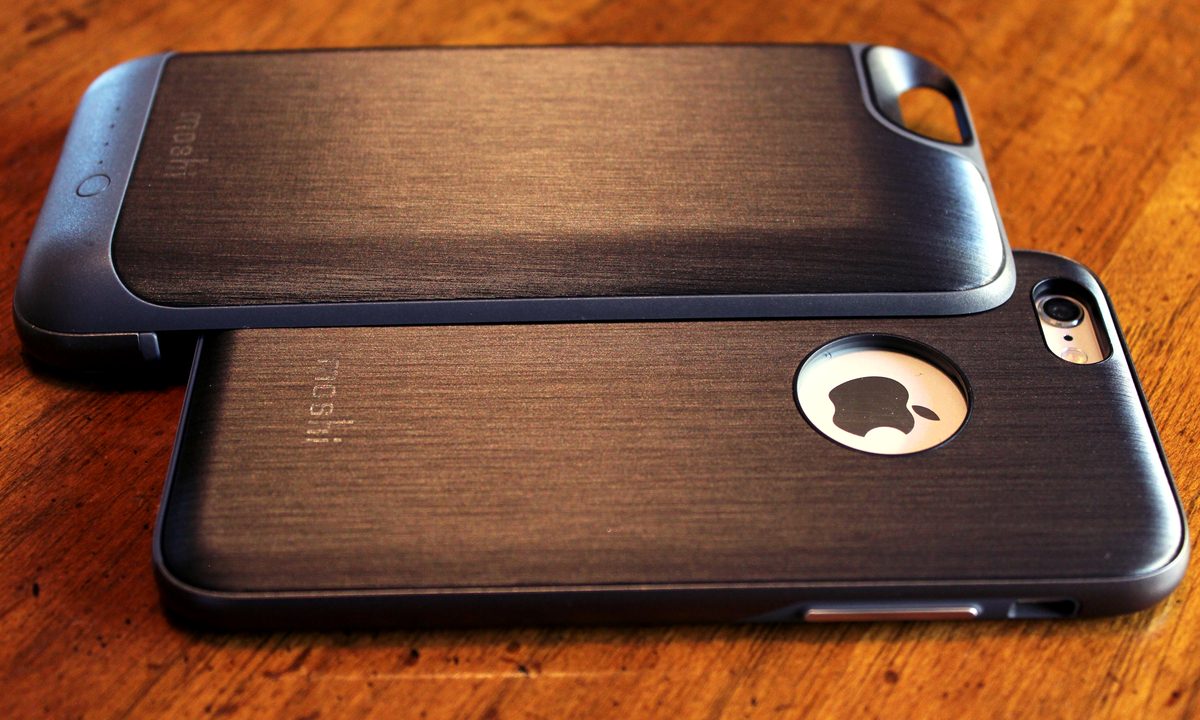
The iGlaze Ion consists of two pieces, a polycarbonate shell case and a 2,750mAh Lithium ion battery case that attaches to the back of it. The interior of the shell and battery are lined with soft microfiber to protect the back of your phone and case from scratches. The back of the case and battery both have a brushed titanium look and a finely textured smooth feel that provides grip and traction for your hands.
The two pieces fit together neatly, and the shell locks into the battery, thanks to a notch hidden in the cutout for the Apple logo. You just slide the battery case on over the slimmer shell case, and voila! You’ve got extra battery. When you’re done juicing up, you can pop your phone back out of the battery case and go back to the more minimal case.
The iPhone slips snugly into the shell case, which is completely functional and durable as a standalone case. It is shock-absorbent, providing decent protection against bumps, knocks, and drops. The raised rim around the front of the screen lets you place your phone face down on a table, while avoiding scratches. The volume and sleep buttons are fully covered, but still easy to use.


Fitted but generous cutouts for the headphone and lighting port allow usage with most third-party cables and accessories, and the speaker and mic cutouts didn’t muffle or interfere with sound transmission during calls or music playback. With the battery attached to the case, however, the headphone port sits farther back and some headphone connectors won’t be able to reach it. Moshi’s thought of that, too and includes a short headphone extension cable with each case, so you can access it.
Like most battery cases, the Ion charges via Micro USB instead of Apple’s Lightning cable. With the extra capacity, you’ll have roughly double the normal battery life of the iPhone, so expect to get at least one full charge out of the case. The case supports 2.1A fast charging that can fully charge your phone in about two and a half hours.
The charging function is on demand, however. Pressing the power button on the back of the case activates charging for the phone and shows you how much juice is left in the battery. Once the phone is fully charged, the battery pack turns off by itself.
Even though the added thickness and weight of the case is about double that of the naked iPhone, it still fits comfortably in your hand. Besides, having the option to ditch the battery and just use the low-profile case means you can have the slimmer lighter case whenever you need it. Most battery cases don’t give you that option, and it’s nice to know that you don’t have to get stuck with a chunky battery case all day when you don’t need the extra juice.
To make the case even more versatile than it already is, Moshi made the battery case compatible with its low-profile Napa leather shell case. The Napa case features the same notch in its logo cutout, so it also fits with the Ion battery case. It’s a pretty clever design.
You can pick one up today on Moshi’s website for $100. Although, it’s expensive, the convenience of all-day, on-demand charging and dual form factor is definitely well worth the price tag.
Highs
- Detachable battery pack design
- Simple, attractive design
- Support for quick charging
- Extended battery life
Lows
- The battery case is thick
- It’s expensive